
Introduction
Oddin.gg BetBuilder (OBB) allows bettors to create a combo (multiple-selection) bet using selections from the same match. This is typically not possible due to the correlation of probabilities between the markets in the same match. Unlike a standard combo bet, the odds for BetBuilder cannot be calculated simply by multiplying the selected market odds. Instead, a complex model is needed to compute the final ticket odds.
The goal of every booking operator is to expand the betting offer and provide a unique and engaging way for the punters to interact with the odds. Oddin.gg BetBuilder (OBB) enables punters to become more invested in Esports matches and bet on specific outcome combinations within the same match.
1. General information
In this chapter, you will find general information regarding fundamental concepts and processes of the OBB service. If you have further questions, or you feel that our documentation does not provide the required information, please contact us through your dedicated Oddin.gg communication channels.
1.1. Supported Esports and eSimulators
Oddin.gg BetBuilder (OBB) is currently available for the following Esports and eSimulators:
- Counter-Strike 2 (CS2) – Prematch-only
- Counter-Strike 2 Duels (CS2 Duels) – Prematch-only
- Valorant – Prematch-only
- eFootball & eFootball bots – Prematch and Live
- eBasketball – Prematch-only
1.2. Concepts
Oddin.gg BetBuilder (OBB) is a natural extension of our existing services and offering. It is an extended functionality for betting markets, where we would consider a combination of OBB market selections as one selection inside a combo or single ticket.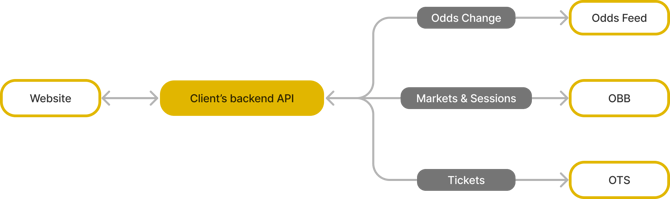
1.3. Session
The core concept of bet placement with OBB is a session. A session identifies one unique combination of selections (betting opportunities). Each new combination of selections creates a new session. This process can be repeated multiple times with different selection combinations.
1.4. Markets
A betting market is a combination of multiple selections. OBB uses the same identifiers for markets and selections as are available in the Odds Feed Service. The list of OBB-supported markets per sport is available in the Oddin.gg Markets and Sports document.
1.5. Environments
| Environment | API URL |
| Production | api-obb.oddin.gg:443 |
| Integration | api-obb.integration.oddin.gg:443 |
1.6. Authentication
Access to the API is only allowed from known IP addresses. Please send us your IP range(s), and we will whitelist you.
You have to use an access token to access the OBB API. You should obtain this access token through the Oddin.gg Settings Platform (back-office). To get access to the Settings Platform, please contact us through your Oddin.gg communication channels. Typically, access tokens are valid for one year and should be extended automatically.
The access token has to be inserted into the gRPC context with the “token” key.
grpc.Dial(target,
   grpc.WithPerRPCCredentials(&grpcToken{
      token: "xxxxxx",
   }))
Example of a token setting (Go)
1.7. Rate limiting
We limit the Session endpoints to protect the API. Please check the table below for more granular rate limits:
| API endpoint name | Rate limiting |
SessionCreate |
100 requests/second |
SessionInfo |
100 requests/second |
PopularCombination |
60 requests/minute (configurable on request) |
2. OBB API
The Oddin.gg BetBuilder (OBB) API is based on gRPC and protocol buffers. gRPC-based communication has been battle-proven by software industry giants like Google, Microsoft, and others. It offers simple export and client/server code generation for many languages (Java, C#, Python, Node.js, Go, and others). We use protocol buffers as a message format. It is an extremely lightweight and data-saving format, used in many applications.
- More about gRPC: https://grpc.io
- More about protocol buffers: https://developers.google.com/protocol-buffers
- OBB protocol buffer message schema: https://github.com/oddin-gg/obbschema
2.1. gRPC concept
The OBB gRPC schema is available on the Oddin.gg GitHub: https://github.com/oddin-gg/obbschema.
You can generate binding codes from this message schema for your desired development language. A typical request to gRPC is a unary request. You send us a request, and we deliver a response in one RPC call.
2.2. Available endpoints
| Endpoint | Type | Description |
AvailableMarkets |
Request | Used to get a list of supported markets for a given match. |
SessionCreate |
Request | Used to calculate new sessions. Returns a new market after a successful calculation. |
SessionInfo |
Request | Used to validate sessions. A session can be valid or invalid. |
PopularCombination |
Request | Used to get popular combinations of selections. |
2.3. AvailableMarkets endpoint
2.3.1. AvailableMarkets request
| Parameter | Type | Description |
event_urn |
string | Event ID URN – e.g., "od:match:123456". |
2.3.2. AvailableMarkets response
| Parameter | Type | Description |
markets |
repeated AvailableMarket | Event markets. |
2.3.2.1. AvailableMarket
| Parameter | Type | Description |
market_id |
integer | Market ID. The ID uses the same values as our Odds Feed in XML. |
specifiers |
string | Market specifiers. The specifiers use the same values as our Odds Feed in XML. |
2.4. SessionCreate endpoint
2.4.1. SessionCreateRequest
| Parameter | Type | Description |
selection_ids |
repeated string | The list of desired selections to include in the new session. Format: "<event_id>/<market_id>/<outcome_id>?<market_specifiers>", e.g., "od:match:123456/1/1?variant=way:two&way=two". |
2.4.2. SessionCreateResponse
| Parameter | Type | Description |
session_id |
string | Session ID returned by the OBB system. |
status |
oneof created | rejected | The status of the response. |
2.4.2.1. Status
| Parameter | Type | Description |
created |
SessionCreated | Successfully created session information. |
rejected |
SessionRejected | Session creation was rejected. |
2.4.2.1.1. SessionCreated
| Parameter | Type | Description |
selections |
repeated SessionSelection | The list of selections used in the current session. |
odds |
integer | The final odds for the selected combination of picks. To be multiplied by 10000 and rounded to uint64 value. |
raw_probability |
double | Combined probability of the selected combination before margin is applied (value between 0.0 and 1.0). |
available_markets |
repeated SessionMarket | Available markets for the new session with the current session selections. |
2.4.2.1.1.1. SessionMarket
| Parameter | Type | Description |
market_id |
integer | Market ID. The ID uses the same values as our Odds Feed in XML. |
specifiers |
string | Market specifiers. The specifiers use the same values as our Odds Feed in XML. |
outcomes |
repeated SessionMarketOutcome | The list of available outcomes for the market. |
2.4.2.1.1.1.1. SessionMarketOutcome
| Parameter | Type | Description |
outcome_id |
string | Outcome ID. The ID uses the same values as our Odds Feed in <outcome> XML tag, e.g., "10" for a classic market, or "od:player:123" for dynamic markets. |
odds |
integer | Outcome odds multiplied by 10000 and rounded to uint64 value. |
raw_probability |
double | Raw probability of the outcome before margin is applied (value between 0.0 and 1.0). |
2.4.2.1.2. SessionRejected
| Parameter | Type | Description |
reason |
SessionRejectReason | Information about the rejection reason. |
2.4.2.1.2.1. SessionRejectReason
| Parameter | Type | Description |
code |
Code | Rejection reason code. |
message |
string | The message describing the rejection reason. |
2.4.2.1.2.1.1. SessionRejectReason codes
| Parameter | Code | Description |
CODE_UNSPECIFIED |
0 | Not a valid value. Used for blocking 0 as an invalid state. |
CODE_INTERNAL |
1 | Session rejected due to internal server problems. |
CODE_INVALID_ARGUMENT |
2 | Session rejected due to incorrect or malformed arguments. |
CODE_INVALID_MARKET_COMBINATION |
3 | Session rejected due to invalid market combination. |
2.5. SessionInfo endpoint
2.5.1. SessionInfoRequest
| Parameter | Type | Description |
session_id |
string | Session ID returned by SessionCreatedResponse. |
selections |
repeated SessionSelection | The list of selections used for the OBB combination. |
odds |
integer | The final odds for the selected combination of picks. To be multiplied by 10000 and rounded to uint64 value. |
2.5.1.1. SessionSelection
| Parameter | Type | Description |
selection_id |
string | Selection ID. Format: "<event_id>/<market_id>/<outcome_id>?<market_specifiers>", e.g., "od:match:123456/1/1?variant=way:two&way=two". |
2.5.2. SessionInfoResponse
| Parameter | Type | Description |
session_id |
string | Session ID. |
status |
oneof valid | invalid | The status of the response. |
2.5.2.1. Status
| Parameter | Type | Description |
valid |
ValidSession | The session is valid. |
invalid |
InvalidSession | The session is invalid. |
2.5.2.1.1. ValidSession
If the parameter exists, the session is valid.
2.5.2.1.2. InvalidSession
| Parameter | Type | Description |
reason |
InvalidSessionReason | Detailed information about why the session is no longer valid. |
2.5.2.1.2.1. InvalidSessionReason
| Parameter | Type | Description |
code |
Code | Invalid session reason code. |
message |
string | A message describing the invalid session reason. |
2.5.2.1.2.1.1. InvalidSessionReason codes
| Parameter | Code | Description |
CODE_UNSPECIFIED |
0 | Not a valid value. Used for blocking 0 as an invalid state. |
CODE_INTERNAL |
1 | We are having internal problems. |
CODE_INVALID_ARGUMENT |
2 | The session is not valid. |
CODE_EXPIRED |
3 | The session is expired. |
CODE_NOT_FOUND |
4 | The session is not found in our system. |
2.6. PopularCombination endpoint
Returns ready-made, priced selection combinations (“quick picks”) for a match. Each combination’s selection_ids use the exact SessionCreateRequest.selection_ids format, so you can echo them verbatim into SessionCreate for one-click placement – no per-selection assembly is needed.
Combinations are built only from markets you actually receive in your Odds Feed and only from markets that combine validly with each other (no cross-map-part combinations, no repeated market types, and winner and handicap markets are never combined). Each offered combination is re-priced through the same correlation-aware simulation path as SessionCreate, so it is creatable at the quoted odds at offer time. The offered odds are indicative: SessionCreate re-prices when the bettor clicks, and the odds can change or the combination can be rejected. The bet must always be placed on the SessionCreate odds.
2.6.1. PopularCombinationRequest
| Parameter | Type | Description |
event_urn |
string | Event ID URN – e.g., od:match:123456 |
2.6.2. PopularCombination response
| Parameter | Type | Description |
combinations |
repeated PopularCombination | Popular selection combinations for the event, ready to use in SessionCreateRequest without further processing. Empty when the event has no OBB support or no combinable markets. |
2.6.2.1. PopularCombination
| Parameter | Type | Description |
selection_ids |
repeated string | Selections forming the combination, in the same format as SessionCreateRequest.selection_ids: “<event_id>/<market_id>/<outcome_id>?<market_specifier>”, e.g., “od:match:1234/1/1?map=1&way=two”. |
odds |
uint64 | Total combined odds for the combination, multiplied by 10000 and rounded to uint64 – same encoding as SessionCreate odds. Indicative only: SessionCreate re-prices at click time, so the placed odds may differ. |
raw_probability |
double | Combined probability of all selections before margin is applied (value between 0.0 and 1.0). |
ℹ An empty response is normal, not an error. It simply means there is nothing to offer for that match right now – for example, the event has no OBB support or no combinable markets. You should show nothing rather than surface an error.
2.7. Caching
We are caching almost all API endpoints to optimise performance. The cache is not invalidated by entity changes. We always wait for the entity TTL expiration. Please check the table below for the TTL information:
| Path | TTL |
SessionCreate |
- |
SessionInfo |
10 minutes – max. 2 hours |
PopularCombination |
5 minutes – refreshed earlier whenever the odds or market availability change. |
ℹ The
AvailableMarketsresponse is not cached with a fixed TTL. It is computed per request from the live odds feed and the per-event BetBuilder availability, both updated in near-real time. Re-polling the endpoint reflects availability changes within seconds. Internal metadata caches (event/client attributes) may delay some changes by minutes up to ~1 hour and refresh on TTL expiry.
3. Workflow
3.1. Concepts
- Website opening:
- A client should call AvailableMarkets to get a list of available BetBuilder markets for the event.
- A client can also call PopularCombination when the match page opens to obtain ready-made, priced selection combinations. When a bettor picks a combination, its selections are passed straight into SessionCreate: the returned
selection_ids are already in the SessionCreateRequest format, so no transformation is needed on the client side.
- Session:
- The term used to describe the process of creating a bet in BetBuilder.
- Bettors/punters typically select one selection and expect new odds.
- This process can be repeated multiple times with different selection combinations.
- Each new combination creates a new session.
- Ticket risk management (for OTS clients):
- Clients gather selection_id(s), odds, and the session_id for each BetBuilder ticket.
- Upon the bet placement, a new ticket request is sent to OTS by the client.
- OTS validates the ticket against OBB (through session_id).
- The ticket is accepted or rejected.
- Odds invalidation:
- All sessions which contain changed selection(s) are invalidated and sent to clients.
- SessionInfo should be polled periodically, as it returns the information about the session validity.
- Clients must create a new session by requesting SessionCreate.
3.2. BetBuilder mode switching
A front-end solution to display the odds in the BetBuilder mode can have either the following:
- A manual switch to the BetBuilder mode by punters via a button, OR
- An automatic switch when a punter starts adding selections to the bet slip, for example:
- A bettor adds a Map winner selection to the bet slip.
- They try to add other selections from the same map (period) to the bet slip.
- A modal appears, informing the bettor about the BetBuilder functionality, allowing them to switch to the BetBuilder mode or remove the previous selection:
- removes the old selection and adds a new one → continues with normal single/combo flow, OR
- accepts and switches to the BetBuilder mode.
3.3. Betting flow examples
3.3.1. Example #1: Placing an OBB bet & risk management through OTS 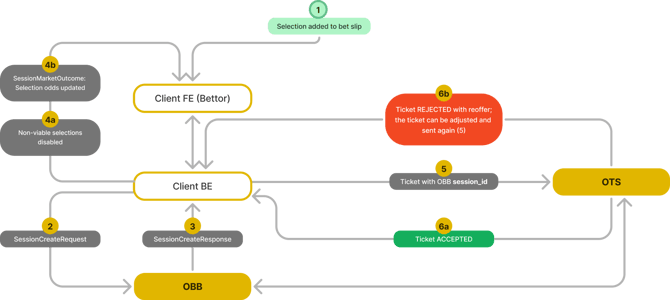
- Client (FE) → Client platform (BE): Bettor adds Selection X to the bet slip.
- Client platform (BE) → OBB service (BE): A new SessionCreate request is sent, including Selection X.
- OBB service (BE) → Client platform (BE): A response with a session_id, SessionMarket array, SessionSelection array, and optional RejectionReason is received.
- Client platform (BE & FE): The response message is accepted, and on the FE appropriate selections are disabled OR their odds are updated based on the SessionMarketOutcome.
- → Steps 1. – 4. can be repeated as long as there are any available selections left.
- Client platform (BE) → OTS service (BE): The BetBuilder ticket (the betting ticket constructed with the BetBuilder selection_id) is sent through the OTS service, the same as a regular ticket, but it also includes the OBB session_id.
- OTS service (BE) → Client platform (BE): The response is sent back through the OTS service with either a) rejection and reoffer OR b) information about the ticket being accepted.
- If the ticket is rejected, the bettor can adjust the stake and resend the ticket → Step 5.
- Client platform (BE): The ticket is saved in the system with the accepted status.
- The match ends and all markets are resolved on the Oddin.gg side.
- OTS service (BE) → Client platform (BE): Ticket status is updated and sent through OTS.
3.3.2. Example #2: Odds change during the OBB bet-building process
- Client (FE) → Client platform (BE): Bettor adds Selection X to the bet slip.
- Client platform (BE) → OBB service (BE): A new SessionCreate request is sent, including Selection X.
- OBB service (BE) → Client platform (BE): A response with a session_id, SessionMarket array, SessionSelection array, and optional RejectionReason is received.
- Client platform (BE & FE): The response message is accepted, and a) on the FE appropriate selections are disabled OR b) their odds are updated based on the SessionMarketOutcome.
- Odds Feed (BE) → OBB service (BE): Change of odds is received from the odds feed.
- Client platform (BE) → OBB service (BE): A SessionInfo request is made to the OBB API.
- OBB service (BE) → Client platform (BE): SESSION_STATUS_INVALID is received in SessionStatus.
- Client platform (BE) → OBB service (BE): A new SessionCreate request is sent, including Selection X.
- OBB service (BE) → Client platform (BE): A response with a session_id, SessionMarket array, SessionSelection array, and optional RejectionReason is received with new, up-to-date odds.
- Back to → Step 4. under Example #1, and the process continues.
3.3.3. Example #3: PopularCombination one-click placement & risk management through OTS
- Client (FE) → Client platform (BE): The bettor opens the match page.
- Client platform (BE) → OBB service (BE): AvailableMarkets is called to load the available BetBuilder markets for the event.
- Client platform (BE) → OBB service (BE): PopularCombination is called for the same event.
- OBB service (BE) → Client platform (BE): A response with a list of ready-made, priced combinations is received. An empty list is normal – the client simply shows nothing.
- Client (FE): The bettor picks one of the offered combinations.
- Client platform (BE) → OBB service (BE): A SessionCreate request is sent, echoing the offered
selection_idsverbatim (no transformation on the client side). - OBB service (BE) → Client platform (BE): A response with a session_id, SessionMarket array, SessionSelection array, and final odds (or a RejectionReason) is received. The bet is placed on these SessionCreate odds, which may differ from the indicative PopularCombination odds.
- Client platform (BE) → OTS service (BE): The BetBuilder ticket is sent through OTS for risk management, as in Example #1.
- OTS service (BE) → Client platform (BE): The ticket is accepted or rejected (with reoffer), and the final ticket status is returned through OTS.