
Introduction
Esports is a new opportunity for many betting operators. Our goal at Oddin.gg is to speed up your go-to-market strategy as much as possible. We have therefore simplified its integration by taking advantage of the already existing standards within the industry.
1. General information
In this chapter, you will find general information regarding fundamental concepts and processes for the integration of Oddin.gg Esports Betting iFrame. If you have further questions, or you feel that our documentation does not provide information you require, please contact us through your Oddin.gg communication channels.
1.1. Concept
Operators can include the Oddin.gg Esports Betting iFrame solution to speed up the integration process. We deliver a modern web application with top-notch esports content embedded into the operator's web page. The operator only needs to create a simple HTTP server with a few endpoints in order to credit and debit users, while Oddin.gg will take care of settling bets and informing you.
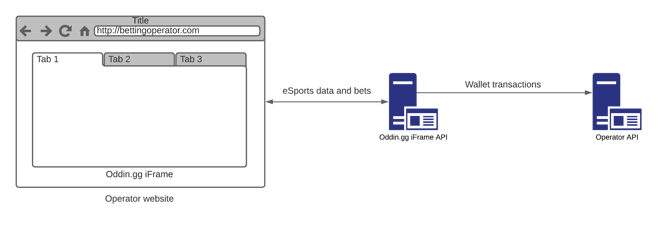
Flow illustration
1.2. Brand/website deployment
The same iFrame can be used for a group of different brands if these brands share all of the same settings, as listed below:
- The same liability limits (general and front-end).
- The same template and tournament settings (margins, min/max. odds per market, tournament tiers…).
- The same display settings for the same currencies (no. of decimals, rounding).
- The same phrases/words used within the same languages (if custom translations are needed).
- The same tax settings per currency.
- Unified user base and performance calculations.
If the brands don’t share all of the mentioned settings, separate iFrames are needed. However, the same iFrame can be used on multiple websites with any of the supported currencies and/or languages, with multiple colour themes (skins).
1.3. Authentication
We expect that authentication will be solved on the operator's side. Operators will provide iFrame integration with a token which authenticates users to make debit/credit operations. We will use the same token to call the operator API.
- It is a common pattern to extend the validity of a token by a reasonable amount every time the user makes a bet.
- You can pass a “null” token or omit it completely, but this is only valid for the /userDetails endpoint. iFrame will not allow bets in this case and will require a login.
- UNAUTHORIZED error cannot be returned on a debit or credit transaction, because it can happen that the user will never log in, and the transaction will be lost completely. The issued tokens need to be stored for a while (our recommendation would be at least for a few months), to be sure that the transactions are successful.
1.3.1. API security
We will perform requests to your API only from these IPs, please whitelist them in your system:
- 108.128.47.233
- 3.1.190.49
You can also set up a security key, which will be included in the X-API-Key header in every request to your server.
Additionally, you can set a hash secret in our Settings platform (Freya) that is used as another layer of protection - we will send you the hmac-sha256 hash of the user token in the “Authorization” header. You can compare this hash with the hash you generate on your side.
1.4. Environments
We currently provide two different environments - production and integration. The production environment is intended to be used only when you are finished with integration and ready to go live. Please use the integration environment for all testing and integration purposes. You can select the environment by providing a different URL for init script. Please be aware that a proper API endpoint has to be set for each environment.
| Name | Script URL |
| Production | https://bifrost.oddin.gg/script.js |
| Integration | https://bifrost.integration.oddin.gg/script.js |
Environments table
1.5. Betting limit
One user can place the maximum of 50 bets in the time span of 5 minutes.
1.6. Handicap markets
Handicap markets can be communicated differently in various Oddin.gg betting products:
- Vanilla: default handicap sign
- Inverted: inverted handicap sign (used by most booking operators)
| Odds Feed & OTS | Back office platform (Freya) | iFrame visualization | iFrame API (transactions) |
| Vanilla or Inverted (configurable) | Inverted | Inverted + Away Inverted | Vanilla |
Example - Team handicap +/-1.5:
| Team | Odds Feed & OTS INVERTED |
Back office platform (Freya) INVERTED |
iFrame visualization INVERTED + AWAY INVERTED |
iFrame API (transactions) VANILLA |
| home | handicap=-1.5 | handicap=-1.5 | handicap=-1.5 | handicap=+1.5 |
| home | handicap=+1.5 | handicap=+1.5 | handicap=+1.5 | handicap=-1.5 |
| away | handicap=-1.5 | handicap=-1.5 | handicap=+1.5 | handicap=+1.5 |
| away | handicap=+1.5 | handicap=+1.5 | handicap=-1.5 | handicap=-1.5 |
2. iFrame integration
The integration steps should be very straightforward. We have created a custom script which you can call directly or just include it. We need to whitelist all URLs from which you will be accessing the iFrame. Updatable properties can be handled via updateConfig.
ℹ The web page where the iFrame is loaded must be HTTPS, regardless of the environment used (Integration or Production).
| Name | Required | Updatable | Type | Description |
| token | no | yes | string | any string used to authorize users to make debit/credit operations: when omitted, a user is not allowed to bet |
| brandToken | yes | no | string | unique brand token |
| language | no | yes | string | language to be used when initialising the iFrame; the default language from brand settings is used if omitted |
| currency | no | yes | string | currency to be used when initialising the iFrame; the default currency from brand settings is used if omitted |
| customCurrencySymbols | no | no | CustomCurrencySymbol[] | custom symbol for the selected currency, set across the iFrame app (for example, to the left or right side of the stake amount); the actual currency of the iFrame stays the same, only the displayed symbol changes |
| contentElement | yes | no | string | the element where iFrame will be placed; it can be an ID or a class name |
| baseUrl | yes | no | string |
URL address of the iFrame environment used:
|
| height | no | no | string | number | fn() => number |
by default, iFrame has 100% height of the parent element; a different height can be setup via height settings |
| customDomain | no | no | string | string[] | null | the custom domain parameter must be set when Oddin.gg Esports Betting iFrame solution is inside another iFrame, or the Twitch video stream does not work; if nested iFrames are used, all the domains for all the iFrames must be present; the order of the domains in the array is not relevant |
| eventHandler | no | no | fn(e) => void | used for communication between your website and our iFrame; we are supporting multiple events |
| banners | no | yes | Banner configuration | allows adding custom banners to the iFrame; we are supporting two types: image & iFrame |
| oddsFormat | no | yes | Odds Format | allows setting active odds format: decimal, US, Hong Kong, Indo & Malay |
| supportedOddsFormats | no | yes | OddsFormat[] | allows setting a list of supported odds formats |
| darkMode | no | yes | boolean | allows (un)setting the dark mode; dark mode is enabled by default |
| theme | no | yes | string | allows setting a custom colour theme (skin) for the iFrame; multiple themes can be configured and deployed in advance, with each theme using its own unique name, which is passed as the parameter string value |
| route | no | yes | string | allows setting a route name; used to load the iFrame at a selected page |
Properties table
2.1. Handler events
| Definition | Description |
{ "type": "LOADED"} |
iFrame successfully loaded |
{ "type": "ERROR", "error": 401} |
iFrame API returned an error |
{ "type": "REQUEST_SIGN_IN"} |
bettor requested the sign-in action |
{ "type": "REQUEST_REFRESH_BALANCE"} |
bettor has done an action which can change their wallet balance |
{ "type": "ROUTE_CHANGE", "route": "route_name"} |
sent on every iFrame page load, identifying the page; if set in the init script as the value of the route parameter, the iFrame will be loaded at the indicated page |
{ "type": "ANALYTICS", "action": "bet-accepted" | "bet-rejected" | "match-in-view" | "click-match-detail" | "ticket-add-selection" | "ticket-remove-selection" "payload": "JSON inside a string"} |
can be used for a web analytics implementation; triggered on different actions:
|
{ "type": "TOGGLE_FULLSCREEN"} |
bettor switched the iFrame to full screen |
Handler events table
2.2. Page routing / deep linking
You should listen for the ROUTE_CHANGE event and store the route name into a URL (use the history replace state). When you load a page, check the route from your URL and send it within the iframe initialization. This will persist the opened route in the iFrame, so you can refresh the browser window and stay on the same page.
Example URL: https://bet.bet/esports?page=route_name
2.3. Banner configuration
A banner can be displayed on the top of the match timeline with the default width of 100% of the timeline element. The aspect ratio of the banner is 5:1, the height value is in pixels.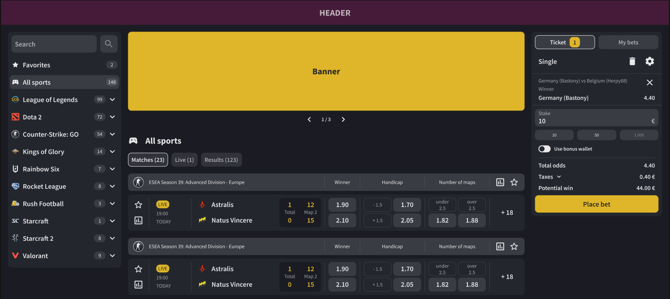
enum BannerType {
  Iframe = 'IFRAME',
  Image = 'IMAGE'
}

type BaseBanner<T extends BannerType> = {
  height?: number
  type: T
}

type ImageBanner = {
  src: string
  link?: string
} & BaseBanner<BannerType.Image>

type IframeBanner = {
  src: string
} & BaseBanner<BannerType.Iframe>

type Banner = ImageBanner | IframeBanner

type BannersConfig = {
  timeline?: {
    items: Banner[]
  }
}
2.4. Odds format configuration
Supported formats:
enum OddsFormat {
  Decimal = 'DECIMAL',
  Us = 'US',
  HongKong = 'HONG_KONG',
  Indo = 'INDO',
  Malay = 'MALAY'
}
2.5. Height
The default iFrame height is 100% of the parent element. 
2.5.1. Header selector [string]
The iFrame height is calculated automatically (100% window height - element height). Must be a valid query selector.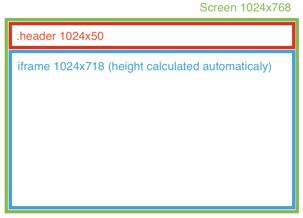
Example: “.header”
2.5.2. Exact height [number]
Set the exact iFrame height in pixels.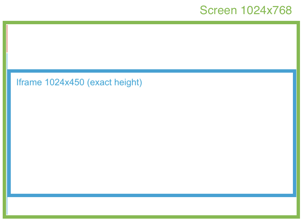
Example:
2.5.3. Custom function [fn() => number]
Custom function that calculates the exact iFrame height. The function is called on each window resize, and it must return a number (height in px).
2.5.4. Best practice
If possible, please make use of option 2.5.1. (defining the menu height in the header element), so the iFrame height is calculated optimally. This is especially important for the mobile view, where the double scroll bar issue (scrollbars within the outlying page and iFrame at the same time) should be avoided.
ℹ Recommended integration:
- The header menu should take up minimal height.
- It is recommended to avoid the footer, especially in the mobile view.
- Nested iFrames or elements with bezels of any kind are to be avoided.
- The scrolling should only happen within the iFrame, not in the outlying page.
Recommended (mobile):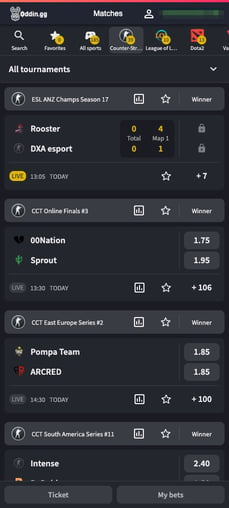 |
Not optimal (mobile):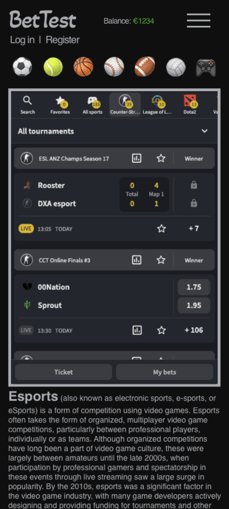 |
2.6. Integration examples
<script type="text/javascript">
   window["OddinConfig"] = {
      token: "foo",
      brandToken: "foo",
      baseUrl: "https://bifrost.oddin.gg",
      language: "en",
      currency: "EUR",
      theme: "custom_theme_name",
      height: ".header",
      contentElement: "#bifrost",
      eventHandler: (e) => {
          if (e.type === "REQUEST_REFRESH_BALANCE") {
             // call balance refresh
          }
      },
   }
</script>
<script src="https://bifrost.oddin.gg/script.js" type="text/javascript"></script>
In case you do not use static website rendering, i.e., a single-page React JavaScript application, you can include the iFrame as follows:
oddin.buildBifrost({
    token: "foo",
    brandToken: "foo",
    baseUrl: "https://bifrost.oddin.gg",
    language: "en",
    currency: "EUR",
    theme: "custom_theme_name",
    contentElement: "#bifrost",
    eventHandler: (e) => {
        if (e.type === "REQUEST_REFRESH_BALANCE") {
            // call balance refresh
        }
    },
    banners: {
        timeline: {
             items: [
                 {
                   type: "IFRAME",
                   src: "http://www.youriframelocation.com",
                 },
                 {
                   type: "IMAGE",
                   src: "http://www.yourimagelink.com/image.png",
                   link: "http://www.yourlinkdestination.com",
                }
            ]
        }
    }
})
2.7. Bifrost instance
oddin.buildBifrost(config: BifrostConfig, singleInstance = true) is returning object of BifrostInstance. The last instance can also be accessed via oddin.instance.
2.7.1. Instance.updateConfig(config)
Update the config in the runtime without iFrame reinitialization. Check which properties can be updated in the properties table.
2.7.2. Instance.refreshToken(token)
Update the client token for the current user without reloading the iFrame.
2.7.3. Instance.destroy()
Destroy the iFrame safely.
2.8. Custom currency symbol
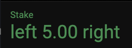
You can send an array of custom currency symbols. The symbols will be replaced everywhere in the app, but will not affect actual currency functionality. If you are using custom symbols, you have to send them every time to keep a correct bet history.
type CustomCurrencySymbol = {
  currency: string
  left?: string
  right?: string
}
2.8.1. Custom currency icon
An optional field iconUrl on customCurrencySymbols entries can be delivered via oddin.updateConfig(...) / CONFIG postMessage or the per-client NEXT_PUBLIC_APP_CONFIG:
oddin.updateConfig({
  customCurrencySymbols: [
    { currency: "CUSTOM", left: "$", iconUrl: "https://cdn.client.com/currency-a.svg" }
  ]
})
iconUrlmust be https:// or data:image// (validated in the loader script and enforced at render time).- In
NEXT_PUBLIC_APP_CONFIGthe record keys must be uppercase ("CUSTOM", not "custom"). - Text left/right are recommended as fallback – used for broken icons and string-only contexts.
- Supported formats include JPEG / JPG, PNG, GIF, SVG, WebP, AVIF, APNG, ICO, and BMP.
3. API Endpoints
In order to be able to debit/credit users, the client needs to provide us with a server URL address with these endpoints exposed:
| Name | HTTP Method |
/userDetails |
POST |
/debitUser |
POST |
/creditUser |
POST |
Methods table
Additional parameters:
- All requests and responses use the JSON format.
- All requests are sent with the Content-Type: application/json header – we will send JSON in the request body
3.1. Request flow
It is very important for these endpoints to be idempotent, i.e., more calls with the same transaction ID should return the same value every time. In the case of failure, we call /debitUser and /creditUser endpoints five more times (six times in total). This does not apply for the initial debit (block) transaction - if no response is received from the client API for the block transaction, the ticket placement will be rejected.
3.1.1. Regular request flow

ℹ The second debit transaction (debit with updated possible win) is just informative and should be used to update the possible winning amount based on the information in the Ticket object (if enabled). It should be responded to with HTTP 200 and error code 0 or 5 in order not to be repeated. If the initial debit (block) transaction is accepted with OK (0), the whole ticket will be accepted, regardless if the debit with updated possible win transaction has been acknowledged or not.
ℹ The credit refund transaction is sent in the following cases:
- if the response to the debit block transaction is not HTTP 200 (API error), or
- if the OTS system rejects the placed bet based on liability limits and/or other factors, or
- if the client’s API responds with HTTP 200 and certain error codes, for which the initial blocking of the funds on the client side has been assumed, please check 3.5. Error codes for the error codes that trigger credit refund.
3.1.2. Correction request flow (after incorrect settlement)
Betting tickets can be manually corrected within the Oddin.gg Settings platform (back office) if needed. Once a certain type of correction is done, the transactions to the client API are sent according to the following examples:
- Won ➔ Lost = debitTransaction "debit after credit" & creditTransaction "lost" (wonAmount 0)
- Won ➔ Void = debitTransaction "debit after credit" & creditTransaction "void" (stake wonAmount)
- Won ➔ Won = debitTransaction "debit after credit" & creditTransaction "credit" (new wonAmount)
- Lost ➔ Won = debitTransaction "debit after credit" (amount 0) & creditTransaction "credit" (new wonAmount)
- Lost ➔ Void = debitTransaction "debit after credit" (amount 0) & creditTransaction "void" (stake wonAmount)
- Lost ➔ Lost = debitTransaction "debit after credit" (amount 0) & creditTransaction "lost" (wonAmount 0)
- Void ➔ Lost = debitTransaction "debit after credit" & creditTransaction "lost" (wonAmount 0)
- Void ➔ Won = debitTransaction "debit after credit" & creditTransaction "credit" (new wonAmount)
3.2. User details - HTTP POST
This endpoint will be called when a user token is set in the iFrame initialisation properties. We use this to obtain user personalisation details.
3.2.1. Request parameters
| Name | Required | Type | Description |
| token | yes | string | user token passed during the iFrame set up |
User details request parameters
3.2.2. Response parameters
| Name | Required | Type | Description |
| userId | yes | string | unique user ID to distinguish different users |
| nickname | no | string | optional user nickname |
| currency | yes | string | please check the chapter Currency codes for acceptable currencies |
| language | yes | string | please check the chapter Language codes for acceptable languages |
| expirationSeconds | no | int | user token expiration in seconds; if sent, it defines a limit on how many times the /userDetails endpoint is called by the iFrame, potentially saving resources by minimizing the number of requests |
| errorCode | yes | int | please check the chapter Error codes for acceptable error codes |
| errorMessage* | no | string | optional error message describing the issue * this element should not be present if the errorCode value is 0 (OK), otherwise, the message will be treated as erroneous and the request discarded |
User details response parameters
3.3. Debit user - HTTP POST
We call this endpoint whenever the user is to be debited, e.g., placing a bet. The timeout for /debitUser requests is 60 seconds.
3.3.1. Request parameters
| Name | Required | Type | Description |
| token | yes | string | token passed during iFrame set up |
| userId | yes | string | unique user ID |
| currency | yes | string | please check the chapter Currency codes for acceptable currencies |
| amount | yes | Amount object | please check Amount object |
| description | no | string | description of debit operation |
| transactionId | yes | string | unique transaction ID from Oddin.gg side |
| ticketId | yes | string | unique ticket ID |
| transactionType | no | int | type of transaction |
| creditOperatorTransactionId | no | string | optional operator credit transaction ID in case of the outcome settlement rollback |
| creditTransactionId | no | string | optional credit transaction ID in case of the outcome settlement rollback |
| ticket | no | Ticket | optional Ticket with more information about the bet, please check the chapter Ticket |
Debit user request parameters
3.3.2. Amount object
| Name | Required | Type | Description |
| amount | yes | decimal | stake amount to be debited to the player |
| tax | no | decimal | tax if applicable |
| totalAmount | yes | decimal | amount plus taxes (if taxes are applicable, otherwise amount = totalAmount), this is the total amount to be debited to the player |
Amount object
3.3.3. Response parameters
| Name | Required | Type | Description |
| operatorTransactionId | yes | string | unique transaction ID from operator side |
| errorCode | yes | int | please check the chapter Error codes for acceptable error codes |
| errorMessage* | no | string | optional error message describing the issue * this element should not be present if the errorCode value is 0 (OK), otherwise the message will be treated as erroneous and the request discarded |
Debit user request parameters
3.4. Credit user - HTTP POST
The purpose of this endpoint is to credit the user, e.g., when the user wins a bet or a bet was rejected. Every time a user wants to bet, we will call the /debitUser endpoint with the transactionId. In the case of an API timeout (60 seconds) or request failure, we call /creditUser with the original debit transactionId. We want to give you an opportunity to roll back the debit operation in case it was already processed, but we have not received any information about it.
ℹ Before crediting the bettors, you should always make sure that the corresponding debitTransactionId has been processed correctly.
3.4.1. Request parameters
| Name | Required | Type | Description |
| token | yes | string | token passed during iFrame set up |
| userId | yes | string | unique user ID |
| currency | yes | string | please check the chapter Currency codes for acceptable currencies |
| amount | yes | Amount object | please check Amount object |
| description | no | string | description of the credit operation |
| transactionId | yes | string | unique transaction ID from Oddin.gg side |
| debitOperatorTransactionId | no | string | original operator debit transaction ID |
| debitTransactionId | yes | string | original debit transaction ID |
| ticketId | yes | string | unique ticket ID |
| transactionType | no | int | type of transaction |
| ticket | no | Ticket | optional Ticket with more information about the bet, please check the chapter Ticket |
Credit user request parameters
3.4.2. Amount object
| Name | Required | Type | Description |
| amount | yes | decimal | amount to credit user |
| tax | no | decimal | tax if applicable for winnings |
| totalAmount | yes | decimal | amount plus taxes (if taxes are applicable, otherwise amount = totalAmount) |
Amount object
3.4.3. Response parameters
| Name | Required | Type | Description |
| operatorTransactionId | yes | string | unique transaction ID from operator side |
| errorCode | yes | int | please check the chapter Error codes for acceptable error codes |
| errorMessage* | no | string | optional error message describing the issue * this element should not be present if the errorCode value is 0 (OK), otherwise the message will be treated as erroneous and the request discarded |
Credit user request parameters
3.5. Error codes
We expect the client to respond with the HTTP response OK (200) and then send one of the error codes from the below table within the response body.
ℹ If the HTTP response is not OK (e.g., 4xx, 5xx), the Oddin.gg system will try to resend the request up to 5 times according to exponential backoff: 1st: 60s, 2nd: 150s, 3rd: 285s, 4th: 487s, 5th: 791s. This does not apply for the initial debit (block) transaction, where Oddin.gg will reject the transaction and send a credit (refund) transaction automatically, if the response is not HTTP 200.
| Name | Code | Description | credit refund sent after debit block |
| OK | 0 | everything is OK | ❌ |
| InvalidToken | 1 | authentication token is invalid | ✅ |
| UserAccount | 2 | user account is locked or inactive | ❌ |
| InvalidCurrency | 3 | request uses invalid currency code | ✅ |
| InsufficientFunds | 4 | user does not have enough funds | ❌ |
| TransactionAlreadyProcessed | 5 | transaction ID was already processed | ✅ |
| OriginalTransactionNotFound | 6 | credit operation tried without previous debit transaction ID | ✅ |
| LimitExceeded | 7 | user is over their betting limit | ❌ |
| CustomerError | 8 | customer specific error; we will show the field errorMessage directly to the user, so, customers can use it for their own business logic | ❌ |
| InvalidArguments | 9 | invalid arguments in the transaction sent to the API | ❌ |
| OtherError | -1 | other error, not fitting other descriptions | ✅ |
Possible error codes
3.6. Language codes
We accept all valid ISO 639-1 two-character codes: https://en.wikipedia.org/wiki/List_of_ISO_639-1_codes
3.6.1. Supported languages
| Language | ISO 639-1 code |
| Bengali | bn |
| Bulgarian | bg |
| Chinese | zh |
| Croatian | hr |
| Danish | da |
| Dutch | nl |
| English | en |
| Finnish - Suomi | fi |
| French | fr |
| Georgian | ka |
| German | de |
| Greek | el |
| Hindi | hi |
| Hungarian | hu |
| Italian | it |
| Japanese | ja |
| Kazakh | kk |
| Korean | ko |
| Norwegian | no |
| Polish | pl |
| Portuguese | pt |
| Portuguese (Brazilian) | br |
| Romanian | ro |
| Russian | ru |
| Serbian Latin | srl |
| Sinhala | si |
| Slovenian | sl |
| Spanish | es |
| Swedish | sv |
| Tagalog | tl |
| Tamil | ta |
| Telugu | te |
| Thai | th |
| Turkish | tr |
| Ukrainian | uk |
| Uzbek | uz |
| Vietnamese | vi |
List of supported languages
3.7. Currency codes
We accept all valid ISO 4217 currency codes: https://en.wikipedia.org/wiki/ISO_4217
ℹ You should not accept iFrame bets in a currency that you do not support. You should do a currency verification on your side, and if a debit block transaction is made to your API with a currency you do not support, you should reject the transaction with HTTP response OK (200) and errorCode 3 (InvalidCurrency).
3.8. Transaction types
| Name | Endpoint | Code | Description |
| DebitWithUpdatedPossibleWin | /debitUser | -3 | informative transaction, confirming the ticket has been accepted; not receiving this transaction does not stop ticket acceptance; must be responded to with HTTP 200 and error code 0 or 5, otherwise, it will be repeated up to 5 times according to exponential back off; the potential changing of the odds during the bet delay is communicated within the Ticket object if enabled |
| DebitAfterCredit | /debitUser | -2 | debit the bettor after a wrongly settled transaction |
| Block | /debitUser | -1 | blocked funds while waiting for the risk management validation |
| Refund | /creditUser | 1 | ticket was rejected - return money; Refund transaction should not be sent more than once, unless there is some error with the service - please ignore all subsequent Refund transactions |
| Credit | /creditUser | 2 | ticket was winning - pay money |
| Void | /creditUser | 3 | ticket was fully voided - return money; Void transactions can be sent multiple times in some rare cases when a ticket is corrected more than once, for example, VOID→WON→VOID |
| Lost | /creditUser | 4 | ticket lost - no payment |
Possible transaction types
3.9. Ticket
We can optionally send tickets with the transaction, which is useful for local storage or meeting regulatory requirements. You can enable this in our settings platform or contact us. Tickets will be in the following format:
| Name | Required | Type | Description |
| id | yes | string | ticket ID |
| stake | yes | Amount | Amount object, describing the ticket stake; it is the sum of the stakes for all bets |
| wonAmount | no | Amount | Amount object, describing the ticket won amount; it is the sum of the won amounts for all bets |
| possibleWinAmount | yes | Amount | Amount object, describing the possible ticket win amount; it is the sum of the possible won amounts for all bets |
| date | yes | date | date of ticket creation in ISO format |
| status | yes | string | Ticket Status enum, describing the ticket status |
| bets | yes | TicketBet array | Ticket Bet array |
| deviceInfo | no | object | An object, describing the device from which the ticket was placed. Contains the displayResolution and userAgent string fields. |
Ticket parameters
3.9.1. Amount
| Name | Required | Type | Description |
| amount | yes | decimal | amount without taxes |
| tax | no | decimal | optional tax amount |
| totalAmount | yes | decimal | total amount - amount + tax |
Ticket Amount parameters
3.9.2. Ticket Status
| Name | Code | Description |
| Pending | pending | ticket is waiting to be accepted or rejected |
| Accepted | accepted | ticket was accepted, waiting for result |
| Rejected | rejected | ticket was rejected, money should be returned |
| Won | won | ticket is winning and money should be paid |
| Lost | lost | ticket is lost |
| Voided | voided | ticket is fully voided, money should be returned |
Ticket Status
3.9.3. Ticket Bet
| Name | Required | Type | Description |
| id | yes | string | bet ID |
| stake | yes | Amount | Amount object, describing the bet stake |
| selections | yes | TicketSelection array | Ticket Selection array, with all bet selections |
| won | no | boolean | flag for a completely won bet |
| voided | no | boolean | flag for a completely voided bet |
| wonAmount | no | Amount | Amount object, describing the bet won amount |
| totalOdds | yes | decimal | total odds for the bet |
| systems | yes | int array | selected bet systems |
Ticket Bet parameters
3.9.3.1. Ticket Selection
| Name | Required | Type | Description |
| id | yes | string | Unique ticket selection ID |
| outcome | yes | TicketOutcome | Ticket Outcome object, describing the selection outcome |
| odds | yes | decimal | outcome odds; in the case of an Oddin.gg BetBuilder (OBB) ticket, all selections from a given OBB session will have equal odds |
| event | yes | TicketEvent | Ticket Event object, describing the outcome event |
| status | yes | string | Ticket Selection Status enum, describing the status of the selection |
Ticket Selection parameters
3.9.3.1.1. Ticket Outcome
| Name | Required | Type | Description |
| name | yes | string | name describing outcome, e.g., “home” |
| id | yes | int | unique ID of an outcome |
| outcomeId | yes | string | unique ID of an outcome |
| marketId | yes | string | unique ID of a market |
| marketName | yes | string | name describing a market, e.g., “Map winner” |
| localizationId | yes | string | ID of the competitor or player |
| description | no | string | additional outcome description, e.g., the opposing selection in a player market |
| obbSessionId | no | string | if a selection is created via Oddin.gg BetBuilder (OBB), this field contains the ID of the session group; all selections in same group have the same obbSessionId |
Ticket Outcome parameters
3.9.3.1.2. Ticket Event
| Name | Required | Type | Description |
| id | yes | string | unique ID of the event, e.g., “od:match:1” |
| tournamentId | yes | string | unique ID of the tournament, e.g., “od:tournament:1” |
| tournamentName | yes | string | tournament name |
| sportId | yes | string | unique ID of the sport, e.g., “od:sport:1” |
| sportName | yes | string | sport name |
| dateStart | yes | date | date of the event start in ISO format |
| teams | no | TicketEventTeam array | array of Ticket Event Team |
| isLive | no | boolean | true if the bet was placed during a live event |
Ticket Event parameters
3.9.3.1.2.1 Ticket Event Team
| Name | Required | Type | Description |
| name | yes | string | competitor name |
| id | no | string | competitor ID in URN format |
| isHome | no | boolean | optional information about home or away |
Ticket Event Team parameters
3.9.3.1.3. Ticket Selection Status
| Name | Code | Description |
| Pending | pending | selection is waiting to be processed |
| Won | won | selection is winning |
| Half-won | half_won | selection is half-winning (Asian markets) |
| Lost | lost | selection is lost |
| Half-lost | half_lost | selection is half-lost (Asian markets) |
| Voided | voided | selection is fully voided |
Ticket Selection Status
3.9.4. deviceInfo object
| Name | Required | Type | Description |
| displayResolution | yes | string | resolution of the bettor’s device display in pixels |
| userAgent | yes | string | info about the bettor’s operating system and browser |
deviceInfo parameters
3.9.4.1. deviceInfo example
"deviceInfo": {
    "displayResolution": "393x620",
    "userAgent": "Mozilla/5.0 (Linux; Android 10; K) AppleWebKit/537.36 (KHTML, like Gecko) Chrome/125.0.0.0 Mobile Safari/537.36"
}
4. JSON examples
4.1. JSON ANALYTICS event payload examples
4.1.1. bet-accepted payload
{
  "ticketId": "d1212130-d87a-4350-9cf2-fa3c866af646",
  "stake": 20.0,
  "currency": "EUR",
  "selections": [
    {
       "selectionId": "d1652930-d87a-4870-9cf2-fa3c353af646",
       "marketGroupName": "Winner",
       "outcomeName": "Team Bars",
       "odds": 3.5,
       "title": "Team Bars vs ASAKURA",
       "matchName": "Team Bars vs ASAKURA",
       "tournamentName": "Dreamleague Season 22"
     }
   ]
}
4.1.2. bet-rejected payload
{
    "ticketId": "c12542130-d40c-49f4-0fe3-3fk3866aii14",
    "stake": 10.0,
    "currency": "EUR",
    "rejectionReason": "INSUFFICIENT_FUNDS",
    "rejectionReasonMessage": "Not enough funds on the account",
    "hasReOffer": false,
    "selections": [
      {
        "selectionId": "od:outcome:12345",
        "marketGroupName": "Match winner",
        "outcomeName": "Team A",
        "odds": 1.85,
        "matchName": "Team A vs Team B",
        "tournamentId": "od:tournament:6785"
      }
    ]
  }
4.1.3. match-in-view payload
{
  "match_id": "bWF4Y2gvb3Q7bWF1Y3g5Njc2Njk1",
  "state": "STARTED",
  "matchName": "Sprout vs Alliance",
  "tournamentName": "YaLLa Compass Spring 2024",
  "sportName": "Counter-Strike 2"
}
4.1.4. click-match-details payload
{
  "match_id": "bWF4Y2gvb3Q7bWF1Y3g5Njc2Njk1",
  "datePlannedStart": "2024-03-07T11:00:00Z",
  "state": "STARTED",
  "matchName": "Sprout vs Alliance",
  "tournamentName": "YaLLa Compass Spring 2024",
  "sportName": "Counter-Strike 2",
  "teams": [
    {
      "team": {
                   "id": "dGVhbS9vZDpjb21wZXRpdG9yOjIyMw==",
                   "name": "Sprout"
      }
    },
    {
      "team": {
                   "id": "dGVhbS9vZDpjb21wZXRpdG9yOjI5",
                   "name": "Alliance"
      }
    }
  ]
}
4.1.5. ticket-add-selection / ticket-remove-selection payload
{
  "marketGroupName": "Winner",
  "datePlannedStart": "2024-03-07T11:00:00Z",
  "outcomeName": "Team Bars",
  "odds": 3.5,
  "matchName": "Team Bars vs ASAKURA",
  "tournamentName": "Dreamleague Season 22"
}
4.2. JSON ticket example
"ticket": {
  "stake": {
    "amount": 717424,
    "totalAmount": 717424
  },
  "wonAmount": {
    "amount": 875257,
    "totalAmount": 875257
  },
  "date": "2024-02-09T13:01:30Z",
  "status": "won",
  "bets": [
    {
      "id": "c7328465-0650-4f94-8eac-d298hk3ad5fn",
      "stake": {
        "amount": 717424,
        "totalAmount": 717424
      },
      "selections": [
        {
          "id": "b3P9Y29tZS9vZDptYXRjaDo2OCh5NYSvODcvODctLzE=",
          "outcome": {
            "name": "San Antonio Spurs (Brent)",
            "id": 1,
            "outcomeId": "1",
            "marketId": "87-",
            "marketName": "Match Winner Draw No Bet",
            "localizationId": "od:competitor:9781"
          },
          "odds": 1.22,
          "event": {
            "id": "od:match:698954",
            "teams": [
              {
                "name": "San Antonio Spurs (Brent)",
                "isHome": true,
                "id": "od:competitor:9781"
              },
              {
                "name": "Houston Rockets (Jason)",
                "isHome": false,
                "id": "od:competitor:10459"
              }
            ],
            "tournamentId": "od:tournament:5569",
            "tournamentName": "Valhalla League 2024 Week #6",
            "sportName": "eBasketball",
            "sportId": "od:sport:34",
            "dateStart": "2024-02-09T13:24:00Z",
            "isLive": false
          },
          "won": true,
          "voided": false
        }
      ],
      "won": true,
      "voided": false,
      "wonAmount": {
        "amount": 875257,
        "totalAmount": 875257
      },
      "totalOdds": 1.22,
      "systems": [
        1
      ]
    }
  ],
  "possibleWinAmount": {
    "amount": 875257,
    "totalAmount": 875257
  },
  "deviceInfo": {
    "displayResolution": "393x620",
    "userAgent": "Mozilla/5.0 (Linux; Android 10; K) AppleWebKit/537.36 (KHTML, like Gecko) Chrome/125.0.0.0 Mobile Safari/537.36"
  },
}
4.3. JSON /userDetails transaction examples
4.3.1. Sending user session token (iFrame ➔ client API):
{
  "token": "3519edfe-0f75-4a30-bfe4-7cbd89340b2c"
}
4.3.2. Receiving correct client response (client API ➔ iFrame):
{
  "userId": "5544fnfg-1g3b-5e62-klm6-8dbc3186c3c",
  "nickname": "BoredPanda116",
  "language": "en",
  "currency": "USD",
  "errorCode": 0
}
4.3.3. Receiving an error response (client API ➔ iFrame):
{
  "errorCode": 1,
  "errorMessage": "Invalid user session token received."
}
4.4. JSON /debitUser and /creditUser transaction examples
ℹ In all the transaction examples below, we are using the following parameters:
- Stake: 10 €
- Odds: 1.5
- Corrected odds in the case of Won ➔ Won corrected transaction: 1.8
4.4.1. Won
- debitTransaction Block (10 €) ➔ stake reserved, deduct 10 € from the user’s wallet
- debitTransaction DebitWithUpdatedPossibleWin ➔ bet confirmed, do nothing in the wallet
- creditTransaction Won ➔ bet won, add 15 € to the user’s wallet
4.4.1.1. debitTransaction Block
After the bet is placed, the first debit transaction “block” (code -1) informs you to deduct the stake a user placed from the user's wallet. The “amount” and “total_amount” is the amount of the placed stake.
Example:
{
  "id": "2609c5be-6628-4461-808d-8f27e525af63",
  "ticketId": "unique_client_ticket_id",
  "amount": {
    "amount": 10,
    "tax": null,
    "totalAmount": 10
  },
  "transactionType": -1
}
4.4.1.2 debitTransaction DebitWithUpdatedPossibleWin
When the bet is accepted after the risk check, the second debit transaction “debit with updated possible win” (code -3) is an informative transaction. It should make no changes to the user's wallet. If the initial debit (block) transaction is accepted with OK (0), the whole ticket will be accepted, regardless if the debit with updated possible win transaction has been acknowledged or not. Tickets can be manually voided/cancelled within the Settings platform if needed.
Example:
{
  "id": "2609c5be-6628-4461-808d-8f27e525af63",
  "ticketId": "unique_client_ticket_id",
  "amount": {
    "amount": 0,
    "tax": null,
    "totalAmount": 0
  },
  "transactionType": -3
}
4.4.1.3. creditTransaction Credit
In case of a winning ticket, credit transaction “credit” (code 2) informs you to add the winning amount to the user’s wallet. The “amount” and “total_amount” should be containing the amount of the placed stake + winnings.
Example:
{
  "id": "2609c5be-6628-4461-808d-8f27e525af63",
  "ticketId": "unique_client_ticket_id",
  "amount": {
    "amount": 15,
    "tax": null,
    "totalAmount": 15
  },
  "transactionType": 2
}
4.4.2. Lost
- debitTransaction Block (10 €) ➔ stake reserved, deduct 10 € from the user’s wallet
- debitTransaction DebitWithUpdatedPossibleWin ➔ bet confirmed, do nothing in the wallet
- creditTransaction Lost ➔ bet lost, do nothing in the user’s wallet
4.4.2.1. debitTransaction Block
After the bet is placed, the first debit transaction “block” (code -1) informs you to deduct the stake a user placed from the user's wallet. The “amount” and “total_amount” is the amount of the placed stake.
Example:
{
  "id": "2609c5be-6628-4461-808d-8f27e525af63",
  "ticketId": "unique_client_ticket_id",
  "amount": {
    "amount": 10,
    "tax": null,
    "totalAmount": 10
  },
  "transactionType": -1
}
4.4.2.2. debitTransaction DebitWithUpdatedPossibleWin
When the bet is accepted after the risk check, the second debit transaction “debit with updated possible win” (code -3) is an informative transaction. It should make no changes to the user's wallet. If the initial debit (block) transaction is accepted with OK (0), the whole ticket will be accepted, regardless if the debit with updated possible win transaction has been acknowledged or not. Tickets can be manually voided/cancelled within the Settings platform if needed.
Example:
{
  "id": "2609c5be-6628-4461-808d-8f27e525af63",
  "ticketId": "unique_client_ticket_id",
  "amount": {
    "amount": 0,
    "tax": null,
    "totalAmount": 0
  },
  "transactionType": -3
}
4.4.2.3. creditTransaction Lost
In case of a losing ticket, credit transaction “lost” (code 4) informs you that the ticket lost. Because of the initial debit transaction “block” the placed stake was already deducted from the user's wallet, which is why the “amount” and “total_amount” in this case should be 0.
Example:
{
  "id": "2609c5be-6628-4461-808d-8f27e525af63",
  "ticketId": "unique_client_ticket_id",
  "amount": {
    "amount": 0,
    "tax": 0,
    "totalAmount": 0
  },
  "transactionType": 4
}
4.4.3. Void
- debitTransaction Block (10 €) ➔ stake reserved, deduct 10 € from the user’s wallet
- debitTransaction DebitWithUpdatedPossibleWin ➔ bet confirmed, do nothing in the wallet
- creditTransaction Void ➔ bet voided, add the stake amount 10 € to the user’s wallet
4.4.3.1. debitTransaction Block
After the bet is placed, the first debit transaction “block” (code -1) informs you to deduct the stake a user placed from the user's wallet. The “amount” and “total_amount” should be the amount of the placed stake.
Example:
{
  "id": "2609c5be-6628-4461-808d-8f27e525af63",
  "ticketId": "unique_client_ticket_id",
  "amount": {
    "amount": 10,
    "tax": null,
    "totalAmount": 10
  },
  "transactionType": -1
}
4.4.3.2. debitTransaction DebitWithUpdatedPossibleWin
When the bet is accepted after the risk check, the second debit transaction “debit with updated possible win” (code -3) is an informative transaction. It should make no changes to the user's wallet. If the initial debit (block) transaction is accepted with OK (0), the whole ticket will be accepted, regardless if the debit with updated possible win transaction has been acknowledged or not. Tickets can be manually voided/cancelled within the Settings platform if needed.
Example:
{
  "id": "2609c5be-6628-4461-808d-8f27e525af63",
  "ticketId": "unique_client_ticket_id",
  "amount": {
    "amount": 0,
    "tax": null,
    "totalAmount": 0
  },
  "transactionType": -3
}
4.4.3.3. debitTransaction Void
In case of a voided ticket, credit transaction “void” (code 3) informs you that the ticket was voided. You should return the amount of the stake to the user's wallet. The “amount” and “total_amount” is the amount to add to the user’s wallet. Void transactions can be sent multiple times in some rare cases when a ticket is corrected more than once, for example, VOID → WON → VOID.
Example:
{
  "id": "2609c5be-6628-4461-808d-8f27e525af63",
  "ticketId": "unique_client_ticket_id",
  "amount": {
    "amount": 10,
    "tax": null,
    "totalAmount": 10
  },
  "transactionType": 3
}
4.4.4. Rejected
- debitTransaction Block (10 €) ➔ stake reserved, deduct 10 € from the user’s wallet
- creditTransaction Void ➔ stake refunded, add the stake amount 10 € to the user’s wallet
4.4.4.1. debitTransaction Block
After the bet is placed, the first debit transaction “block” (code -1) informs you to deduct the stake a user placed from the user's wallet. The “amount” and “total_amount” should be the amount of the placed stake.
Example:
{
  "id": "2609c5be-6628-4461-808d-8f27e525af63",
  "ticketId": "unique_client_ticket_id",
  "amount": {
    "amount": 10,
    "tax": null,
    "totalAmount": 10
  },
  "transactionType": -1
}
4.4.4.3. creditTransaction Refund
When a ticket is rejected after the risk check credit transaction “refund” (code 1) informs you to return the stake to the user’s wallet. The “amount” and “total_amount” is the amount to add to the user’s wallet. Refund transactions should not be sent more than once, unless there is some error with the service - please ignore all subsequent refund transactions.
Example:
{
  "id": "2609c5be-6628-4461-808d-8f27e525af63",
  "ticketId": "unique_client_ticket_id",
  "amount": {
    "amount": 10,
    "tax": null,
    "totalAmount": 10
  },
  "transactionType": 1
}
4.4.5. Won ➔ Lost
- debitTransaction Block (10 €) ➔ stake reserved, deduct 10 € from the user’s wallet
- debitTransaction DebitWithUpdatedPossibleWin ➔ bet confirmed, do nothing in the wallet
- creditTransaction Credit ➔ bet won, add 15 € to the user’s wallet
- debitTransaction DebitAfterCredit ➔ wrongly settled transaction, deduct from the wallet
- creditTransaction Lost ➔ bet lost, do nothing in the wallet
4.4.5.1. debitTransaction Block
After the bet is placed, the first debit transaction “block” (code -1) informs you to deduct the stake a user placed from the user's wallet. The “amount” and “total_amount” should be the amount of the placed stake.
Example:
{
  "id": "2609c5be-6628-4461-808d-8f27e525af63",
  "ticketId": "unique_client_ticket_id",
  "amount": {
    "amount": 10,
    "tax": null,
    "totalAmount": 10
  },
  "transactionType": -1
}
4.4.5.2. debitTransaction DebitWithUpdatedPossibleWin
When the bet is accepted after the risk check, the second debit transaction “debit with updated possible win” (code -3) is an informative transaction. It should make no changes to the user's wallet. If the initial debit (block) transaction is accepted with OK (0), the whole ticket will be accepted, regardless if the debit with updated possible win transaction has been acknowledged or not. Tickets can be manually voided/cancelled within the Settings platform if needed.
Example:
{
  "id": "2609c5be-6628-4461-808d-8f27e525af63",
  "ticketId": "unique_client_ticket_id",
  "amount": {
    "amount": 0,
    "tax": null,
    "totalAmount": 0
  },
  "transactionType": -3
}
4.4.5.3. creditTransaction Credit
In case of a winning ticket, credit transaction “credit” (code 2) informs you to add the winning amount to the user’s wallet. The “amount” and “total_amount” should be containing the amount of the placed stake + winnings.
Example:
{
  "id": "2609c5be-6628-4461-808d-8f27e525af63",
  "ticketId": "unique_client_ticket_id",
  "amount": {
    "amount": 15,
    "tax": null,
    "totalAmount": 15
  },
  "transactionType": 2
}
4.4.5.4. debitTransaction DebitAfterCredit
When a winning ticket is corrected into a losing one, credit transaction “debit after credit” (code -2) informs you about a wrongly settled transaction. Deduct the previously won amount from the user’s wallet. The “amount” and “total_amount” should be containing the amount of the placed stake + winnings.
Example:
{
  "id": "2609c5be-6628-4461-808d-8f27e525af63",
  "ticketId": "unique_client_ticket_id",
  "amount": {
    "amount": 15,
    "tax": null,
    "totalAmount": 15
  },
  "transactionType": -2
}
4.4.5.5. creditTransaction Lost
Because the ticket was corrected from a winning into a losing one, the last credit transaction “lost” (code 4) informs you of the final status of the ticket. Because of the previous debit transaction “debit after credit” the winning amount was already deducted from the user's wallet, which is why the “amount” and “total_amount” in this case should be 0.
Example:
{
  "id": "2609c5be-6628-4461-808d-8f27e525af63",
  "ticketId": "unique_client_ticket_id",
  "amount": {
    "amount": 0,
    "tax": 0,
    "totalAmount": 0
  },
  "transactionType": 4
}
4.4.6. Won ➔ Void
- debitTransaction Block (10 €) ➔ stake reserved, deduct 10 € from the user’s wallet
- debitTransaction DebitWithUpdatedPossibleWin ➔ bet confirmed, do nothing in the wallet
- creditTransaction Credit ➔ bet won, add 15 € to the user’s wallet
- debitTransaction DebitAfterCredit ➔ wrongly settled transaction, deduct from the wallet
- creditTransaction Void ➔ bet voided, add the stake amount 10 € to the user’s wallet
4.4.6.1. debitTransaction Block
After the bet is placed, the first debit transaction “block” (code -1) informs you to deduct the stake a user placed from the user's wallet. The “amount” and “total_amount” should be the amount of the placed stake.
Example:
{
  "id": "2609c5be-6628-4461-808d-8f27e525af63",
  "ticketId": "unique_client_ticket_id",
  "amount": {
    "amount": 10,
    "tax": null,
    "totalAmount": 10
  },
  "transactionType": -1
}
4.4.6.2. debitTransaction DebitWithUpdatedPossibleWin
When the bet is accepted after the risk check, the second debit transaction “debit with updated possible win” (code -3) is an informative transaction. It should make no changes to the user's wallet. If the initial debit (block) transaction is accepted with OK (0), the whole ticket will be accepted, regardless if the debit with updated possible win transaction has been acknowledged or not. Tickets can be manually voided/cancelled within the Settings platform if needed.
Example:
{
  "id": "2609c5be-6628-4461-808d-8f27e525af63",
  "ticketId": "unique_client_ticket_id",
  "amount": {
    "amount": 0,
    "tax": null,
    "totalAmount": 0
  },
  "transactionType": -3
}
4.4.6.3. creditTransaction Credit
In case of a winning ticket, credit transaction “credit” (code 2) informs you to add the winning amount to the user’s wallet. The “amount” and “total_amount” should be containing the amount of the placed stake + winnings.
Example:
{
  "id": "2609c5be-6628-4461-808d-8f27e525af63",
  "ticketId": "unique_client_ticket_id",
  "amount": {
    "amount": 15,
    "tax": null,
    "totalAmount": 15
  },
  "transactionType": 2
}
4.4.6.4. debitTransaction DebitAfterCredit
When a winning ticket is corrected into a voided one, credit transaction “debit after credit” (code -2) informs you about a wrongly settled transaction. Deduct the previously won amount from the user’s wallet. The “amount” and “total_amount” should be containing the amount of the placed stake + winnings.
Example:
{
  "id": "2609c5be-6628-4461-808d-8f27e525af63",
  "ticketId": "unique_client_ticket_id",
  "amount": {
    "amount": 15,
    "tax": null,
    "totalAmount": 15
  },
  "transactionType": -2
}
4.4.6.5. debitTransaction Void
When a winning ticket is being voided, credit transaction “void” (code 3) informs you that the ticket was voided. You should return the amount of the stake to the user's wallet. In the previous transaction debit after credit the amount of stake+winnings has been deducted from the user's wallet. The “amount” and “total_amount” informs you how much was the amount of the initial stake to be returned to the user’s wallet.
Example:
{
  "id": "2609c5be-6628-4461-808d-8f27e525af63",
  "ticketId": "unique_client_ticket_id",
  "amount": {
    "amount": 10,
    "tax": null,
    "totalAmount": 10
  },
  "transactionType": 3
}
4.4.7. Won ➔ Won
- debitTransaction Block (10 €) ➔ stake reserved, deduct 10 € from the user’s wallet
- debitTransaction DebitWithUpdatedPossibleWin ➔ bet confirmed, do nothing in the wallet
- creditTransaction Credit ➔ bet won, add 15 € to the user’s wallet
- debitTransaction DebitAfterCredit ➔ bet corrected, deduct the credited amount (15 €) from the user’s wallet
- creditTransaction Credit ➔ bet won, add 18 € to the user’s wallet
4.4.7.1. debitTransaction Block
After the bet is placed, the first debit transaction “block” (code -1) informs you to deduct the stake a user placed from the user's wallet. The “amount” and “total_amount” is the amount of the placed stake.
Example:
{
  "id": "2609c5be-6628-4461-808d-8f27e525af63",
  "ticketId": "unique_client_ticket_id",
  "amount": {
    "amount": 10,
    "tax": null,
    "totalAmount": 10
  },
  "transactionType": -1
}
4.4.7.2. debitTransaction DebitWithUpdatedPossibleWin
When the bet is accepted after the risk check, the second debit transaction “debit with updated possible win” (code -3) is an informative transaction. It should make no changes to the user's wallet. If the initial debit (block) transaction is accepted with OK (0), the whole ticket will be accepted, regardless if the debit with updated possible win transaction has been acknowledged or not. Tickets can be manually voided/cancelled within the Settings platform if needed.
Example:
{
  "id": "2609c5be-6628-4461-808d-8f27e525af63",
  "ticketId": "unique_client_ticket_id",
  "amount": {
    "amount": 0,
    "tax": null,
    "totalAmount": 0
  },
  "transactionType": -3
}
4.4.7.3. creditTransaction Credit
In case of a winning ticket, credit transaction “credit” (code 2) informs you to add the winning amount to the user’s wallet. The “amount” and “total_amount” should be containing the amount of the placed stake + winnings.
Example:
{
  "id": "2609c5be-6628-4461-808d-8f27e525af63",
  "ticketId": "unique_client_ticket_id",
  "amount": {
    "amount": 15,
    "tax": null,
    "totalAmount": 15
  },
  "transactionType": 2
}
4.4.7.4. debitTransaction DebitAfterCredit
When the amount of the winning ticket is corrected, credit transaction “debit after credit” (code -2) informs you about a wrongly settled transaction. Deduct the previously won amount from the user’s wallet. The “amount” and “total_amount” should be containing the amount of the placed stake + winnings.
Example:
{
  "id": "2609c5be-6628-4461-808d-8f27e525af63",
  "ticketId": "unique_client_ticket_id",
  "amount": {
    "amount": 15,
    "tax": null,
    "totalAmount": 15
  },
  "transactionType": -2
}
4.4.7.5. creditTransaction Credit
The second credit transaction “credit” (code 2) informs you to add the corrected winning amount to the user’s wallet. The “amount” and “total_amount” should be containing the amount of the placed stake + corrected winnings.
Example:
{
  "id": "2609c5be-6628-4461-808d-8f27e525af63",
  "ticketId": "unique_client_ticket_id",
  "amount": {
    "amount": 18,
    "tax": null,
    "totalAmount": 18
  },
  "transactionType": 2
}
4.4.8. Lost ➔ Void
- debitTransaction Block (10 €) ➔ stake reserved, deduct 10 € from the user’s wallet
- debitTransaction DebitWithUpdatedPossibleWin ➔ bet confirmed, do nothing in the wallet
- creditTransaction Lost ➔ bet lost, do nothing in the user’s wallet
- debitTransaction DebitAfterCredit ➔ bet corrected, do nothing in the user’s wallet (amount = 0)
- creditTransaction Void ➔ bet voided, add the stake amount 10 € to the user’s wallet
4.4.8.1. debitTransaction Block
After the bet is placed, the first debit transaction “block” (code -1) informs you to deduct the stake a user placed from the user's wallet. The “amount” and “total_amount” should be the amount of the placed stake.
Example:
{
  "id": "2609c5be-6628-4461-808d-8f27e525af63",
  "ticketId": "unique_client_ticket_id",
  "amount": {
    "amount": 10,
    "tax": null,
    "totalAmount": 10
 },
 "transactionType": -1
}
4.4.8.2. debitTransaction DebitWithUpdatedPossibleWin
When the bet is accepted after the risk check, the second debit transaction “debit with updated possible win” (code -3) is an informative transaction. It should make no changes to the user's wallet. If the initial debit (block) transaction is accepted with OK (0), the whole ticket will be accepted, regardless if the debit with updated possible win transaction has been acknowledged or not. Tickets can be manually voided/cancelled within the Settings platform if needed.
Example:
{
  "id": "2609c5be-6628-4461-808d-8f27e525af63",
  "ticketId": "unique_client_ticket_id",
  "amount": {
    "amount": 0,
    "tax": null,
    "totalAmount": 0
  },
  "transactionType": -3
}
4.4.8.3. creditTransaction Lost
In case of a losing ticket, credit transaction “lost” (code 4) informs you that the ticket was lost. Because of the initial debit transaction “block” the placed stake was already deducted from the user's wallet, which is why the “amount” and “total_amount” in this case should be 0.
Example:
{
  "id": "2609c5be-6628-4461-808d-8f27e525af63",
  "ticketId": "unique_client_ticket_id",
  "amount": {
    "amount": 0,
    "tax": 0,
    "totalAmount": 0
  },
  "transactionType": 4
}
4.4.8.4. debitTransaction DebitAfterCredit
When a losing ticket is corrected into a voided one, credit transaction “debit after credit” (code -2) informs you about a wrongly settled transaction. Because of the initial debit transaction “block” the placed stake was already deducted from the user's wallet, which is why the “amount” and “total_amount” in this case should be 0.
Example:
{
  "id": "2609c5be-6628-4461-808d-8f27e525af63",
  "ticketId": "unique_client_ticket_id",
  "amount": {
    "amount": 0,
    "tax": null,
    "totalAmount": 0
  },
  "transactionType": -2
}
4.4.8.5. debitTransaction Void
When a losing ticket is being voided, the credit transaction “void” (code 3) informs you that the ticket was voided. You should return the amount of the stake to the user's wallet. The “amount” and “total_amount” informs you how much was the amount of the initial stake to be returned to the user’s wallet.
Example:
{
  "id": "2609c5be-6628-4461-808d-8f27e525af63",
  "ticketId": "unique_client_ticket_id",
  "amount": {
    "amount": 10,
    "tax": null,
    "totalAmount": 10
  },
  "transactionType": 3
}
4.4.9. Lost ➔ Won
- debitTransaction Block (10 €) ➔ stake reserved, deduct 10 € from the user’s wallet
- debitTransaction DebitWithUpdatedPossibleWin ➔ bet confirmed, do nothing in the wallet
- creditTransaction Lost ➔ bet lost, do nothing in the user’s wallet
- debitTransaction DebitAfterCredit ➔ bet corrected, do nothing in the user’s wallet (amount = 0)
- creditTransaction Won ➔ bet won, add 15 € to the user’s wallet
4.4.9.1. debitTransaction Block
After the bet is placed, the first debit transaction “block” (code -1) informs you to deduct the stake a user placed from the user's wallet. The “amount” and “total_amount” should be the amount of the placed stake.
Example:
{
  "id": "2609c5be-6628-4461-808d-8f27e525af63",
  "ticketId": "unique_client_ticket_id",
  "amount": {
    "amount": 10,
    "tax": null,
    "totalAmount": 10
  },
  "transactionType": -1
}
4.4.9.2. debitTransaction DebitWithUpdatedPossibleWin
When the bet is accepted after the risk check, the second debit transaction “debit with updated possible win” (code -3) is an informative transaction. It should make no changes to the user's wallet. If the initial debit (block) transaction is accepted with OK (0), the whole ticket will be accepted, regardless if the debit with updated possible win transaction has been acknowledged or not. Tickets can be manually voided/cancelled within the Settings platform if needed.
Example:
{
  "id": "2609c5be-6628-4461-808d-8f27e525af63",
  "ticketId": "unique_client_ticket_id",
  "amount": {
    "amount": 0,
    "tax": null,
    "totalAmount": 0
  },
  "transactionType": -3
}
4.4.9.3. creditTransaction Lost
In case of a losing ticket, credit transaction “lost” (code 4) informs you that the ticket lost. Because of the initial debit transaction “block” the placed stake was already deducted from the user's wallet, which is why the “amount” and “total_amount” in this case should be 0.Example:
{
  "id": "2609c5be-6628-4461-808d-8f27e525af63",
  "ticketId": "unique_client_ticket_id",
  "amount": {
    "amount": 0,
    "tax": 0,
    "totalAmount": 0
  },
  "transactionType": 4
}
4.4.9.4. debitTransaction DebitAfterCredit
When a losing ticket is corrected into a won one, credit transaction “debit after credit” (code -2) informs you about a wrongly settled transaction. Because of the initial debit transaction “block” the placed stake was already deducted from the user’s wallet, which is why the “amount” and “total_amount” in this case should be 0.
Example:
{
  "id": "2609c5be-6628-4461-808d-8f27e525af63",
  "ticketId": "unique_client_ticket_id",
  "amount": {
    "amount": 0,
    "tax": null,
    "totalAmount": 0
  },
  "transactionType": -2
}
4.4.9.5. creditTransaction Credit
The second credit transaction “credit” (code 2) informs you that the status of the ticket changed to won and to add the corrected winning amount to the user’s wallet. The “amount” and “total_amount” should be containing the amount of the placed stake + corrected winnings.
Example:
{
  "id": "2609c5be-6628-4461-808d-8f27e525af63",
  "ticketId": "unique_client_ticket_id",
  "amount": {
    "amount": 15,
    "tax": null,
    "totalAmount": 15
  },
  "transactionType": 2
}
4.4.10. Lost ➔ Lost
- debitTransaction Block (10 €) ➔ stake reserved, deduct 10 € from the user’s wallet
- debitTransaction DebitWithUpdatedPossibleWin ➔ bet confirmed, do nothing in the wallet
- creditTransaction Lost ➔ bet lost, do nothing in the user’s wallet
- debitTransaction DebitAfterCredit ➔ bet corrected, do nothing in the user’s wallet (amount = 0)
- creditTransaction Lost ➔ bet lost, do nothing in the user’s wallet
4.4.10.1. debitTransaction Block
After the bet is placed, the first debit transaction “block” (code -1) informs you to deduct the stake a user placed from the user's wallet. The “amount” and “total_amount” should be the amount of the placed stake.
Example:
{
  "id": "2609c5be-6628-4461-808d-8f27e525af63",
  "ticketId": "unique_client_ticket_id",
  "amount": {
    "amount": 10,
    "tax": null,
    "totalAmount": 10
  },
  "transactionType": -1
 }
4.4.10.2. debitTransaction DebitWithUpdatedPossibleWin
When the bet is accepted after the risk check, the second debit transaction “debit with updated possible win” (code -3) is an informative transaction. It should make no changes to the user's wallet. If the initial debit (block) transaction is accepted with OK (0), the whole ticket will be accepted, regardless if the debit with updated possible win transaction has been acknowledged or not. Tickets can be manually voided/cancelled within the Settings platform if needed.
Example:
{
  "id": "2609c5be-6628-4461-808d-8f27e525af63",
  "ticketId": "unique_client_ticket_id",
  "amount": {
    "amount": 0,
    "tax": null,
    "totalAmount": 0
  },
  "transactionType": -3
}
4.4.10.3. creditTransaction Lost
In case of a losing ticket, credit transaction “lost” (code 4) informs you that the ticket was lost. Because of the initial debit transaction “block” the placed stake was already deducted from the user's wallet, which is why the “amount” and “total_amount” in this case should be 0.
Example:
{
  "id": "2609c5be-6628-4461-808d-8f27e525af63",
  "ticketId": "unique_client_ticket_id",
  "amount": {
    "amount": 0,
    "tax": 0,
    "totalAmount": 0
  },
  "transactionType": 4
}
4.4.10.4. debitTransaction DebitAfterCredit
When a losing ticket is being corrected, the credit transaction “debit after credit” (code -2) informs you about a wrongly settled transaction. Because of the initial debit transaction “block” the placed stake was already deducted from the user's wallet, which is why the “amount” and “total_amount” in this case should be 0.
Example:
{
  "id": "2609c5be-6628-4461-808d-8f27e525af63",
  "ticketId": "unique_client_ticket_id",
  "amount": {
    "amount": 0,
    "tax": null,
    "totalAmount": 0
  },
  "transactionType": -2
}
4.4.10.5. creditTransaction Lost
Second credit transaction “lost” (code 4) informs you that the ticket is still lost. Because of the initial debit transaction “block” the placed stake was already deducted from the user's wallet, which is why the “amount” and “total_amount” in this case should be 0.
Example:
{
  "id": "2609c5be-6628-4461-808d-8f27e525af63",
  "ticketId": "unique_client_ticket_id",
  "amount": {
    "amount": 0,
    "tax": 0,
    "totalAmount": 0
  },
  "transactionType": 4
}
4.4.11. Void ➔ Lost
- debitTransaction Block (10 €) ➔ stake reserved, deduct 10 € from the user’s wallet
- debitTransaction DebitWithUpdatedPossibleWin ➔ bet confirmed, do nothing in the wallet
- creditTransaction Void ➔ bet voided, add the stake amount 10 € to the user’s wallet
- debitTransaction DebitAfterCredit ➔ bet corrected, deduct the credited (stake) amount from the user’s wallet
- creditTransaction Lost ➔ bet lost, do nothing in the user’s wallet
4.4.11.1. debitTransaction Block
After the bet is placed, the first debit transaction “block” (code -1) informs you to deduct the stake a user placed from the user's wallet. The “amount” and “total_amount” should be the amount of the placed stake.
Example:
{
  "id": "2609c5be-6628-4461-808d-8f27e525af63",
  "ticketId": "unique_client_ticket_id",
  "amount": {
    "amount": 10,
    "tax": null,
    "totalAmount": 10
  },
  "transactionType": -1
}
4.4.11.2. debitTransaction DebitWithUpdatedPossibleWin
When the bet is accepted after the risk check, the second debit transaction “debit with updated possible win” (code -3) is an informative transaction. It should make no changes to the user's wallet. If the initial debit (block) transaction is accepted with OK (0), the whole ticket will be accepted, regardless if the debit with updated possible win transaction has been acknowledged or not. Tickets can be manually voided/cancelled within the Settings platform if needed.
Example:
{
  "id": "2609c5be-6628-4461-808d-8f27e525af63",
  "ticketId": "unique_client_ticket_id",
  "amount": {
    "amount": 0,
    "tax": null,
    "totalAmount": 0
  },
  "transactionType": -3
}
4.4.11.3. debitTransaction Void
When a losing ticket is being voided, the credit transaction “void” (code 3) informs you that the ticket was voided. You should return the amount of the stake to the user's wallet. The “amount” and “total_amount” informs you how much was the amount of the initial stake to be returned to the user’s wallet.
Example:
{
  "id": "2609c5be-6628-4461-808d-8f27e525af63",
  "ticketId": "unique_client_ticket_id",
  "amount": {
    "amount": 10,
    "tax": null,
    "totalAmount": 10
  },
  "transactionType": 3
}
4.4.11.4. debitTransaction DebitAfterCredit
When a voided ticket is being corrected, the debit transaction “debit after credit” (code -2) informs you about a wrongly settled transaction. Even though you already returned the stake to the user's wallet through the credit transaction “void” the transaction “debit after credit” informs you to deduct the stake from the user's wallet again. The “amount” and “total_amount” should be the same as in the first debit transaction “block” (amount of the stake)
Example:
{
  "id": "2609c5be-6628-4461-808d-8f27e525af63",
  "ticketId": "unique_client_ticket_id",
  "amount": {
    "amount": 10,
    "tax": null,
    "totalAmount": 10
  },
  "transactionType": -2
}
4.4.11.5. creditTransaction Lost
The correction of the ticket resulted in the ticket being lost. Credit transaction “lost” (code 4) informs you that the ticket was lost. Because of the initial debit transaction “block” the placed stake was already deducted from the user's wallet, which is why the “amount” and “total_amount” in this case should be 0.
Example:
{
  "id": "2609c5be-6628-4461-808d-8f27e525af63",
  "ticketId": "unique_client_ticket_id",
  "amount": {
    "amount": 0,
    "tax": 0,
    "totalAmount": 0
  },
  "transactionType": 4
}
4.4.12. Void ➔ Won
- debitTransaction Block (10 €) ➔ stake reserved, deduct 10 € from the user’s wallet
- debitTransaction DebitWithUpdatedPossibleWin ➔ bet confirmed, do nothing in the wallet
- creditTransaction Void ➔ bet voided, add the stake amount 10 € to the user’s wallet
- debitTransaction DebitAfterCredit ➔ bet corrected, deduct the credited (stake) amount from the user’s wallet
- creditTransaction Won ➔ bet won, add 15 € to the user’s wallet
4.4.12.1. debitTransaction Block
After the bet is placed, the first debit transaction “block” (code -1) informs you to deduct the stake a user placed from the user's wallet. The “amount” and “total_amount” should be the amount of the placed stake.
Example:
{
  "id": "2609c5be-6628-4461-808d-8f27e525af63",
  "ticketId": "unique_client_ticket_id",
  "amount": {
    "amount": 10,
    "tax": null,
    "totalAmount": 10
  },
  "transactionType": -1
}
4.4.12.2. debitTransaction DebitWithUpdatedPossibleWin
When the bet is accepted after the risk check, the second debit transaction “debit with updated possible win” (code -3) is an informative transaction. It should make no changes to the user's wallet. If the initial debit (block) transaction is accepted with OK (0), the whole ticket will be accepted, regardless if the debit with updated possible win transaction has been acknowledged or not. Tickets can be manually voided/cancelled within the Settings platform if needed.
Example:
{
  "id": "2609c5be-6628-4461-808d-8f27e525af63",
  "ticketId": "unique_client_ticket_id",
  "amount": {
    "amount": 0,
    "tax": null,
    "totalAmount": 0
  },
  "transactionType": -3
}
4.4.12.3. debitTransaction Void
When a losing ticket is being voided, the credit transaction “void” (code 3) informs you that the ticket was voided. You should return the amount of the stake to the user's wallet. The “amount” and “total_amount” informs you how much was the amount of the initial stake to be returned to the user’s wallet.
Example:
{
  "id": "2609c5be-6628-4461-808d-8f27e525af63",
  "ticketId": "unique_client_ticket_id",
  "amount": {
    "amount": 10,
    "tax": null,
    "totalAmount": 10
  },
  "transactionType": 3
}
4.4.12.4. debitTransaction DebitAfterCredit
When a voided ticket is being corrected, the debit transaction “debit after credit” (code -2) informs you about a wrongly settled transaction. Even though you already returned the stake to the user's wallet through the credit transaction “void” the transaction “debit after credit” informs you to deduct the stake from the user's wallet again. The “amount” and “total_amount” should be the same as in the first debit transaction “block” (amount of the stake)
Example:
{
  "id": "2609c5be-6628-4461-808d-8f27e525af63",
  "ticketId": "unique_client_ticket_id",
  "amount": {
    "amount": 10,
    "tax": null,
    "totalAmount": 10
  },
  "transactionType": -2
}
4.4.12.5. creditTransaction Credit
The second credit transaction “credit” (code 2) informs you that the status of the ticket changed to won and to add the corrected winning amount to the user’s wallet. The “amount” and “total_amount” should be containing the amount of the placed stake + corrected winnings.
Example:
{
  "id": "2609c5be-6628-4461-808d-8f27e525af63",
  "ticketId": "unique_client_ticket_id",
  "amount": {
    "amount": 15,
    "tax": null,
    "totalAmount": 15
  },
  "transactionType": 2
}