
Introduction
Esports represents an exciting avenue for community websites and media outlets looking to deepen fan engagement. At Oddin.gg, our mission is to enhance your fan engagement strategies efficiently and effectively. By leveraging industry-standard practices, we've streamlined the process, making it easier for you to integrate esports into your website and connect more deeply with your audience.
Oddin.gg Esports Stats Hub iFrame (Edda) delivers continuous fan engagement for the most beloved esports titles, offering a comprehensive suite of features:
- Match Fixtures: Includes upcoming matches for a wide variety of esports titles
- Statistical widgets for CS2, Dota 2, and LoL
- Live match ticker featuring live scores and video streams (across platforms like Twitch and YouTube) for a wide variety of esports titles
- Live widgets for CS2, Dota 2, LoL, and Valorant
- Post-match results
- Customizable Sports and Tournaments: Clients can tailor the sports and tournaments lists via our back office to suit their audience's interests.
Oddin.gg's Esports widgets, Disir, serve as an analytical toolkit enhancing engagement with detailed match statistics and insights. These widgets support deep fan interaction by offering extensive information on tournaments, schedules, standings, and teams, encouraging a richer engagement with each match. The widgets are directly embedded into Oddin.gg's Esports Stats Hub iFrame.
1. General information
In this chapter, you will find general information regarding fundamental concepts and processes. If you have further questions, or you feel that our documentation does not provide the required information, please contact us at support@oddin.gg.
1.1. Concept
Partners can include the Oddin.gg Esports Stats Hub iFrame solution to speed up the integration process. We deliver a modern web application with top-notch esports content embedded into the partner’s web page. To integrate [Oddin.gg](http://oddin.gg/)'s iFrame into your platform, the process is straightforward and requires minimal technical setup. Partners need to embed a designated iframe HTML code into their website. This iframe code points to the [Oddin.gg](http://oddin.gg/)'s Edda service, enabling seamless display and functionality of esports content directly on your site.
1.2. Brand/website deployment
The same iFrame can be used for a group of different brands and on multiple websites with any of the supported languages, with multiple colour themes (skins).
1.3. Authentication and domain whitelisting
The iFrame is secured via a brand token. You should receive your brand token from our support team. If the token is not working, or you still need to obtain it, please contact us at support@oddin.gg. Please note that you need a different access token for each environment.
Every domain where the Esports Stats Hub iFrame will be running needs to be whitelisted on the Oddin.gg side, including the domains used for staging/integration purposes. At the start of the iFrame integration process, you should list all such domain URLs and send them to Oddin.gg integration support.
1.4. Environments
We currently provide two different environments - Production and Integration. The Production environment is intended to be used only when you are finished with integration and ready to go live. Please use the Integration environment for all testing and integration purposes. You can select the environment by providing a different URL for init script.
| Environment | Script URL |
| Production | https://bifrost.oddin.gg/script.js |
| Integration | https://bifrost.integration.oddin.gg/script.js |
2. iFrame integration
The integration steps should be very straightforward. We have created a custom script which you can call directly or include in your parent page. The whitelisted URLs from which you will be accessing the iFrame should be passed as baseUrl parameters. The updatable properties can be handled via updateConfig without reinitialising the iFrame.
| Name | Required | Updatable | Type | Description |
| brandToken | yes | no | string | unique brand token |
| language | no | yes | string | language to be used in case the token is omitted, otherwise language is loaded from the user details; the default language from brand settings is used if omitted |
| contentElement | yes | no | string | the element where iFrame will be placed; it can be an ID or a class name |
| baseUrl | yes | no | string | URL address of the iFrame app for your brand |
| height | no | no | string | number | fn() => number |
by default, iFrame has 100% height of the parent element; a different height can be setup via height settings |
| customDomain | no | no | string | string[] | null | the custom domain parameter must be set when Oddin.gg Esports Stats Hub iFrame solution is inside another iFrame, or the Twitch video stream does not work; if nested iFrames are used, all the domains for all the iFrames must be present; the order of the domains in the array is not relevant |
| eventHandler | no | no | fn(e) => void | used for communication between your website and our iFrame; we are supporting multiple events |
| banners | no | yes | Banner configuration | allows adding custom banners to the iFrame; we are supporting two types: image & iFrame |
| theme | no | yes | string | sets the theme from the out-of-the-box Oddin themes (’dark’, ‘light’, ‘asgard’, ‘loki’, ‘ragnarok’) |
| route | no | yes | string | allows setting a route name; used to load the iFrame at a selected page |
2.1. Handler events
| Definition | Description |
{ "type": "LOADED"} |
iFrame successfully loaded |
{ "type": "ERROR", "error": 401} |
iFrame API returned an error |
{ "type": "ROUTE_CHANGE", "route": "route_name"} |
Sent on every iFrame page load, identifying the page; if set in the init script as the value of the route parameter, the iFrame will be loaded at the indicated page |
2.2. Page routing / specific page linking
You should listen for the ROUTE_CHANGE event and store the route name into a URL (use the history replace state). When you load a page, check the route from your URL and send it within the iframe initialization. This will persist the opened route in the iFrame, so you can refresh the browser window and stay on the same page.
Example URL: https://site.gg/esports?page=route_name
2.3. Banner configuration
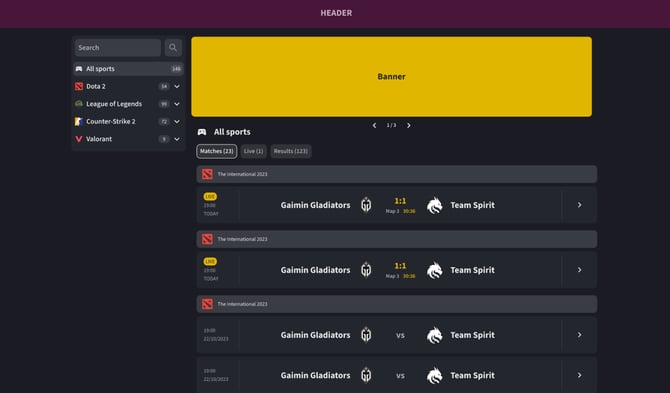
A banner can be displayed on the top of the match timeline with the default width of 100% of the timeline element. The aspect ratio of the banner is 5:1, the height value is in pixels.
enum BannerType {
  Iframe = 'IFRAME',
  Image = 'IMAGE'
}

type BaseBanner<T extends BannerType> = {
  height?: number
  type: T
}

type ImageBanner = {
  src: string
  link?: string
} & BaseBanner<BannerType.Image>

type IframeBanner = {
  src: string
} & BaseBanner<BannerType.Iframe>

type Banner = ImageBanner | IframeBanner

type BannersConfig = {
  timeline?: {
    items: Banner[]
  }
}
2.4. Height
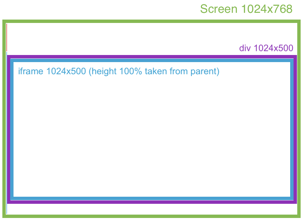
The default iFrame height is 100% of the parent element.
2.4.1. Header selector [string]
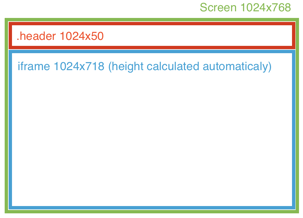
The iFrame height is calculated automatically (100% window height - element height). Must be a valid query selector.
Example: “.header”
2.4.2. Exact height [number]
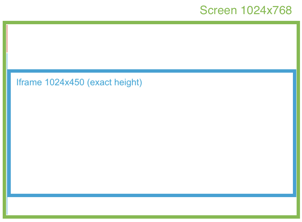
Set the exact iFrame height in pixels.
Example:
2.4.3. Custom function [fn() => number]
Custom function that calculates the exact iFrame height. The function is called on each window resize, and it must return a number (height in px).
2.4.4. Best practice
If possible, please make use of the option 2.4.1. (defining the menu height in the *header* element), so the iFrame height is calculated optimally. This is especially important for the mobile view, where the double scroll bar issue (scrollbars within the outlying page and iFrame at the same time) should be avoided.
ℹ Recommended integration:
- The header menu should take up minimal height.
- It is recommended to avoid the footer, especially in the mobile view.
- Nested iFrames or elements with bezels of any kind are to be avoided.
- The scrolling should only happen within the iFrame, not in the outlying page.
Recommended (mobile):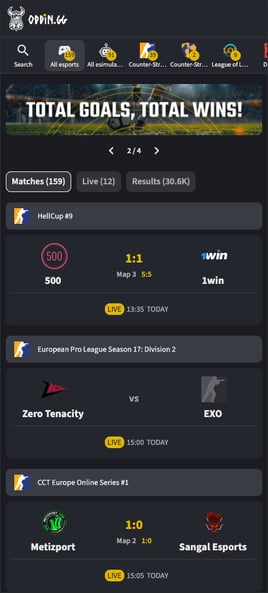 |
Not optimal (mobile):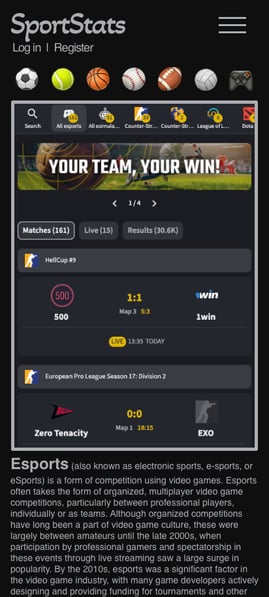 |
2.5. Integration examples
<script type="text/javascript">
   window["OddinConfig"] = {
      brandToken: "foo",
      baseUrl: "https://bifrost.oddin.gg",
      language: "en",
      height: ".header",
      contentElement: "#edda",
      eventHandler: (e) => {
          if (e.type === "LOADED") {
             // do some action
          }
      },
   }
</script>
<script src="https://bifrost.oddin.gg/script.js" type="text/javascript"></script>
In the case you do not use static website rendering, i.e., single page react JavaScript application, you can include the iFrame as follows:
oddin.buildBifrost({
    brandToken: "foo",
    baseUrl: "https://bifrost.oddin.gg",
    contentElement: "#bifrost",
    eventHandler: (e) => {
        if (e.type === "LOADED") {
            // do some action
        }
    },
    banners: {
        timeline: {
             items: [
                 {
                   type: 'IFRAME',
                   src: "http://www.youriframelocation.com",
                 },
                 {
                   type: 'IMAGE',
                   src: "http://www.yourimagelink.com/image.png",
                   link: "http://www.yourlinkdestination.com",
                }
            ]
        }
    }
})
2.6. Bifrost instance
oddin.buildBifrost(config: BifrostConfig, singleInstance = true) is returning object of BifrostInstance. The last instance can also be accessed via oddin.instance.
2.6.1. Instance.updateConfig(config)
Update the config in the runtime without iFrame reinitialization. Check which properties can be updated in the properties table.
2.6.2. Instance.destroy()
Destroy the iFrame safely.
2.7. Supported languages
| Language | ISO 639-1 code |
| Bengali | bn |
| Bulgarian | bg |
| Chinese | zh |
| Croatian | hr |
| Danish | da |
| Dutch | nl |
| English | en |
| Finnish - Suomi | fi |
| French | fr |
| Georgian | ka |
| German | de |
| Greek | el |
| Hindi | hi |
| Hungarian | hu |
| Italian | it |
| Japanese | ja |
| Kazakh | kk |
| Korean | ko |
| Norwegian | no |
| Polish | pl |
| Portuguese | pt |
| Portuguese (Brazilian) | br |
| Romanian | ro |
| Russian | ru |
| Serbian Latin | srl |
| Slovenian | sl |
| Spanish | es |
| Swedish | sv |
| Tagalog | tl |
| Tamil | ta |
| Telugu | te |
| Thai | th |
| Turkish | tr |
| Ukrainian | uk |
| Uzbek | uz |
List of supported languages