
1. General information
1.1. OTS API
Our API is based on gRPC and protocol buffers. The gRPC-based communication is battle-proven by software industry giants like Google, Microsoft, and others. It offers simple export and client/server code generation for many languages (Java, C#, Python, Node.js, Go, and others). We use protocol buffers as a message format; it is an extremely lightweight and data saving format used in many applications.
- More about gRPC: https://grpc.io
- More about protocol buffers: https://developers.google.com/protocol-buffers
- Oddin.gg OTS protocol buffer message schemas: https://github.com/oddin-gg/otsschema
1.2. Environments
We currently provide two different environments - Production and Integration. The Production environment is intended to be used only when you have finished with the integration and are ready to go live. Please use the Integration environment for all testing and integration purposes.
You can find the endpoint for each environment in the following table:
| Environment | API URL |
| Production | api-ots.oddin.gg |
| Integration | api-ots.integration.oddin.gg |
1.3. gRPC concepts
You can find the service description and message scheme on https://github.com/oddin-gg/otsschema. You can generate binding codes from this message scheme for your desired language, or you can use pre-generated bindings for Java, Go, and Node.js:
- A typical request to gRPC is a unary request. You will send us a request, and we will deliver a response in one rpc call.
- For tickets, we are using gRPC bidirectional streaming, where you need to send keepalive messages if you want to have an open stream for a long time.
ℹ You should not create one stream for each ticket, but rather keep only one stream open and send multiple tickets as needed.
1.4. Authentication
Access to the API is only allowed from known IP addresses. Please send us your IP range(s) to us through your dedicated Oddin.gg communication channels and we will whitelist you.
You have to use an access token to access the OTS API. You should be able to obtain this access token for each environment in Oddin.gg Settings Platform (back-office). Typically, access tokens are valid for one year and are extended automatically.
The token has to be inserted to the gRPC context with the “token” key.
grpc.Dial(target,
grpc.WithPerRPCCredentials(&grpcToken{
token: "xxxxx",
}))
Example of a token setting (Go)
1.5. Integration environment
Please use the integration environment to test your connection and message format. It automatically accepts bets, but every fifth bet is rejected. You can cancel bets at will.
1.6. Handicap markets
Handicap markets can be communicated differently in various Oddin.gg betting products:
- Vanilla: default handicap sign
- Inverted: inverted handicap sign (used by most booking operators)
| Odds Feed & OTS | Back office platform (Freya) | iFrame visualisation | iFrame API (transactions) |
| Vanilla or Inverted (configurable) | Inverted | Inverted + Away Inverted | Vanilla |
Example - Team handicap +/-1.5:
| Team | Odds Feed & OTS INVERTED |
Back office platform (Freya) INVERTED |
iFrame visualisation INVERTED + AWAY INVERTED |
iFrame API (transactions) VANILLA |
| home | handicap=-1.5 | handicap=-1.5 | handicap=-1.5 | handicap=+1.5 |
| home | handicap=+1.5 | handicap=+1.5 | handicap=+1.5 | handicap=-1.5 |
| away | handicap=-1.5 | handicap=-1.5 | handicap=+1.5 | handicap=+1.5 |
| away | handicap=+1.5 | handicap=+1.5 | handicap=-1.5 | handicap=-1.5 |
2. Exchange rates
We use euro (EUR) as our system currency. All non-EUR currencies are converted by exchange rates from OpenExchange: https://openexchangerates.org - all valid ISO 4217 currency codes should be accepted: https://en.wikipedia.org/wiki/ISO_4217. Exchange rates are updated every 30 minutes.
Ticket currency conversion process:
- Exchange rates are rounded to 6 digits after the comma
- The tickets are converted using the exchange rate based on the ticket timestamp
- The winning values are calculated based on the converted EUR value
3. Bettor bonuses
Please include information about the betting bonuses (the bettor receiving a percentage uplift on the winnings base by some criteria) present in the ticket for the given bettor. We use it as additional information to monitor bettors and its potential abuse of betting bonuses. It does not affect bettor liability and risk score.
If such a bonus is offered, the bonus winning amount must be included in the appropriate BetBonus (see the chapter BetBonus fields) object for each bet.
4. Odds auto acceptance
We offer the option to automatically accept tickets if odds move outside the acceptable limit. You can set this field in the ticket request to ANY or HIGHER enum.
- ANY - all odds changes will be accepted
- HIGHER - only higher odds will be accepted
5. Ticket reoffer
We offer the option to “reoffer” a ticket again with a different stake. This will significantly reduce bettors' rejection rates and improve their experience. Please check the following bet reoffer flow:
- The ticket is sent to the OTS
- The ticket is rejected because of limited liability
- The rejected ticket contains the reoffer stake in the local currency of the bet
- A new ticket is placed with the reoffer_id set to the previously rejected ticket
6. Ticket processing flow
This chapter provides a complete reference on how tickets are handled by OTS. It is very important to follow the flow described here; otherwise, the OTS cannot guarantee the ticket processing. Please check the diagram at the end of this chapter for a more detailed description.
6.1. Ticket process flowchart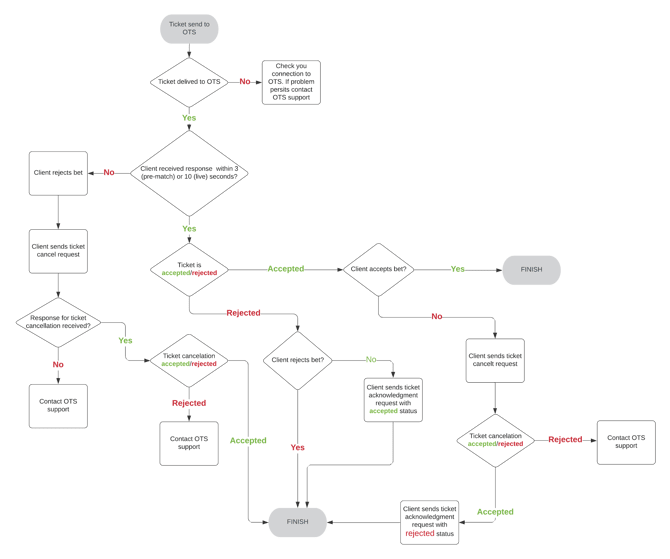
6.2. Acceptance process
- The Client sends a ticket to the OTS.
- The system sends back a Ticket Response with an acceptance status of Accepted or Rejected
- If a response is not received within bet delay + 5 seconds (default betting delay is 0 seconds for prematch and 5 seconds for live), the bet should be rejected, and the ticket cancellation message sent to the OTS (please check Ticket Cancellation). These times are configurable and can be changed based on tournament/bettor specific settings. Maximum delay is 120 seconds.
- If the ticket was Accepted by the OTS, we expect the ticket to be accepted by the client’s system as well. If you need to reject the ticket, please follow this:
- Send the ticket cancellation to the OTS (please check the chapter Ticket Cancellation)
- If the ticket cancellation was Accepted
- Client rejects the bet
- The ticket acknowledgment request with the Rejected status is sent to OTS
- If the ticket cancellation was Rejected
- The Client should accept the bet, however if you still need to cancel it, please contact us at support@oddin.gg or your integration channel
- If the ticket was Rejected by OTS, we expect the ticket to be rejected by the client’s system as well. If you need to accept the rejected ticket, then send the ticket acknowledgment request with Accepted status.
6.3. Ticket cancellation
It is sometimes necessary to cancel a bet. Bet cancellation can have various reasons, but the OTS system needs to know about all cancellations on the client’s side in order to properly manage the liability. We support specific bet cancel scenarios (please check the next table), which need to be correctly set in the TicketCancelRequest message. A ticket can be cancelled only up to 5 minutes after it has been accepted.
| CancelReason | Description |
| CANCEL_REASON_UNSPECIFIED | Not a valid reason. Used for blocking 0 as invalid state. |
| CANCEL_REASON_TICKET_TIMEOUT | Please use this code if a ticket response was not received within a given time. |
| CANCEL_REASON_WRONG_TICKET | Should be used in the case the ticket information is incorrect, and the client is going to send the corrected ticket in the future. |
| CANCEL_REASON_TECHNICAL_ISSUE | Clients should use this if they discover a technical issue, correct it, and then need to cancel the affected tickets. |
| CANCEL_REASON_REGULATOR | The regulator requested to cancel the ticket. |
| CANCEL_REASON_UNEXPECTED_ISSUE | Should be used in the case none of the above codes work. |
CancelReason descriptions
The ticket cancellation can be Accepted or Rejected by the OTS system. Please check the possible rejection codes for the ticket cancellation:
| CancelRejectionReason | Description |
| CANCEL_REJECT_REASON_UNSPECIFIED | Not a valid reason. Used for blocking 0 as invalid state. |
| CANCEL_REJECT_REASON_TICKET_NOT_FOUND | The ticket was not found in the OTS system. |
| CANCEL_REJECT_REASON_TIME_EXPIRED | The time for receiving the ticket cancellation has passed (max. 5 minutes after the ticket acceptance). |
| CANCEL_REJECT_REASON_ALREADY_SETTLED | The ticket has already been settled and cannot be cancelled. |
| CANCEL_REJECT_REASON_OTHER | A reason has not been specified. More info should be contained in the message field. |
CancelRejectionReason descriptions
6.4. Ticket acknowledgment
By default, clients should follow the ticket Accepted or Rejected status, otherwise we cannot guarantee liability processing. In case you do not follow our recommendation, you have to always cancel the ticket and send a ticket acknowledgment message with the final ticket state. We expect to receive the ticket acknowledgment within 10s after you receive the initial ticket response.
7. Message schemas
This chapter offers an in-depth description of each field of the message schemas. Please check https://github.com/oddin-gg/otsschema for the protocol buffer definition of the messages.
7.1. Ticket request schema
7.1.1. TicketRequest fields
We are using gRPC bidirectional streaming for tickets, where you need to send keepalive messages if you want to have an open stream for a long time. Keepalive messages must be sent every 10 seconds.
| Parameter | Details | Required | Type | Description |
| ticket | Ticket fields | yes/no* | Ticket | Your ticket. |
| keepalive | StreamKeepalive fields | yes | StreamKeepalive | StreamKeepalive is used for keeping alive an open client, server, or bidirectional stream. |
| cashout | TicketCashout fields | yes/no* | TicketCashout | Ticket cashout parameters. |
| max_stake | TicketMaxStake fields | yes/no* | TicketMaxStake | Used to get the maximum stake available to be placed by the user. |
*One of the parameters must be present TicketRequest fields
7.1.1.1. Ticket fields
| Parameter | Details | Required | Type | Description |
| id | - | yes | string | Unique ticket ID from the operator’s system. Allowed characters [a-zA-Z0-9\-_]. |
| timestamp | - | yes | Timestamp | Timestamp of the ticket placement in UTC. |
| bets | Bet fields | yes | array of Bet | List of bets in the ticket. There should be only one bet object in the bets[] array - ⚠ multiple bet objects in a ticket are not (yet) supported. |
| accept_odds_change | enums schema | yes | AcceptOddsChange | Specifies if odds change is acceptable for the ticket - None, Any, Higher. |
| total_combinations | - | yes | integer | Total number of system combinations to validate against the generated combinations. Since system bets are not yet supported, the value should always be 1. |
| customer | TicketCustomer fields | yes | TicketCustomer | Customer information. |
| reoffer_id | - | no | string | Reoffer ticket ID. Allowed characters [a-zA-Z0-9\-_]. |
| selections | TicketSelection fields | yes | map of TicketSelection | Map of all selections. The key is the selection ID and the value is the TicketSelection object. |
| location_id | - | no | string | ID of terminal or shop where bet is received. |
| currency | - | yes | string | Currency of bets stakes. Must be the same for the whole ticket. |
| channel | enums schema | yes | TicketChannel | Channel from which ticket was placed (internet, terminal, etc.). |
| lastForeignEventStartTime | - | yes/no* | Timestamp | Timestamp of the latest foreign (non-Oddin) event start time, the selections of which are present on the ticket. The ticket is marked as lost if we do not receive a resolution for the foreign selections within 30 days. Not to be used for TicketMaxStake requests. |
| lastForeignEventEndTime | - | yes/no* | Timestamp | Timestamp of the latest foreign (non-Oddin) event end time, the selections of which are present on the ticket. The ticket is marked as lost if we do not receive a resolution for the foreign selections within 30 days. Not to be used for TicketMaxStake requests. |
| stake_multiplier | - | no | integer | Stake multiplier for stake - an optional value, to be used instead of 10000. |
*In the case of foreign (non-Oddin) event odds selections on the ticket, one of the fields needs to be present.
Ticket fields
7.1.1.1.1. Bet fields
| Parameter | Details | Required | Type | Description |
| id | - | no | string | Bet ID for multi-bets ticket. Allowed characters [a-zA-Z0-9\-_]. |
| bonus | BetBonus fields | no | BetBonus | Bonus part of the bet. |
| stake | BetStake fields | yes | BetStake | Stake of the bet. |
| reoffer_id* | - | no | string | Reoffer bet ID. Allowed characters [a-zA-Z0-9\-_]. * deprecated |
| total_wins | - | no | integer | Total wins for all generated combinations for the bet. We use this for validation purposes. |
| systems | - | yes | array of integers | Array of all the systems in the bet - [0] is not allowed, use [1] for single bets or the number of selections in combo bets (e.g., [3] for treble, etc.). |
| selections | BetSelection fields | yes | array of BetSelection | Array of selection IDs from TicketSelection which form this bet. |
Bet fields
7.1.1.1.1.1. BetBonus fields
| Parameter | Details | Required | Type | Description |
| value | - | yes | integer | Bonus amount to add to the win; it needs to be multiplied by 10000 and rounded to long value in local currency. |
| type | - | yes | BetBonusType | Bonus type - only supported TOTAL for now. |
| mode | - | yes | BetBonusMode | Bonus payout mode; typically used for system bets - the only supported value for now is ALL (it means that all bets need to be winning). |
BetBonus fields
7.1.1.1.1.2. BetStake fields
| Parameter | Details | Required | Type | Description |
| value | - | yes | integer | Stake amount. It needs to be multiplied by 10000 and rounded to long value in local currency. |
| type | enums schema | yes | BetStakeType | Stake type - SUM or UNIT. Until multiple bets on a ticket are supported, SUM should be used by default. |
BetStake fields
7.1.1.1.1.3. Bet types for the systems field
| Name | Description |
| Single | One selection, one bet - systems[1] and selections count = 1. |
| Double | Two selections, one bet - systems[2] and selections count = 2. |
| Treble | Three selections, one bet - systems[3] and selections count = 3. |
| Combo / Accumulator | Four or more selections. It does not matter how many selections there are in a combo bet, it is still counted as one bet - systems[number of folds] and selections count = selections count. |
Bet type descriptions
7.1.1.1.1.4. BetSelection fields
| Parameter | Details | Required | Type | Description |
| id | Selection ID | yes | string | Selection ID. |
BetSelection fields
7.1.1.1.2. TicketCustomer fields
| Parameter | Details | Required | Type | Description |
| id | - | yes | string | Bookmaker unique user ID. Allowed characters [a-zA-Z0-9\-_]. |
| ip | - | no | string | Bettor’s IP address. |
| device_id | - | no | string | Bettor unique device ID from which the ticket was placed. |
| language | - | yes | string | Supported language’s ISO 639-1 code. |
| nickname | - | no | string | Optional bettor nickname. |
TicketCustomer fields
7.1.1.1.3. TicketSelection fields
| Parameter | Details | Required | Type | Description |
| id | Selection ID | yes | string | Selection ID. |
| odds | - | yes | integer | Odds multiplied by 10000 and rounded to integer value. |
| foreign | - | yes | boolean | Information if the selection is foreign, i.e., not based on Oddin.gg Odds Feed. Can be true or false. If the foreign field value is true, the “id” field can take any string as a value. Not to be used for TicketMaxStake requests. |
| obb_session_info | no | OBBSessionInfo | If obb_session_info property is null, then the TicketSelection message represents a regular ticket selection. If obb_session_info property is defined, then the TicketSelection message represents a BetBuilder (OBB) ticket selection. |
TicketSelection fields
7.1.1.1.3.1. Selection ID
Please use the selection information you get from the odds feed in this format:
"<event_urn>/<market_id>/<outcome_id>?<specifier1>=<value1>[&<specifierN=valueN>]*"
- event_urn - event urn from feed REST API
- market_id - market ID from feed REST API
- outcome_id - outcome ID from feed REST API
- specifier and value - specific specifiers for every market from feed AMQP messages
example:
"od:match:1234/6/1?map=1&way=two"
7.1.1.1.3.2. OBBSessionInfo fields
| Parameter | Details | Required | Type | Description |
| session_id | - | yes | string | Represents a BetBuilder session_id. If it is defined, then the selection is a BetBuilder TicketSelection, if not, then it is a regular selection. |
| sub_selections | - | yes | array of strings | An individual sub_selection ID for the OBB session selections must have a specific format, which is the same format as for regular market selections (but without odds). E.g.: "od:<product_id>:<event_id>/<market_id>/<outcome_id>?<specifier1>=<value1>[&<specifierN=valueN>]*" The OBB format (e.g.: "od:obb_session:xxxxxxxx-xxxx-xxxx-xxxx-xxxxxxxxxxxx") is not allowed here. |
7.1.1.2. StreamKeepalive fields
| Parameter | Details | Required | Type | Description |
| timestamp | commons schema | yes | Timestamp | Timestamp of the keepalive message. |
StreamKeepalive fields
7.1.1.3 TicketCashout fields
| Parameter | Details | Required | Type | Description |
| id | - | yes | string | Unique ticket ID from the operator’s system. Allowed characters [a-zA-Z0-9\-_]. |
| timestamp | - | yes | Timestamp | Timestamp of the ticket placement in UTC. |
| cashout_stake | yes | integer | Total cashout amount. Applicable for the whole ticket. It needs to be multiplied by 10000 (or ticket stake multiplier) and rounded to long value in local currency. All subsequent partial cashouts must include previous values. | |
| cashout_percent | yes | integer |
Cashout ratio in relation to the total potential winnings. Applicable for the whole ticket. It needs to be multiplied by 10000 (or ticket stake multiplier) and rounded to long value. Examples:
|
|
| bet_cashout | - | no | BetCashout | Should be omitted or set to null. The required cashout information should be included in the other TicketCashout fields. |
| stake_multiplier | - | no | integer | Stake multiplier for stake - an optional value, to be used instead of 10000. |
TicketCashout fields
7.1.1.3.1 BetCashout fields (NOT to be used!)
| Parameter | Details | Required | Type | Description |
| id | - | yes | string | Bet ID. |
| cashout_stake | yes | integer | Total cashout amount. Applicable for the bet. It needs to be multiplied by 10000 (or ticket stake multiplier) and rounded to long value in local currency. All subsequent partial cashouts must include previous values. | |
| cashout_percent | yes | integer | Total cashout percent. Applicable for the bet. It needs to be multiplied by 10000 (or ticket stake multiplier) and rounded to long value. |
BetCashout fields (NOT to be used!)
7.1.1.4. TicketMaxStake fields
| Parameter | Details | Required | Type | Description |
| ticket | Ticket fields | yes | Ticket | Your ticket. Please use 0 as the stake value in Ticket > Bets[] > Stake. |
TicketMaxStake fields
7.2. Ticket response schema
7.2.1. TicketResponse fields
| Parameter | Details | Required | Type | Description |
| state | TicketState fields | yes/no* | TicketState | State of the ticket. |
| keepalive | StreamKeepalive fields | yes | StreamKeepalive | Used to maintain the stream connection. |
| cashout | TicketCashoutState fields | yes/no* | TicketCashoutState | Cashout state. |
| max_stake | TicketMaxStakeState fields | yes/no* | TicketMaxStakeState | Ticket max stake state. |
*One of the parameters must be present TicketResponse fields
7.2.1.1. TicketState fields
| Parameter | Details | Required | Type | Description |
| id | - | yes | string | Unique ticket ID from operator’s system. |
| ticket_status | - | yes | AcceptanceStatus | Acceptance status - PENDING | REJECTED | ACCEPTED. |
| reject_reason | TicketRejectReason fields | no | TicketRejectReason | Information about the rejection reason. |
| bet_info | TicketResponseBetInfo fields | no | map of TicketResponseBetInfo | Rejection details of bets. |
| selection_info | TicketSelectionRejectReason fields | no | map of TicketSelectionRejectReason | Rejection details of selections. |
| exchange_rate | - | no | integer | Exchange rate used to convert currency to EUR, multiplied by 10000 and rounded to long value. No value sent for TicketMaxStakeState responses. |
| auto_accepted_odds | AutoAcceptedOdds fields | no | map of AutoAcceptedOdds | Alternative odds used to accept the bet. |
| reoffer | - | no | ResponseReoffer | Information about the reoffer stake. |
| total_odds | - | no | Integer | Total odds for the whole ticket. |
| pending_delay | - | no | Integer | Possible ticket pending delay. |
TicketState fields
ℹ We recommend not to set a fixed time limit for voiding tickets without a response. The preferred method is to take the delay information (seconds) from the pending_delay field and add 5 seconds to it - if after this combined time there is no response from the OTS system, the ticket should be voided.
7.2.1.1.1. TicketRejectReason fields
| Parameter | Details | Required | Type | Description |
| code | TicketRejectReason codes | yes | ReasonCode | Reject reason code. |
| message | - | yes | string | Message describing the reason. |
TicketRejectReason fields
7.2.1.1.1.1. TicketRejectReason codes
| Name | Code | Description |
| CODE_UNSPECIFIED | 0 | Not a valid value. Used for blocking 0 as invalid state. |
| CODE_INTERNAL | 1 | Internal issues on Oddin.gg. |
| CODE_INVALID_ARGUMENT | 2 | The ticket is not valid. |
| CODE_ALREADY_EXISTS | 3 | The ticket already exists in our system. |
| CODE_STAKE_TOO_LOW | 4 | Bet stake is lower than the minimum allowed stake. |
| CODE_STAKE_TOO_HIGH | 5 | Bet stake is higher than the maximal allowed stake. |
| CODE_MAX_PAYOUT_BREACHED | 6 | Max. payout limit breached. |
| CODE_BETS_NOT_ACCEPTABLE | 7 | Ticket bets are not acceptable, check the bet_info field for details. |
| CODE_SELECTIONS_NOT_ACCEPTABLE | 8 | Ticket selections are not acceptable, check selection_info field for details. |
| CODE_NOT_FOUND | 9 | Ticket not found in our system. |
TicketRejectReason code descriptions
7.2.1.1.2. TicketResponseBetInfo fields
| Parameter | Details | Required | Type | Description |
| id | - | yes | string | Unique bet ID from operator’s system. |
| reject_reason | TicketBetRejectReason fields | no | TicketBetRejectReason | Information about the rejection/acceptance reason. |
| reoffer | - | no | ResponseReoffer | Information about the reoffer stake. |
| total_odds | - | no | integer | Total odds for the whole bet. |
TicketResponseBetInfo fields
7.2.1.1.2.1. TicketBetRejectReason fields
| Parameter | Details | Required | Type | Description |
| code | TicketBetRejectReason codes | yes | Code | Reject reason code. |
| message | - | yes | string | Message describing the reason. |
TicketSelectionRejectReason fields
7.2.1.1.2.1.1. TicketBetRejectReason codes
| Name | Code | Description |
| CODE_UNSPECIFIED | 0 | Not a valid value. Used for blocking 0 as invalid state. |
| CODE_ODDS_CHANGED | 1 | At least one odds value in the bet is different from the current odds. |
| CODE_SELECTION_NOT_ACTIVE | 2 | At least one selection in the bet is not active. |
| CODE_STAKE_TOO_LOW | 3 | Bet stake is lower than the minimum allowed stake. |
| CODE_STAKE_TOO_HIGH | 4 | Bet stake is higher than the maximum allowed stake. |
| CODE_MAX_PAYOUT_BREACHED | 5 | Maximum payout breached. |
| CODE_MARKET_LIABILITY_BREACHED | 6 | Market liability breached. |
| CODE_BETTOR_LIABILITY_BREACHED | 7 | Bettor liability breached. |
| CODE_EVENT_LIABILITY_BREACHED | 8 | Event liability breached. |
| CODE_MARKET_BETTOR_LIABILITY_BREACHED | 9 | Market bettor liability breached. |
TicketBetRejectReason codes
7.2.1.1.3. TicketSelectionRejectReason fields
| Parameter | Details | Required | Type | Description |
| code | TicketSelectionRejectReason codes | yes | Code | Reject reason code. |
| message | - | yes | string | Message describing the reason. |
TicketSelectionRejectReason fields
7.2.1.1.3.1. TicketSelectionRejectReason codes
| Name | Code | Description |
| CODE_UNSPECIFIED | 0 | Not a valid value. Used for blocking 0 as invalid state. |
| CODE_CHANGED | 1 | Selection odds are different from the current odds. |
| CODE_NOT_ACTIVE | 2 | Selection is not active. |
| CODE_INDEPENDENT | 3 | Selection is not independent. Sent in the case of correlated team or market rejections. |
TicketSelectionRejectReason code descriptions
7.2.1.1.4. AutoAcceptedOdds fields
| Parameter | Details | Required | Type | Description |
| id | Selection ID | yes | string | Selection ID. |
| requested_odds | - | yes | integer | Odds which were ticked placed, multiplied by 10000 and rounded to long value. |
| used_odds | - | yes | integer | Odds which were ticked accepted, multiplied by 10000 and rounded to long value. |
AutoAcceptedOdds fields
7.2.1.2. TicketCashoutState fields
| Parameter | Details | Required | Type | Description |
| id | - | yes | string | Unique ticket ID from operator’s system. |
| ticket_status | - | yes | AcceptanceStatus | Acceptance status - REJECTED | ACCEPTED. PENDING is not used. |
| reject_reason | TicketCashoutRejectReason fields | no | TicketCashoutRejectReason | Information about the rejection reason. |
TicketCashoutState fields
7.2.1.2.1. TicketCashoutRejectReason fields
| Parameter | Details | Required | Type | Description |
| code | TicketCashoutRejectReason codes | yes | Code | Reject reason code. |
| message | - | yes | string | Message describing the reason. |
TicketCashoutRejectReason fields
7.2.1.2.1.1. TicketCashoutRejectReason codes
| Name | Code | Description |
| CODE_UNSPECIFIED | 0 | Not a valid value. Used for blocking 0 as invalid state. |
| CODE_INTERNAL | 1 | We are having internal problems. |
| CODE_INVALID_ARGUMENT | 2 | Ticket cashout is not valid. |
| CODE_NOT_FOUND | 3 | Ticket not found. |
| CODE_WRONG_TICKET_STAKE | 4 | The ticket is not in the accepted state. |
| CODE_MAX_PAYOUT_BREACHED | 5 | Cashout amount is higher than possible payout. |
TicketCashoutRejectReason code descriptions
7.2.1.3. TicketMaxStakeState fields
| Parameter | Details | Required | Type | Description |
| state | TicketState fields | yes | TicketState | State of the ticket. |
TicketMaxStakeState fields
7.3. Ticket result request schema
7.3.1. TicketResult request
| Parameter | Details | Required | Type | Description |
| ticket | TicketResult fields | yes/no* | TicketResult | Ticket result. |
| keepalive | StreamKeepalive fields | yes | StreamKeepalive | Used to maintain the stream connection. |
| after | TicketsAfter fields | yes/no* | TicketsAfter | Request tickets after this date/time. |
*One of the parameters must be present TicketResultRequest fields
7.3.1.1 TicketResult fields
| Parameter | Details | Required | Type | Description |
| id | - | yes | string | Bookmaker unique betting ticket ID. Allowed characters [a-zA-Z0-9\-_]. |
TicketResult fields
7.3.1.2. TicketsAfter fields
| Parameter | Details | Required | Type | Description |
| request_id | - | yes | TicketResult | Unique request id. |
| after | - | yes | Timestamp | Request tickets after this date/time. The past period of max. 24 hours is supported. |
TicketsAfter fields
7.4. Ticket result response schema
7.4.1. TicketResult response
| Parameter | Details | Required | Type | Description |
| state | TicketResultState fields | yes/no* | TicketResultState | Ticket result. |
| keepalive | StreamKeepalive fields | yes | StreamKeepalive | Used to maintain the stream connection. |
| after | TicketsAfterState fields | yes/no* | TicketsAfterState | Request tickets after this date/time. |
*Based on the request, one will be sent TicketResultResponse fields
7.4.1.1. TicketResultState fields
| Parameter | Details | Required | Type | Description |
| id | - | yes | string | Unique ticket ID from the operator’s system. |
| ticket_status | enums schema | yes | ResultingStatus | Resulting status - WON | VOIDED | LOST | PENDING_LOST | NOT_RESULTED | REJECTED. |
| won_amount | - | yes | integer | Won amount of the ticket, converted by exchange_rate, multiplied by 10000 and rounded to uint value. |
| bet_info | TicketResultStateBetInfo fields | no | array of TicketResultStateBetInfo | Rejection details of bets. |
| selection_info | TicketResultStateSelectionInfo fields | no | array of TicketResultStateSelectionInfo | Rejection details of selections. |
| exchange_rate | - | no | integer | Exchange rate used to convert currency to EUR, multiplied by 10000 and rounded to long value. |
| resulted_at | - | no | Timestamp | Ticket result timestamp. |
| error | TicketResultError fields | no | TicketResultError | Information about a possible error during processing. |
| modified_at | - | no | Timestamp | Time when the ticket was modified. |
| ticket_result_state_type | enums schema | yes | TicketResultStateType | Information about the result type. |
TicketResultState fields
7.4.1.1.1. TicketResultStateBetInfo fields
| Parameter | Details | Required | Type | Description |
| id | - | yes | string | Unique ticket ID from the operator’s system. |
| ticket_status | enums schema | yes | ResultingStatus | Resulting status - WON | VOIDED | LOST | PENDING_LOST | NOT_RESULTED | REJECTED. |
| won_amount | - | yes | integer | Won amount of the ticket, converted by exchange_rate, multiplied by 10000 and rounded to uint value. |
TicketResultStateBetInfo fields
7.4.1.1.2. TicketResultStateSelectionInfo fields
| Parameter | Details | Required | Type | Description |
| ticket_status | enums schema | yes | ResultingStatus | Resulting status - WON | VOIDED | LOST | PENDING_LOST | NOT_RESULTED | REJECTED. |
TicketResultStateSelectionInfo fields
7.4.1.1.3. TicketResultError fields
| Parameter | Details | Required | Type | Description |
| code | enums schema | yes | ReasonCode | Reject reason code. |
| message | - | yes | string | Message describing the reason. |
TicketResultError fields
7.4.1.2. TicketAfterState fields
| Parameter | Details | Required | Type | Description |
| request_id | - | yes | string | Unique request ID from the TicketsAfter request. |
| after | - | yes | Timestamp | Requested tickets after this date/time. |
| tickets | TicketResultState fields | yes | array of TicketResultState | Tickets resulted after the timestamp. |
| error | TicketResultError fields | no | TicketResultError | Information about a possible error during processing. |
| batch_info | BatchInfo fields | no | BatchInfo | Information about batching - batch size is fixed to 100 tickets. |
TicketResultState fields
7.4.1.2.1. BatchInfo fields
| Parameter | Details | Required | Type | Description |
| actual | - | yes | integer | Actual ticket batch size. |
| total | - | yes | integer | Total ticket batch size. |
BatchInfo fields
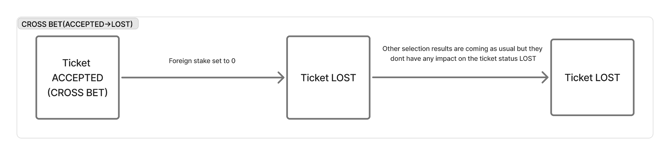
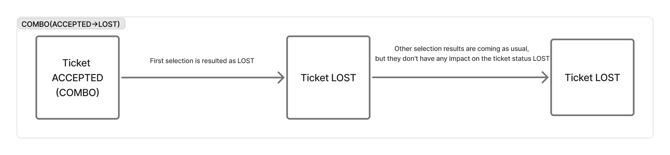
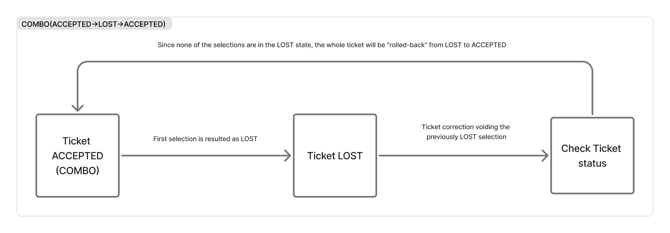
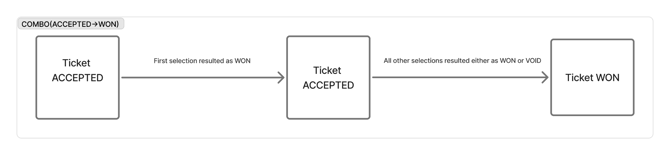
7.4.2. TicketResult flow (cross bets and combo bets)
 7.5. Ticket acknowledgement schema
| Parameter | Details | Required | Type | Description |
| id | - | yes | string | Unique ticket ID from the operator’s system. |
| timestamp | - | no | Timestamp | Timestamp of when the ticket was accepted. |
| acceptance_status | enums schema | yes | AcceptanceStatus | Acceptance status - REJECTED or ACCEPTED. |
| reason | commons schema | no | Reason | Information about the rejection/acceptance reason. |
TicketAckRequest fields
7.6. Ticket cancel schema
7.6.1. TicketCancelRequest fields
| Parameter | Details | Required | Type | Description |
| id | - | yes | string | Unique ticket ID from the operator’s system. |
| cancel_reason | enums schema | yes | CancelReason | Description of the reason for cancelling the ticket. |
| cancel_reason_detail | - | yes | string | Verbose description of the reason for cancelling the ticket. |
| timestamp | - | yes | timestamp | Timestamp of the ticket cancellation in UTC. |
| cancel_percent* | - | no | integer | Cancel percent multiplied by 10000 and rounded to a long value. Only applicable if cancelling the whole ticket. * currently not supported |
| cancel_bet_info* | CancelBetInfo fields | no | array of CancelBetInfo | Information about the partial bet cancellation. Mutually exclusive with cancel_percent. * currently not supported |
TicketCancelRequest fields
7.6.1.1. CancelBetInfo fields (currently not supported!)
| Parameter | Details | Required | Type | Description |
| id | - | yes | string | Unique bet ID from the operator’s system. |
| cancel_percent | - | no | integer | Cancel percent multiplied by 10000 and rounded to a long value. Only applicable if cancelling the entire bet. |
CancelBetInfo fields
7.6.2. TicketCancelResponse fields
| Parameter | Details | Required | Type | Description |
| status | enums schema | yes | AcceptanceStatus | Acceptance status - REJECTED or ACCEPTED. |
| cancel_rejection_reason | enums schema | yes | CancelRejectionReason | Description of the reason for cancelling the rejection. |
| cancel_rejection_message | - | yes | string | Verbose description of the reason for rejecting the ticket cancellation. |
TicketCancelResponse fields
7.7. Player risk score schema
You can use this method to get more insight on individual player risk score.
7.7.1. PlayerRiskScore request
| Parameter | Details | Required | Type | Description |
| id | - | yes | string | Unique player ID from the operator’s system. |
PlayerRiskScoreRequest fields
7.7.2. PlayerRiskScore response
| Parameter | Details | Required | Type | Description |
| bos | - | yes | float | Bettor Oddin Score (0-1). Lowered liability factor for the bettor. |
| oaf | - | yes | float | Over Ask Factor (OAF), 1-10. Increased liability factor for the bettor. Also affects the multiplication of max. stake and payout. |
| live_delay | - | yes | integer | Live betting delay in seconds. |
| prematch_delay | - | yes | integer | Prematch betting delay in seconds. |
PlayerRiskScoreResponse fields
7.8. Resolve foreign events schema
7.8.1. ResolveForeignEventsInTicket request
| Parameter | Details | Required | Type | Description |
| id | - | yes | string | Unique ticket ID from the operator’s system. |
| foreign_stake | - | yes | integer |
Stake not handled by Oddin.gg in the same currency as the previous ticket, multiplied by 10000 and rounded to a long value.
|
| timestamp | - | yes | Timestamp | Timestamp of the non Oddin.gg settlement. |
ResolveForeignEventsInTicketRequest fields
7.8.2. ResolveForeignEventsInTicket response
| Parameter | Details | Required | Type | Description |
| status | enums schema | yes | AcceptanceStatus | Acceptance status - REJECTED or ACCEPTED. |
| reason | - | no | Reason | Information about the rejection/acceptance reason. |
ResolveForeignEventsInTicketResponse fields
7.9. Health schema
7.9.1. HealthCheck request
| Parameter | Details | Required | Type | Description |
| service | yes | string | Health check for the OTS service. |
HealthCheckRequest fields
7.9.2. HealthCheck response
| Parameter | Details | Required | Type | Description |
| status | enums schema | yes | ServingStatus | Health status of the OTS service. |
HealthCheckResponse fields
7.9.2.1. ServingStatus codes
| Name | Code | Description |
| UNKNOWN | 0 | OTS service status unknown. |
| SERVING | 1 | OTS service is operational. |
| NOT_SERVING | 2 | OTS service is not operational. |
| SERVICE_UNKNOWN | 3 | Unknown service. Used only by the Watch method. |
ServingStatus code descriptions
More details about the implemented gRPC Health Checking Protocol at: https://github.com/grpc/grpc/blob/master/doc/health-checking.md
8. Risk API
8.1. Introduction
Oddin.gg Risk API service API is an extension of the OTS service, offering enhanced functionalities for sending tickets and managing bettor properties. It provides you with robust tools to manage bettor liabilities, leverage valuable customer information, and automate critical processes.
Key Features:
- Comprehensive Metadata Integration: Each bettor is associated with betting score labels and metadata, which are essential for calculating maximum liabilities and managing risks effectively.
- Utilise Existing Customer Information: Make the most of your valuable bettor data to optimise your risk management strategies.
- Streamlined Data Sharing: With API access, you can automate the process of sharing bettor information, eliminating the need for manual processing through trading chats. This ensures faster and more accurate adjustments to risk management settings.
- Automated Bettor Management: Easily import lists of bettors, and set limitations even before they place their first bet. The API allows bulk adjustments, saving time and reducing manual errors.
- Real-time Adjustments and Monitoring: The system includes a push feed for each client, ensuring that adjustments to the risk management settings are communicated in a timely fashion. This allows for real-time monitoring and review of the risk management processes.
The Risk API is designed to be flexible and scalable, capable of supporting a wide range of services and automating bettor labelling processes throughout the year.
8.2. Concepts
The Risk API gRPC schema is available on Oddin.gg GitHub repository: https://github.com/oddin-gg/otsschema/pull/10/files. You can generate binding codes from this message schema for your desired development language. A typical request to gRPC is a unary request. You send us a request, and we deliver a response in one RPC call.
- Extended OTS gRPC API with one unary gRPC stream which pushes updates about Bettor’s risk coefficients to the clients. The stream supports recovery since a given timestamp (max. timestamp threshold is configurable).
- As Bettor’s risk coefficients we consider bettor information such as: BOS (Bettor’s Oddin Score), OAF (Over Ask Factor), Oddin.gg labels, and Client labels.
- The API supports authorisation and authentication.
8.3. Endpoints
8.3.1. BettorsRequest
| Parameter | Type | Description |
recover_since |
Timestamp | If the timestamp value is null, no updates will be recovered. If it is defined, the system will start to send to the consumer all Bettors since the given timestamp value. |
BettorsRequest field
8.3.2. BettorsResponse
| Parameter | Type | Description |
bettor |
Bettor | Bettor risk information. |
keepalive |
StreamKeepalive | Connection maintaining ticker. |
BettorsResponse fields
8.3.2.1. Bettor
| Parameter | Type | Description |
id |
string | Unique bettor ID from Oddin.gg system. |
ext_id |
string | Unique bettor ID from the operator’s system. |
modified_at |
Timestamp | The time of the bettor information modification. |
bos |
float | Balance Optimisation Score (BOS). Lowered liability factor for the bettor, representing the multiplier of the liability. Must be between 0 and 1 (inclusive). If provided with a value other than 1, over_ask_factor is automatically set to 1. If not defined, no changes are applied. |
over_ask_factor |
float |
Over Ask Factor (OAF). Must be between 1 and 10 (inclusive). If provided with a value other than 1, bos is automatically set to 1. If not defined, no changes are applied. For VIP bettors with an OAF higher than 3, there is an additional multiplicative reduction factor to the risk limit calculations. It reduces the overall bet liability value and allows VIP bettors to bet more freely without draining away shared liability pools (like market or event liability) from other casual bettors. The value of this new factor is tied to OAF and is divided into 9 ranges:
This reduction factor is working multiplicatively with the standalone OAF. |
oddins_labels |
string array | Bettor label assigned by Oddin.gg. |
clients_labels |
string array | Bettor label assigned by the client. |
Bettor fields
8.3.2.2. StreamKeepAlive
| Parameter | Type | Description |
timestamp |
Timestamp | Timestamp of the keepalive message. |
StreamKeepAlive field
8.3.3. BettorUpsertRequest
This request is used to update or create a bettor.
| Parameter | Type | Description |
id |
string | Unique bettor ID from the operator's system. |
bos |
float | Balance Optimisation Score (BOS). Lowered liability factor for the bettor, representing the multiplier of the liability. Must be between 0 and 1 (inclusive). If provided with a value other than 1, over_ask_factor is automatically set to 1. If not defined, no changes are applied. |
over_ask_factor |
float |
Over Ask Factor (OAF). Must be between 1 and 10 (inclusive). If provided with a value other than 1, bos is automatically set to 1. If not defined, no changes are applied. For VIP bettors with an OAF higher than 3, there is an additional multiplicative reduction factor to the risk limit calculations. It reduces the overall bet liability value and allows VIP bettors to bet more freely without draining away shared liability pools (like market or event liability) from other casual bettors. The value of this new factor is tied to OAF and is divided into 9 ranges:
This reduction factor is working multiplicatively with the standalone OAF. |
labels |
string array | Bettor's labels. If provided, it updates the existing labels; an empty list removes all labels. If not defined, no changes are applied. |
nickname |
string | Bettor's nickname. If not defined, no changes are applied. |
BettorUpsertRequest fields
ℹ When sending bos and over_ask_factor, only one of these parameters can have their value other than 1.
8.3.4. BettorUpsertResponse
This message contains the updated bettor information.
| Parameter | Type | Description |
bettor |
Bettor | Bettor risk information (the updated Bettor object). |
BettorUpsertResponse field
8.3.5. AvailableBettorLabelsRequest
This message is used to request the list of available bettor labels.
8.3.6. AvailableBettorLabelsResponse
This message contains the list of available bettor labels.
| Parameter | Type | Description |
labels |
repeated string | List of available bettor labels. |
AvailableBettorLabelsResponse field
8.4. Logic and workflow
8.4.1. Implement gRPC client
- Objective: Implement a gRPC client for the Bettor stream.
8.4.2. Initial connection
- Send initial request: When the client connects for the first time, it must send a request with the timestamp set to a minimum value (e.g., 28/11/2018).
- Purpose: To trigger a full recovery and receive all available Bettors.
- Send latest timestamp: For subsequent connections, the client sends the latest timestamp it has received and stored.
- Purpose: To receive only updates that occurred after the last recorded update, ensuring no data is missed.
- No recovery mode: If the client sends a request with a null value for the timestamp, it will receive only new updates.
- Risk: The client may miss updates that occurred while it was disconnected.
8.4.3. Continuous updates and database management
- Update storage: Upon receiving Bettor updates via the gRPC stream, the client must:
- Load: Load Bettor for the given id/ext_id from the database.
- Store: Store received Bettors in the case when no such bettor is stored in DB.
- Conditionally update: In case when Bettor is already stored in the DB. You are supposed to compare timestamps; if the incoming update’s timestamp is higher or equal to the stored one, update the record in the DB. Ignore the received update if the update has the modified_at timestamp lower than the already stored timestamp for the same id/ext_id.
8.4.4. Keepalive messages
- Connection maintenance:
- The OTS service will send keepalive messages every 10 seconds to ensure the connection remains active. If you do not receive a keepalive message within 20 seconds, please restart the connection.
8.5. Risk API integration examples
8.5.1. AvailableBettorLabels
Retrieves a list of all available labels that can be assigned to a bettor.
grpcurl example:
grpcurl --plaintext \
  -H "token: XXXXX-XXXXX-XXXXX-XXX-XXXXX" \
  api-ots.integration.oddin.gg \
  ots.ots/AvailableBettorLabels
8.5.2. BettorUpsert
Creates a new bettor or updates an existing one based on the provided id.
- Create: If the
iddoes not exist, a new bettor is created. - Update: If the
idexists, this endpoint performs a partial update. Only the fields provided in the request payload will be modified. Any omitted fields will retain their current values.
grpcurl example:
grpcurl --plaintext \
  -H "token: XXXXX-XXXXX-XXXXX-XXX-XXXXX" \
  -d @ \
  api-ots.integration.oddin.gg \
  ots.ots/BettorUpsert < data.json
Request payload parameters:
id(string, required): The unique identifier for the bettor.bos(number, optional)over_ask_factor(number, optional)labels(object, optional): An object containing a values array of strings to set or overwrite the bettor's labels.nickname(string, optional)
Here are several examples of data.json payloads for different scenarios:
8.5.2.1. Create or full update
Action: Sets all specified parameters for the bettor.
{
        "id": "3257ff3b-b26e-40eb-9ee6-88d3f82f5701",
        "bos": 1,
        "over_ask_factor": 7.001,
        "labels": {
                "values": ["VIP"]
        },
        "nickname": "nickname1"
}
8.5.2.2. Partial update (BOS only)
Action: Updates only the bos value. All other parameters (over_ask_factor, labels, nickname) are unaffected.
{
        "id": "3257ff3b-b26e-40eb-9ee6-88d3f82f5701",
        "bos": 0.5
}
8.5.2.3. Remove assigned labels
Action: Removes all labels from the bettor by passing an empty values array.
{
        "id": "3257ff3b-b26e-40eb-9ee6-88d3f82f5701",
        "labels": {
                "values": []
        }
}
8.5.2.4. Update nickname
Action: Updates only the nickname.
{
        "id": "3257ff3b-b26e-40eb-9ee6-88d3f82f5701",
        "nickname": "nickname2"
}
8.5.2.5. Update constraints
Action: Updates both bos and over_ask_factor simultaneously.
{
        "id": "3257ff3b-b26e-40eb-9ee6-88d3f82f5701",
        "bos": 1,
        "over_ask_factor": 9.95
}