
Introduction
Esports are a new opportunity for many betting operators. Our goal at Oddin.gg is to speed up your go-to-market strategy as much as possible. We have, therefore, simplified their integration by taking advantage of the already existing standards within the industry. Our messaging feed and REST API focus on both performance and reliability. We have performed the hard work on our side, so you do not have to. Part of this is our plan to distribute an SDK, which will help you with integration, in particular with caching of markets, matches, and other elements.
1. General information
In this chapter you will find general information regarding fundamental concepts, rate limiting, and authentication. If you have further questions, or you feel that our documentation is not descriptive enough, please contact us through your dedicated Oddin.gg communication channels.
1.1. Concept
The Oddin.gg Odds Feed is separated into two parts: a high performance messaging feed through AMQP (Advanced Message Queuing Protocol) and a classic REST based XML API. In order to deliver odds as fast as possible, we separated the delivery mechanisms. Messaging-feed messages are really lightweight messages, consisting of important changes only. Moreover, clients can control which messages they want to receive and filter them as required. The REST API should be used to fetch various constants (market types, market states, etc.) and actual matches, in addition to controlling which messages should be delivered through the AMQP messaging.
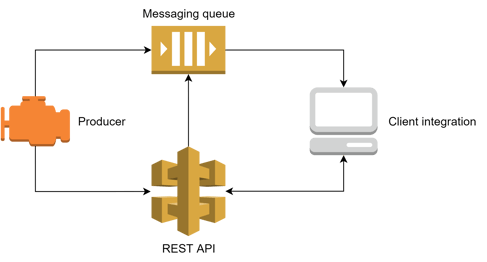
Message flow schematic
1.2. Producers
We use the concept of producers to separate different products to which you can subscribe, e.g., pre-match "pre" (or Producer 1) or live "live" (or Producer 2). All producers have a unique ID and name, with the name used in the REST API to separate different products. There will only be one producer generating odds for a particular event at any given time. You can find a list of all available producers at the API endpoint - description/producers.
1.3. Sport Events
Sport events are assigned to a hierarchical structure, which is schematically illustrated below:

Data hierarchy
Sport - Represents a given sport title, e.g., Dota 2 or League of Legends
Tournament - Groups matches together. We create a new tournament for each new season, e.g., The International 2024 vs The International 2025.
Match - A competition event between multiple opponents (typically two).
Map or Period - A match is typically divided either into multiple maps based on its format (e.g., Bo3 - Best of three), or into multiple periods (e.g., Halves, Quarters, Innings…) in our eSimulator products.
Any sport event in the REST API feed is either a match or tournament. Every message possesses information about one event only. For example, an odds change message usually includes all changes to any markets for a particular event. Every event has a unique ID that specifies the event in the message. The REST API then provides endpoints that allow you to search for details about fixtures for the required event ID.
<odds_change product="1" event_id="od:match:1" timestamp="1">
  <sport_event_status status="0" match_status="0"/>
  <odds>
    … Info about markets …
  </odds>
</odds_change>
Each sport event status message contains match_status information, which indicates the current match phase. You can find a complete list of match statuses via the REST API through the endpoint /match_status.
1.4. Fixture changes
We provide only limited fixture information through the messaging feed, typically covering fixture status or time changes. It is desirable to re-fetch fixtures from REST API due to the fact that there can be multiple changes (e.g., winner team), which were not delivered through the messaging feed.
The change from Pre-match to Live is a special case. The message where the fixture changes from pre-match odds to live odds looks like the following:
<odds_change product="1" event_id="od:match:1" timestamp="1746527880000">
  <sport_event_status status="0" match_status="0"/>
  <odds>
    <market status="1" id="2" specifiers="handicap=-1.5">
      <outcome id="1" odds="1.85" active="1"/>
      <outcome id="2" odds="1.85" active="1"/>
    </market>
    … More info about markets …
  </odds>
</odds_change>
The pre-match producer will then suspend all markets, which should not go live ("-1" market status), and mark the markets which should go live with status "-2" handed over.
<odds_change product="1" event_id="od:match:1" timestamp="1">
  <sport_event_status status="0" match_status="0"/>
  <odds>
    <market status="-2" id="2"/>
    <market status="-1" id="10"/>
    <market status="-1" id="542"/>
  </odds>
</odds_change>
If we do not provide live odds on a particular fixture, its markets will be deactivated on match start with market status "0".
1.5. Markets
Each market is labelled with an ID and a specifiers attribute. This combination uniquely identifies the market and its lines. A good example is the Total Kills market. Total Kills 2.5 and Total Kills 1.5 are the same market with the same ID but with different specifiers attributes ("2.5" and "1.5" respectively). A specifiers attribute is a key value pair separated by the "|" character, e.g., "map=1|kills=2.5". We typically provide odds for pre-match and live. You will get the first pre-match odds from the pre-match producer well in advance of the start of the planned sport event. Other information will be sent when the sport event is live and the live producer will seamlessly take over this event. During the whole cycle, the market unique ID (market.id + market.specifiers) is preserved. We also provide additional market information in the "extended_specifiers" attribute. This can be perceived as information to clarify the market line. Please note that the extended_specifiers attribute is not a part of the unique market identifier.
1.5.1. Outright markets
Outright markets (called "Futures" in the U.S.) are long-term winner betting markets. Since they have variable outcomes, an additional variant market endpoint has been introduced to fetch the outcome descriptions. The markets of this type have the format of regular markets, but will come in odds change messages based on tournament sport events.
One market variant, i.e., one dynamic outcome ID, is based on uniqueness of the team (or player) combinations. So, if V1 contains competitor IDs 1, 2, 3, 4, we will generate a unique market variant, for example od:dynamic_outcomes:27|v1. After the next match is played, we will create a V2 market variant with competitor IDs 1, 2, 3 (competitor 4 lost the match, so it was "removed"), and this will generate a different dynamic outcome ID, for example, od:dynamic_outcomes:38|v2. It is normal to receive a different od:dynamic_outcome ID each time the Outright market is reopened after the next match in the tournament.
The reason the Version information can be added to the same dynamic outcome ID is that if the market variant (for example, od:dynamic_outcomes:27|v1 with competitors 1, 2, 3, 4) gets cancelled and then created again with the same competitors, the dynamic outcome ID will again be od:dynamic_outcomes:27. But since the cancellation has already been received for it, a different Version will be added to the already used market variant.
1.5.2. Market lifecycle
Each market goes through the same lifecycle. It is very important to understand how we treat market states and what possible combinations can occur. Please check the schematic illustration below:
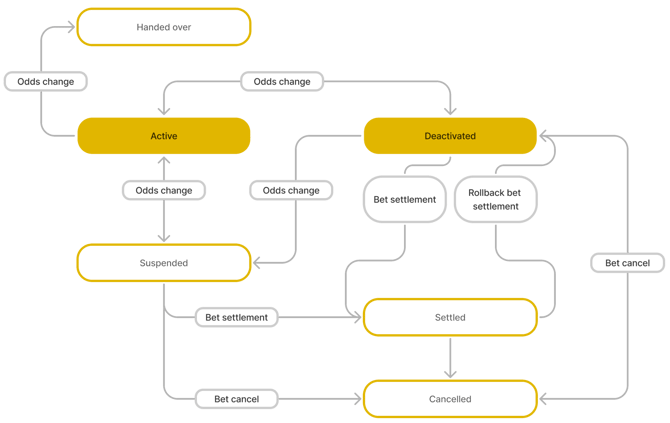
Market lifecycle schematic
You can find more information about the meaning of the market state in the following table:
| ID | Text description | Description |
| 1 | active | bets can be accepted, everything is in a correct state and odds are flowing |
| 0 | inactive/deactivated | odds are not shown and bets are not accepted |
| -1 | suspended | odds are not shown and bets are not accepted; this status can have numerous reasons, for example a dangerous situation |
| -2 | handed over | used in pre-match producer when the market is handed over to the live producer - this is not a "real" market status, but is rather used to distinguish between pre-match and live transition; if you do not receive live odds within a reasonable time after receiving the handed over state, consider this as an error and suspend all markets |
| -3 | settled | the result for the market is known , and no further odds will be provided; only available as a part of a bet_settlement message |
| -4* | cancelled | the market was cancelled as it was not played or there was an error; no odds will be provided and bets should be refunded; only available as a part of a bet_cancel message * not yet available in the feed |
Market status description
ℹ Although each market is usually deactivated (status="0") before it is settled or cancelled, this might not always be the case. On rare occasions, the market will be settled or cancelled directly from being suspended (status="-1"). This can happen especially within eSimulator Bots matches. Clients should take this situation into account and deactivate the markets that have been settled or cancelled, even if their last odds change status is still suspended (status="-1").
1.5.3. Handicap markets
Handicap markets can be communicated differently in various Oddin.gg betting products:
- Vanilla: default handicap sign
- Inverted: inverted handicap sign (used by most booking operators)
| Odds Feed & OTS | Back office platform (Freya) | iFrame visualisation | iFrame API (transactions) |
| Vanilla or Inverted (configurable) | Inverted | Inverted + Away Inverted | Vanilla |
Example - Team handicap +/-1.5:
| Team | Odds Feed & OTS INVERTED |
Back office platform (Freya) INVERTED |
iFrame visualisation INVERTED + AWAY INVERTED |
iFrame API (transactions) VANILLA |
| home | handicap=-1.5 | handicap=-1.5 | handicap=-1.5 | handicap=+1.5 |
| home | handicap=+1.5 | handicap=+1.5 | handicap=+1.5 | handicap=-1.5 |
| away | handicap=-1.5 | handicap=-1.5 | handicap=+1.5 | handicap=+1.5 |
| away | handicap=+1.5 | handicap=+1.5 | handicap=-1.5 | handicap=-1.5 |
1.6. Localisation
We support localisation in multiple languages, a list of which is constantly expanding. Should you need us to support any particular language, please contact us through your Oddin.gg communication channels.
1.6.1. Supported languages
| Language | ISO 639-1 code |
| Bengali | bn |
| Bulgarian | bg |
| Chinese | zh |
| Croatian | hr |
| Danish | da |
| Dutch | nl |
| English | en |
| Finnish - Suomi | fi |
| French | fr |
| Georgian | ka |
| German | de |
| Greek | el |
| Hindi | hi |
| Hungarian | hu |
| Italian | it |
| Japanese | ja |
| Kazakh | kk |
| Korean | ko |
| Norwegian | no |
| Polish | pl |
| Portuguese | pt |
| Portuguese (Brazilian) | br |
| Romanian | ro |
| Russian | ru |
| Serbian Latin | srl |
| Sinhala | si |
| Slovenian | sl |
| Spanish | es |
| Swedish | sv |
| Tagalog | tl |
| Tamil | ta |
| Telugu | te |
| Thai | th |
| Turkish | tr |
| Ukrainian | uk |
| Uzbek | uz |
| Vietnamese | vi |
List of supported languages
1.7. Environments
We currently provide two different environments – Production and Integration.
The Production environment is intended to be used only when you are finished with the integration process and ready to go live. Please use the Integration environment for all testing and integration purposes. The Integration environment also offers a match replay feature, which you can take advantage of when there are no live matches available. You can find the endpoints for each environment in the following table:
| Environment | Messaging feed | REST API |
| Production | mq.oddin.gg |
api-mq.oddin.gg |
| Production (Asia) | mq.ap-southeast-1.oddin.gg |
api-mq.ap-southeast-1.oddin.gg |
| Integration | mq.integration.oddin.gg |
api-mq.integration.oddin.gg |
List of environments
ℹ On the same client account within a separate environment (Production or Integration), a maximum of ten (10) connections can be made to the feed at the same time, with the total of ten (10) sessions (queues) across all the connections.
1.8. Authentication
Access to the messaging feed and REST API is only allowed from known IP addresses. Please send us your IPs / IP ranges together to Oddin.gg communication channels, and we will whitelist you.
Both the messaging feed and REST API use access tokens as the authentication mechanism. You should receive your access token after your account has been created. If your token does not work, or you have not received it yet, please contact us through your Oddin.gg communication channels. Typically, access tokens are valid for one year. You will be notified prior to the access token expiration date, and we will extend your token one month before the expiration of the old one.
1.9. Rate limiting
We have fixed limits on the messaging feed and REST API (both have a distinct limit):
- 25,000 requests in 1 minute
- 100,000 requests in 5 minutes
Your requests will start to be rejected if you send more than the allowed number in the specified time frame.
Additionally, we limit the recovery endpoints to protect the API. Please check the table below for more granular rate limit information:
| Recovery length | Max per 10 mins | Max per hour |
| < 30 minutes ago | 20 | 60 |
| >= 30 minutes & < 1 day | 4 | 10 |
| >= 1 day | 2 per 30 mins | 4 per 2 hours |
| single events | 100 | 300 |
Recovery rate limits
2. Messaging feed
Below, we are highlighting a few key AMQP 0.9.1 concepts necessary for your integration of Oddin.gg Odds Feed:
- Virtual Host - an isolated environment for each customer on the AMQP server. It is similar to a virtual host used by many popular web server frameworks.
- Exchange - producers push messages to exchanges, and they route these messages to queues.
- Queue - consumers get messages from exchanges based on queue binding.
- Queue binding - binding defines which messages should be routed from the exchange to the queue.
If you need additional resource material, please refer to the AMQP specification: https://www.rabbitmq.com/tutorials/amqp-concepts.html.
You can use any AMQP 0.9.1 compatible client to connect to our feed. Please use this configuration to set up your client:
| Server |
|
| Port | 5672 |
| Virtual Host | /oddinfeed/<customer_id> (you can find your customer ID via the REST API endpoint users/whoami) |
| Username | <access_token> |
| Password | (leave blank) |
| Queue | name (leave blank); passive=false, exclusive=true, durable=false |
| Exchange | oddinfeed |
| Protocol | amqps (secure) |
AMQP 0.9.1 client settings
After you have successfully connected, you have to create a queue. The queue has to be defined as non-passive, exclusive, and non-durable. Please leave the queue name blank, as the server will assign a name to it automatically - you do not have permission to create a new named queue.
The final step is to bind the new queue to the exchange via a routing key. You can simply use the key "#", allowing you to receive all messages.
2.1. Authentication
The messaging feed requires your access token as a username. Please leave the password empty, as it is not used. You can consult your AMQP client documentation on how to provide a username and password.
2.2. Topic filtering
All messages have a unique key, and you can easily route/filter them by binding that key to an exchange. Message topic consists of 8 sections:
| Priority | Pre-match | Live | Type | Sport | URN | Sport event ID | Node ID |
| hi/lo/- priority processing information |
pre/- can be used by pre/match only consumers |
live/- can be used by live only consumers |
message type information | sport ID | URN for sport event type, e.g., "od:match" | sport event ID, e.g., "123456" | optional parameter in a recovery request |
Message topic structure
Common topics look like this:
- pre-match odds change
hi.pre.-.odds_change.1.od:match.123456.- - live odds change
hi.-.live.odds_change.1.od:match.123456.- - bet settlement
lo.pre.live.bet_settlement.1.od:match.123456.- - alive message
-.-.-.alive.-.-.-.- - snapshot complete message
-.-.-.snapshot_complete.-.-.-
You can use wildcards "#" and "*", where "*" substitutes only one section while "#" substitutes more. A typical subscription can look like this:
*.*.live.#- you will get all live messages-.-.-.#- you will get all system messages (e.g., alive message or snapshot complete message)
2.3. Timestamps
All messages contain a field with the Unix timestamp of the time when the message was created. In feed messages, it is present as a "timestamp" attribute. Due to the nature of parallel systems, some messages can have the same timestamp (even for the same producer). You usually need to store the last processed message timestamp for recovery.
2.4. Messages
The messaging feed sends only lightweight messages to which you should react. The basic message types are described in the next table:
| Name | Priority | Description |
| fixture_change | high | indicates an important change on a fixture or a new fixture creation |
| odds_change | high | a list of market and match changes, together with market statuses, odds values, and odds availability |
| alive | low | periodic information about the producer state |
| bet_cancel | low | cancel the market due to an error or a market is not played |
| rollback_bet_cancel | low | reverse the bet cancellation, potentially retake the previously cancelled bets |
| bet_settlement | low | market results or event outcomes |
| rollback_bet_settlement | low | change last bet settlement because of a mistake or error |
| snapshot_complete | none | confirmation message that your recovery has finished |
Message types table
2.4.1. Odds change
The odds change message is a fundamental part of the messaging feed. Sent within is the information regarding odds changes, sport event changes, and outcomes. The message is constructed as a delta message, i.e., it contains only the information about the changed properties (markets, sport event fields…). Fields that are not present in the message have not been updated and should remain unchanged in the consumer system. The odds change message consists of the following attributes:
| Name | Description |
| event_id | URN ID of the sport event - can be od:match for match markets, or od:tournament for outright markets |
| timestamp | message creation date in UNIX timestamp in milliseconds |
| product | information about the source odds producer of this message - 1 for prematch, 2 for live; please note that this can be used for information about the producer down status |
| sport_event_status | carries information regarding various sport event data; please check the next chapter for more information |
| odds | contains all required information for odds updates |
| market | carries information about changes for a single market |
| market.id | ID of a market; check the REST API endpoint markets for possible variants |
| market.favourite | optional field indicating the most balanced or recommended market; present only if set to 1 - typically used on markets with multiple lines (e.g., Totals, or Handicaps) |
| market.specifiers | separated list of additional market parameters; we use "|" as a separator - please refer to the market descriptions endpoint for more information |
| market.status | information indicator for current market status; if not present, consider it as active; the possible values are the following: 1 - active; display odds and accept bets 0 - deactivated; remove odds and do not accept bets -1 - suspended; disable odds and do not accept bets -2 - handed over; treat markets as suspended if you do not receive another odds update within 60 seconds |
| market.extended_specifiers | possible information about market setup, can be used for visualisation |
| m.market_metadata | possible information for specific markets |
| outcome | carries information about the changes for a single outcome |
| outcome.id | ID of the outcome within the market |
| outcome.odds | outcome odds |
| outcome.probabilities | outcome probabilities (available on request, please contact Oddin.gg support for more information) |
| outcome.active | information if the outcome is active and should be offered; can be "1" (active) or "0" (deactivated) |
Odds change message
ℹ On rare occasions, it may be necessary to modify the score of a match after it has already been settled and closed. In such cases, an odds change message will be triggered within the feed for the respective settled match. If you receive an odds change message after the match has been closed, do not reactivate the match, as its status information will consistently reflect its closed state. Also, refrain from taking any additional actions on the UI, except for the potential update of scores on tickets and other areas where match results are displayed.
2.4.1.1. Market types and examples
1. Regular match markets
Markets in regular sports with two competitors (teams). Market descriptions to be obtained from the Markets API endpoint.
Example odds change message with regular match markets:
<odds_change timestamp="1665406912728" product="2" event_id="od:match:112663">
  <sport_event_status home_score="1" away_score="0" status="1" scoreboard_available="true" match_status="52">
    <period_scores>
      <period_score type="map" number="1" match_status_code="51" home_score="1" away_score="0" home_won_rounds="16" away_won_rounds="4"></period_score>
      <period_score type="map" number="2" match_status_code="52" home_score="0" away_score="0"></period_score>
      <period_score type="map" number="3" match_status_code="53" home_score="0" away_score="0"></period_score>
    </period_scores>
    <scoreboard current_ct_team="2" home_won_rounds="0" away_won_rounds="3" current_round="5"></scoreboard>
  </sport_event_status>
  <odds>
    <market id="11" specifiers="map=2|handicap=-5.5" status="1">
      <outcome id="2" odds="3.6" probabilities="0.232" active="1"></outcome>
      <outcome id="1" odds="1.25" probabilities="0.768" active="1"></outcome>
    </market>
    <market id="1" specifiers="variant=way:two|way=two" status="1">
      <outcome id="2" odds="5.3" probabilities="0.143" active="1"></outcome>
      <outcome id="1" odds="1.06" probabilities="0.857" active="1"></outcome>
    </market>
  </odds>
</odds_change>
2. Regular player markets (props)
Player markets with fixed outcomes in regular sports with two competitors (teams). Market descriptions to be obtained from the Markets API endpoint. Slots are being used for different combinations, where one slot equals one player.
Example odds change message with a regular player market:
<market id="169" specifiers="threshold=24.5|map=1|slot=2|entity=od:player:108" status="1">
    <outcome id="4" odds="1.15" probabilities="0.83328" active="1"></outcome>
    <outcome id="5" odds="4.8" probabilities="0.16672" active="1"></outcome>
</market>
3. Flexible player markets (props)
Player markets with flexible outcomes in regular sports with two competitors (teams). Market descriptions to be obtained from the Market variants API endpoint based on the variant market specifiers.
Example odds change message with a flexible player market:
<odds_change timestamp="1695812094586" product="2" event_id="od:match:123456">
  <odds>
    <market id="106" specifiers="variant=od:dynamic_outcomes:1234|slot=1|map=1" status="1">
      <outcome id="od:player:1234" odds="1.85" active="1"></outcome>
      <outcome id="od:player:4321" odds="3.1" active="1"></outcome>
      <outcome id="3" odds="4.63" active="1"></outcome>
    </market>
  </odds>
</odds_change>
4. Racing markets
Markets in racing or battle royale sports with 3 or more competitors (teams). Market descriptions to be obtained from the Market variants API endpoint.
Example odds change message with a racing market:
<odds_change timestamp="1744196135040" product="1" event_id="od:match:14796">
  <sport_event_status home_score="0" away_score="0" status="0" scoreboard_available="false" match_status="0">
    <period_scores>
      <period_score type="round" number="1" match_status_code="51" home_score="0" away_score="0">
      </period_score>
      <period_score type="round" number="2" match_status_code="52" home_score="0" away_score="0">
      </period_score>
      <period_score type="round" number="3" match_status_code="53" home_score="0" away_score="0">
      </period_score>
      <period_score type="round" number="4" match_status_code="54" home_score="0" away_score="0">
      </period_score>
      <period_score type="round" number="5" match_status_code="55" home_score="0" away_score="0">
      </period_score>
      <period_score type="round" number="6" match_status_code="56" home_score="0" away_score="0">
      </period_score>
    </period_scores>
  </sport_event_status>
  <odds>
    <market id="170" specifiers="variant=od:dynamic_outcomes:161|round=1" status="1">
      <outcome id="od:competitor:193" odds="7" probabilities="0.1" active="1">
      </outcome>
      <outcome id="od:competitor:847" odds="7" probabilities="0.1" active="1">
      </outcome>
      <outcome id="od:competitor:4117" odds="7" probabilities="0.1" active="1">
      </outcome>
      <outcome id="od:competitor:17016" odds="7" probabilities="0.1" active="1">
      </outcome>
      <outcome id="od:competitor:6" odds="7" probabilities="0.1" active="1">
      </outcome>
      <outcome id="od:competitor:25" odds="7" probabilities="0.1" active="1">
      </outcome>
      <outcome id="od:competitor:3733" odds="7" probabilities="0.1" active="1">
      </outcome>
      <outcome id="od:competitor:17017" odds="7" probabilities="0.1" active="1">
      </outcome>
      <outcome id="od:competitor:14" odds="7" probabilities="0.1" active="1">
      </outcome>
      <outcome id="od:competitor:269" odds="7" probabilities="0.1" active="1">
      </outcome>
    </market>
  </odds>
</odds_change>
5. Outrights
Long-term tournament markets. Market descriptions to be obtained from the Market variants API endpoint.
Example odds change message with an outright (tournament winner) market:
<odds_change timestamp="1695812094586" product="1" event_id="od:tournament:1234">
  <odds>
    <market id="108" specifiers="variant=od:dynamic_outcomes:1234|version=1" status="1">
      <outcome id="od:competitor:1234" odds="1.4" active="1"></outcome>
      <outcome id="od:competitor:4321" odds="2.7" active="1"></outcome>
      <outcome id="od:competitor:3214" odds="10.0" active="1"></outcome>
      <outcome id="od:competitor:2134" odds="10.0" active="1"></outcome>
      <outcome id="od:competitor:4123" odds="5.8" active="1"></outcome>
      <outcome id="od:competitor:3412" odds="10.0" active="1"></outcome>
      [ … ]
    </market>
  </odds>
</odds_change>
2.4.1.2. Sport event status element
You can find more detailed information about a currently running sport event here. This element is heavily customised based on a sport title, so all the elements except "status" are optional. Please find more possible fields in the following table:
| Name | Description | Possible values |
| status | actual high-level status of the sport event | Integer: 0 (not started), 1 (live), 4 (closed), 5 (cancelled) |
| scoreboard_available | flag informing if scoreboard is available | Boolean |
| home_score | actual score for the home team; showing the overall home team score for the whole match (series score in Esports) | Integer |
| away_score | actual score for the away team; showing the overall away team score for the whole match (series score in Esports) | Integer |
| match_status | current sport-specific match status of the sport event, please see match status | Integer |
| winner_id | the winner of the match (available at match end) | Competitor ID (e.g., od:competitor:5057) |
Sport event status attributes
Example message:
<sport_event_status winner_id="od:competitor:5057" home_score="0" away_score="1" status="4" scoreboard_available="true" match_status="1">
ℹ The home_score and away_score will be the same as the number of goals, points, runs, etc. in our eSimulator products (eFootball, eBasketball, eCricket). In Esports like CS2, Dota2, or League of Legends, where only one map is played (Best of 1 - BO1), home_score and away_score represent the series score, so, the values will either be 1:0 or 0:1. To visualise the score in BO1 matches, we recommend using the relevant period score based on the particular sport, for example, home_kills and away_kills in League of Legends, or home_rounds and away_rounds in CS2.
2.4.1.3. Sport event periods
Each map is represented as a period score. The period score element includes the scores for a given map or period:
- For Esports, the period score is updated after the map or period has ended.
- For eSimulators (eFootball, Basketball, eCricket), the period score is updated already during the current period.
The period score element has the following attributes:
| Name | Description | Sport |
| type | information about the period score type (map, half, quarter, or inning) | all |
| number | information about the map/period | all |
| match_status_code | code of the match status for the map/period | all |
| home_score | indicates if the home team won the indicated map/period | all |
| away_score | indicates if the away team won the indicated map/period | all |
| home_won_rounds | total won rounds for home team on the indicated map | Counter-Strike 2, Valorant |
| away_won_rounds | total won rounds for away team on the indicated map | Counter-Strike 2, Valorant |
| home_kills | total kills for home team on the indicated map | Dota 2, LoL, KoG, Mobile Legends |
| away_kills | total kills for away team on the indicated map | Dota 2, LoL, KoG, Mobile Legends |
| home_goals | total goals home team in the indicated period | eFootball, eFootball bots |
| away_goals | total goals for away team in the indicated period | eFootball, eFootball bots |
| home_points | total points by the home team in the indicated period | eBasketball, eBasketball bots, Table Tennis |
| away_points | total points by the away team in the indicated period | eBasketball, eBasketball bots, Table Tennis |
| home_runs | total runs by the home team in the indicated period | eCricket |
| away_runs | total runs by the away team in the indicated period | eCricket |
| home_wickets_fallen | total wickets fallen of the home team in the indicated period | eCricket |
| away_wickets_fallen | total wickets fallen of the away team in the indicated period | eCricket |
| home_overs_played | total overs played by the home team in the indicated period | eCricket |
| away_overs_played | total overs played by the away team in the indicated period | eCricket |
| home_balls_played | total balls played by the home team in the indicated period | eCricket |
| away_balls_played | total balls played by the away team in the indicated period | eCricket |
Sport event period attributes
Example messages:
<period_scores>
  <period_score type="map" number="1" match_status_code="51" home_score="0" away_score="1" home_won_rounds="11" away_won_rounds="16"></period_score>
  <period_score type="map" number="2" match_status_code="52" home_score="1" away_score="0" home_won_rounds="16" away_won_rounds="10"></period_score>
  <period_score type="map" number="3" match_status_code="53" home_score="0" away_score="1" home_won_rounds="10" away_won_rounds="16"></period_score>
</period_scores>

<period_scores>
  <period_score type="map" number="1" match_status_code="51" home_score="0" away_score="1" home_goals="1" away_goals="2"></period_score>
</period_scores>
2.4.1.4. Sport event scoreboard
We provide basic live statistics for each sport for clients to be able to visualise their own live scoreboard. Please check the sport event status element "scoreboard_available" if the scoreboard is available. The scoreboard might not be available if there are issues with the data source.
| Name | Description | Possible values | Sport |
| current_ct_team | current team playing for Counterterrorists | Integer - 1 (home), 2 (away) | Counter-Strike 2 |
| current_def_team | current team playing for Defenders | Integer - 1 (home), 2 (away) | Valorant |
| home_won_rounds | total rounds won by the home team on the current map | Integer | Counter-Strike 2, Valorant |
| away_won_rounds | total rounds won by the away team on the current map | Integer | Counter-Strike 2, Valorant |
| current_round | current played round | Integer | Counter-Strike 2, Valorant |
| home_kills | total kills by the home team on the current map | Integer | LoL, Dota 2, KoG, Mobile Legends |
| away_kills | total kills by the away team on the current map | Integer | LoL, Dota 2, KoG, Mobile Legends |
| home_destroyed_turrets | total turrets destroyed by the home team on the current map | Integer | LoL, KoG, Mobile Legends |
| away_destroyed_turrets | total turrets destroyed by the away team on the current map | Integer | LoL, KoG, Mobile Legends |
| home_gold | total earned gold in thousands by the home team on the current map | Integer | LoL, Dota 2, KoG, Mobile Legends |
| away_gold | total earned gold in thousands by the away team on the current map | Integer | LoL, Dota 2, KoG, Mobile Legends |
| home_destroyed_towers | total towers destroyed by the home team on the current map | Integer | Dota 2 |
| away_destroyed_towers | total towers destroyed by the away team on the current map | Integer | Dota 2 |
| home_goals | total goals by the home team in the current period | Integer | eFootball, eFootball bots |
| away_goals | total goals by the away team in the current period | Integer | eFootball, eFootball bots |
| time | real playing time in seconds (2x 4 minutes) | Integer | eFootball |
| game_time | displayed match time in seconds (2x 45 minutes) | Integer | eFootball, eFootball bots |
| elapsed_time | elapsed time in seconds, calculated as the difference between the current timestamp and the match start time | Integer | eFootball, eFootball bots, eBasketball, eBasketball bots, eTouchdown |
| home_points | total points by the home team in the current period | Integer | eBasketball, eBasketball bots |
| away_points | total points by the away team in the current period | Integer | eBasketball, eBasketball bots |
| remaining_game_time | remaining game time in the current period in seconds | Integer | eBasketball, eBasketball bots |
| home_runs | total runs by the home team in the indicated period | Integer | eCricket |
| away_runs | total runs by the away team in the indicated period | Integer | eCricket |
| home_wickets_fallen | total wickets fallen by the home team in the indicated period | Integer | eCricket |
| away_wickets_fallen | total wickets fallen by the away team in the indicated period | Integer | eCricket |
| home_overs_played | total overs played by the home team in the indicated period | Integer | eCricket |
| away_overs_played | total overs played by the away team in the indicated period | Integer | eCricket |
| home_balls_played | total balls played by the home team in the indicated period | Integer | eCricket |
| away_balls_played | total balls played by the away team in the indicated period | Integer | eCricket |
| home_batting | home team batting in the indicated period | Boolean | eCricket |
| away_batting | away team batting in the indicated period | Boolean | eCricket |
| home_won_coin_toss | coin toss won by the captain of the home team | Boolean | eCricket |
| inning | current inning number | Integer | eCricket |
| home_games | current set score (games won) | Integer | Table Tennis |
| away_games | current set score (games won) | Integer | Table Tennis |
Scoreboard attributes
Example message:
<scoreboard current_ct_team="1" home_won_rounds="2" away_won_rounds="1" current_round="4"/>
2.4.2. Bet settlement
This message indicates that the market has been resulted, and you can pay out the bets. The message consists of these attributes:
| Name | Description |
| event_id | ID of match or tournament |
| timestamp | message creation date as a UNIX timestamp (ms) |
| product | indicates the producer for a message; can also be used for the information about the producer down status |
| outcomes | list of settled markets |
| market.id | ID of the market; check the REST API endpoint markets for possible variants |
| market.specifiers | separated list of market additional parameters; we use "|" as a separator - please refer to market description for more information |
| market.status | -3 - settled |
| outcome.id | unique ID of the outcome |
| outcome.result | information about the outcome; "1" indicates a winning and "0" a losing outcome |
| outcome.void_factor | information about the void ratio of the outcome; "0.5" is used with Asian market types to indicate whether the outcome is half-winning (together with result="1") or half-losing (together with result="0"); "1.0" is used when the outcome should be fully voided |
Bet settlement message
Example message:
<bet_settlement timestamp="1679395308446" product="1" event_id="od:match:251425">
  <outcomes>
    <market id="37" specifiers="side=home" status="-3">
      <outcome id="7" result="1"></outcome>
      <outcome id="6" result="0"></outcome>
    </market>
    <market id="1" specifiers="variant=way:two|way=two" status="-3">
      <outcome id="2" result="1"></outcome>
      <outcome id="1" result="0"></outcome>
    </market>
    <market id="3" specifiers="threshold=2.5" status="-3">
      <outcome id="5" result="0"></outcome>
      <outcome id="4" result="1"></outcome>
    </market>
    <market id="2" specifiers="handicap=-1.25" status="-3">
      <outcome id="2" void_factor="0.5" result="1"></outcome>
      <outcome id="1" i result="0"></outcome>
    </market>
  </outcomes>
</bet_settlement>
ℹ When a market or market line is settled with a bet_settlement message, it will be automatically removed from all subsequent match odds_change messages.
2.4.3. Rollback bet settlement
This message is sent when there is an error found during market resulting. It should happen only in rare cases, and you should also be notified via your preferred support channel. The message consists of the following attributes:
| Name | Description |
| event_id | ID of match or outright |
| timestamp | message creation date as a UNIX timestamp (ms) |
| product | indicates the producer for a message; can also be used for the information about the producer down status |
| market.id | ID of the affected market |
| market.specifiers | specifiers for the given market |
Rollback bet settlement message
Example message:
<rollback_bet_settlement event_id="od:match:1" timestamp="1" product="1">
  <market id="1"/>
</rollback_bet_settlement>
2.4.4. Bet cancel
This message indicates an issue with a particular market and suggests that all bets on this market need to be refunded. The message consists of the following attributes:
| Name | Description |
| event_id | ID of match or outright |
| timestamp | message creation date as a UNIX timestamp (ms) |
| product | indicates the producer for a message; can also be used for the information about the producer's down status |
| start_time | optional time period attribute; indicates the time after which the bets on the affected market(s) should be voided ⚠️ If the time period fields are ignored, entire affected markets can be voided in client implementations, negatively affecting the number of accepted bets. |
| end_time | optional time period attribute; indicates the time before which the bets on the affected market(s) should be voided ⚠️ If the time period fields are ignored, entire affected markets can be voided in client implementations, negatively affecting the number of accepted bets. |
| market.id | ID of the market; check the REST API endpoint markets for possible variants |
| market.specifiers | specifiers for the given market |
| market.void_reason_id | reason why market was cancelled |
| market.void_reason* | legacy reason why the market was cancelled: the value is always 1 = not_played * should not be used |
Bet cancel message
ℹ Possible combinations of the bet_cancel time period attributes and the recommended client actions:
- start_time only: Cancel all bets after this time. The affected market will be suspended/deactivated.
- end_time only: Cancel all bets before this time. The affected market remains correct and active for betting during the match.
- start_time and end_time: Cancel all bets during this time period. The affected market remains correct and active for betting during the match.
- No time attributes present: Cancel all bets on the affected market. The market will be suspended/deactivated.
ℹ If a market is cancelled after it has already been settled, there won’t be any rollback_bet_settlement messages to reverse the settlement; the market will just receive the bet_cancel message directly. The bet voiding process should be implemented in the same way as if the settled market had previously been rolled back.
Example messages:
<bet_cancel timestamp="1734431816494" product="2" event_id="od:match:284542" start_time="1734429600000" end_time="1734430815000">
  <market id="1" specifiers="variant=way:two|way=two" void_reason_id="5" void_reason_params="custom=Technical issues">
  </market>
  <market id="4" specifiers="variant=best_of:3|best_of=3" void_reason_id="5" void_reason_params="custom=Technical issues">
  </market>
  <market id="6" specifiers="variant=way:two|map=1|way=two" void_reason_id="5" void_reason_params="custom=Technical issues">
  </market>
  <market id="28" specifiers="map=1" void_reason_id="5" void_reason_params="custom=Technical issues">
  </market>
  <market id="11" specifiers="map=1|handicap=-9.5" void_reason_id="5" void_reason_params="custom=Technical issues">
  </market>
</bet_cancel>
<bet_cancel timestamp="1678449598018" product="1" event_id="od:match:191956">
  <market id="6" specifiers="variant=way:two|map=3|way=two" void_reason="1" void_reason_id="4"></market>
</bet_cancel>
2.4.5. Rollback bet cancel
This message is sent to reverse a prior bet cancellation. A possible implementation by a booking operator would be reactivating the bets previously voided based on the bet_cancel message. The message consists of the following attributes:
| Name | Description |
| event_id | ID of match or outright |
| timestamp | message creation date as a UNIX timestamp (ms) |
| product | indicates the producer for a message; can also be used for the information about the producer down status |
| start_time | optional time period attribute; used as a unique identifier of the existing bet_cancel message to be rollbacked |
| end_time | optional time period attribute; used as a unique identifier of the existing bet_cancel message to be rollbacked |
| market.id | ID of the market; check the REST API endpoint markets for possible variants |
| market.specifiers | specifiers for the given market |
Rollback bet cancel message
ℹ The time period attributes in rollback_bet_cancel messages, together with match IDs, act as unique identifiers for reversing specific bet_cancel messages.
Example messages:
<rollback_bet_cancel timestamp="1734433175059" product="2" event_id="od:match:284542" start_time="1734429600000" end_time="1734430815000">
  <market id="1" specifiers="variant=way:two|way=two">
  </market>
  <market id="4" specifiers="variant=best_of:3|best_of=3">
  </market>
  <market id="6" specifiers="variant=way:two|map=1|way=two">
  </market>
  <market id="28" specifiers="map=1">
  </market>
  <market id="11" specifiers="map=1|handicap=-9.5">
  </market>
</rollback_bet_cancel>
<rollback_bet_cancel timestamp="167844967355" product="1" event_id="od:match:191956">
  <market id="6" specifiers="variant=way:two|map=3|way=two"></market>
</rollback_bet_cancel>
2.4.6. Fixture change
This message is intended as quick information about an important fixture change. Typically, we will notify you about a new fixture or fixture start time change (e.g., when it is delayed). We strongly recommend that you always re-fetch the fixture information for the affected match if you receive this message. If a fixture is cancelled, you will not receive the closed match status in the odds_change message - this can happen at any time during the fixture life cycle. The message consists of these attributes:
| Name | Description |
| event_id | ID of match or outright |
| timestamp | message creation date as a UNIX timestamp (ms) |
| product | indicates the producer for a message; can also be used for the information about the producer down status |
| change_type | optional information about what was changed on the fixture |
Fixture change message
Example messages:
<fixture_change event_id="od:match:1" change_type="1" product="1" timestamp="1746527880000"/>

<fixture_change event_id="od:tournament:1234" change_type="2" product="2" timestamp="1"/>
The change_type attribute (if present) represents the information about what changed on the fixture. You are recommended to always re-fetch the given fixture from the REST API and not solely rely on this attribute. There can be multiple changes not covered by change_type. Possible change_type attribute values:
| ID | Name | Description |
| 1 | NEW | a new fixture has been added, you need to fetch its information through the REST API |
| 2 | DATE_TIME | the fixture start time has changed |
| 3 | CANCELLED | the fixture has been cancelled and will not be offered any more |
| 4 | FORMAT | the fixture format has changed, for example, Best of 3 (Bo3) to Best of 5 (Bo5) |
| 5 | COVERAGE | the fixture coverage has changed; in such instances, we usually cannot provide live odds for the event, even though we initially marked the event as live |
| 106 | STREAM_URL | video stream URL(s) have been added/changed for the event |
Possible fixture change type values
2.4.7. Alive
A very important message that you should use to check if you are receiving the feed correctly. The message also contains the information about your subscription status for a given producer. It is sent every 10 seconds by each producer separately; to validate the connection to the feed, you need to confirm the reception of every alive message with 10 seconds in between. Generally speaking, there can be two types of errors:
- You receive alive messages in longer or irregular intervals (a possible problem with networking)
- Timestamps in the alive messages are more/less than 10s away from each other (a possible issue on our side)
In either case, you should suspend all markets and investigate the potential issues. Then restart with a new recovery request to fully restore the service. In the specific case of a service error, you will also receive the "subscribed" attribute set to 0. If you see this message, please initiate the recovery immediately and do not open the markets before the recovery is fully finished. The message consists of the following attributes:
| Name | Description |
| timestamp | message creation date as a UNIX timestamp (ms) |
| product | indicates the producer for a message; can also be used for the information about the producer down status |
| subscribed | "0" means you are not subscribed, or the producer is up after a downtime (if the previous value was "1"); you should immediately initiate a recovery through the REST API |
Alive message
Example message:
<alive timestamp="1746527880000" product="1" subscribed="1"/>
2.4.8. Snapshot complete
You will receive this message after all recovery responses have been sent to you as the result of a recovery request. You can safely start processing the odds_change messages again. The message consists of these attributes:
| Name | Description |
| timestamp | message creation date as a UNIX timestamp (ms) |
| product | indicates the producer for a message; can also be used for the information about the producer down status |
| request_id | optional ID of the request from the initiate recovery parameter within the REST API |
Snapshot complete message
Example message:
<snapshot_complete request_id="1234" timestamp="1746527880000" product="1"/>
3. REST API
This chapter provides a complete reference to the REST API. Here you will find a description of all methods and other necessary information required to interact with the REST API.
3.1. Authentication
The REST API is secured via an access token. You should be able to obtain your access token in the Oddin.gg Back-office after your Odds Feed and API have been set up. If the token is not working, or you still need to get user credentials to the back-office, please contact us through your dedicated Oddin.gg communication channels. Please note that you need to supply the access token in each request in the header - "x-access-token".
3.2. Available endpoints
The REST API offers the following endpoints:
| HTTP Method | Path | Description |
| GET | /v1/descriptions/:language/markets | list of all markets with their descriptions |
| GET | /v1/descriptions/:language/match_status | list of all possible match statuses used in an odds_change message |
| GET | /v1/descriptions/producers | list of all producers with descriptions |
| POST | /v1/:product/stateful_messages/events /:id/initiate_request | request for all stateful messages for an event (bet_settlement, bet_cancel, etc.) for a given sport event ID |
| POST | /v1/:product/recovery/initiate_request?after=?&request_id =?&node_id=? |
|
| POST | /v1/:product/odds/events/:id/initiate_request | list of all current odds for a single sport event, which is in the state not_started or live |
| GET | /v1/sports/:language/competitors/:id/profile | details regarding competitor (typically team) |
| GET | /v1/sports/:language/fixtures/changes?after=? | list of IDs of sport events that have changed after the provided timestamp, which can be specified for max. 14 days in the past; if no timestamp is provided, the list is returned for the last 24 hours |
| GET | /v1/sports/:language/sport_events/:id/fixture | fixture details for the given sport event ID |
| GET | /v1/sports/:language/sport_events/:id/summary | results for a given sport event - you have to use ID in URI format (e.g., od:match:1) |
| GET | /v1/sports/:language/schedules/:date/schedule | list of all sport events for a given date; date is specified in UTC ISO format (e.g., 2023-07-19) |
| GET | /v1/sports/:language/schedules/live/schedule | list of currently live sport events |
| GET | /v1/sports/:language/schedules/pre/schedule?start=?&limit=? | list of all events with pre-match odds; pagination needs to be used, because the response is limited to 1000 sport events |
| GET | /v1/sports/:language/sports | list of all available sports |
| GET | /v1/sports/:language/sports/:id/tournaments | list of all available tournaments for a given sport ID |
| GET | /v1/sports/:language/tournaments | list of all available tournaments |
| GET | /v1/sports/:language/tournaments/:id/info | description about a given tournament ID |
| GET | /v1/sports/:language/tournaments/:id/schedule | list of all sport events for a tournament |
| GET | /v1/descriptions/void_reasons | list of all possible cancellation reasons used in a bet_cancel message |
| GET | /v1/users/whoami | description of the client; details about AMQP virtual host and access token expiration |
| GET | /v1/sports/{language}/players/{player_urn}/profile | description of individual players (used for player markets) |
| GET | /v1/descriptions/{language}/markets/{market_id}/variants/{variant_urn} | description of individual outright markets and variant market outcomes |
Endpoints table
ℹ When timestamps are used, they need to be specified in UNIX format and in milliseconds.
3.3. HTTP Response codes
We use standard HTTP response codes. Please check the below table for the description of available statuses:
| Code | Name | Description |
| 200 | OK | request was successful |
| 403 | Forbidden | access token is missing or invalid, or has expired |
| 404 | Not found | endpoint was not found |
| 409 | Conflict | another recovery is running |
| 429 | Too many requests | too many requests were issued to the API, please see Rate limiting |
| 500 | Internal server error | server is unable to process your request |
| 503 | Service unavailable | server cannot be contacted, please try your request later |
REST API response codes
3.4. Competitor profile endpoint
This resource provides information about the competitor name and some additional details. The response has the following structure:
| Name | Description |
| competitor_profile | root element |
| competitor.id | ID of the competitor (e.g., od:competitor:1) |
| competitor.name | team name |
| competitor.abbreviation | team abbreviation |
| competitor.underage | team having underage players -1=Unknown, 0=NO, 1=YES |
| competitor.icon_path | path to the team icon logo (usually .png) if available |
| sport | sport competed in by the team (check Sports endpoint for details) |
| players | list of players belonging to the competitor |
| player.id | URN ID of the player in the format od:player:1234 |
| player.name | nickname / playing name of the player |
| player.full_name | real full name of the player in the format Name(s) Surname(s) |
| player.sport | URN ID of the sport the player is competing in, in the format od:sport:1234 |
Competitor attributes
Example response:
<competitor_profile>
  <competitor id="od:competitor:5" name="Team Liquid" abbreviation="Liquid" underage="0" icon_path="https://cdn.oddin.gg/assets/teams/icons/liquid.png">
    <sport id="od:sport:4" name="Fortnite" abbreviation="Fortnite"></sport>
    <sport id="od:sport:44" name="Tekken" abbreviation="Tekken"></sport>
    <sport id="od:sport:31" name="Mobile Legends" abbreviation="ML"></sport>
    <sport id="od:sport:1" name="League of Legends" abbreviation="LoL"></sport>
    <sport id="od:sport:16" name="Rainbow Six" abbreviation="R6"></sport>
    <sport id="od:sport:41" name="Free Fire" abbreviation="Free Fire"></sport>
    <sport id="od:sport:42" name="Geo Guessr" abbreviation="GEO"></sport>
    <sport id="od:sport:45" name="Street Fighter" abbreviation="Street Fighter"></sport>
    <sport id="od:sport:46" name="Crossfire" abbreviation="Crossfire"></sport>
    <sport id="od:sport:47" name="World of Warcraft" abbreviation="WoW"></sport>
    <sport id="od:sport:2" name="Dota 2" abbreviation="Dota2"></sport>
    <sport id="od:sport:3" name="Counter-Strike 2" abbreviation="CS2"></sport>
    <sport id="od:sport:12" name="Rocket League" abbreviation="RocketLeague"></sport>
    <sport id="od:sport:13" name="Valorant" abbreviation="Valorant"></sport>
    <sport id="od:sport:8" name="Overwatch 2" abbreviation="Overwatch"></sport>
    <sport id="od:sport:48" name="Marvel Rivals" abbreviation="Marvel Rivals"></sport>
    <sport id="od:sport:49" name="Chess" abbreviation="Chess"></sport>
    <sport id="od:sport:11" name="Starcraft 2" abbreviation="SC2"></sport>
    <sport id="od:sport:5" name="Playerunknown's Battlegrounds" abbreviation="PUBG"></sport>
    <sport id="od:sport:37" name="Playerunknown's Battlegrounds Mobile" abbreviation="PUBG Mobile"></sport>
</competitor>
  <players>
    <player id="od:player:4998" name="Boxi" full_name="Samuel Svahn" sport="od:sport:2"></player>
    <player id="od:player:5420" name="Nisha" full_name="Michał Jankowski" sport="od:sport:2"></player>
    <player id="od:player:5907" name="miCKe" full_name="Michael Vu" sport="od:sport:2"></player>
    <player id="od:player:12690" name="Yuuji" full_name="Ganbat Ulziidelger" sport="od:sport:1"></player>
    <player id="od:player:66" name="EliGE" full_name="Jonathan Jablonowski" sport="od:sport:3"></player>
    <player id="od:player:12346" name="UmTi" full_name="Eom Seong-hyeon" sport="od:sport:1"></player>
    <player id="od:player:12646" name="Yeon" full_name="Sean Sung" sport="od:sport:1"></player>
    <player id="od:player:8147" name="CoreJJ" full_name="Jo Yong-in" sport="od:sport:1"></player>
    <player id="od:player:2353" name="ultimate" full_name="Roland Tomkowiak" sport="od:sport:3"></player>
    <player id="od:player:10655" name="Morgan" full_name="Park Gi-tae" sport="od:sport:1"></player>
    <player id="od:player:1319" name="Nertz" full_name="Guy Iluz" sport="od:sport:3"></player>
    <player id="od:player:350" name="siuhy" full_name="Kamil Szkaradek" sport="od:sport:3"></player>
    <player id="od:player:15396" name="nAts" full_name="Ayaz Akhmetshin" sport="od:sport:13"></player>
    <player id="od:player:19554" name="kamo" full_name="Kamil Frąckowiak" sport="od:sport:13"></player>
    <player id="od:player:19552" name="paTiTek" full_name="Patryk Fabrowski" sport="od:sport:13"></player>
    <player id="od:player:15383" name="trexx" full_name="Nikita Cherednichenko" sport="od:sport:13"></player>
    <player id="od:player:5977" name="tOfu" full_name="Erik Engel" sport="od:sport:2"></player>
    <player id="od:player:4920" name="Ace" full_name="Marcus Folke Hoelgaard Christensen" sport="od:sport:2"></player>
    <player id="od:player:9674" name="Josedeodo" full_name="Brandon Joel Villegas" sport="od:sport:1"></player>
    <player id="od:player:11282" name="Quid" full_name="Lim Hyeon-seung" sport="od:sport:1"></player>
    <player id="od:player:19715" name="purp0" full_name="Semyon Borchev" sport="od:sport:13"></player>
    <player id="od:player:19569" name="MiniBoo" full_name="Dominykas Lukaševičius" sport="od:sport:13"></player>
    <player id="od:player:222" name="Krimbo" full_name="Karim Moussa" sport="od:sport:3"></player>
    <player id="od:player:19173" name="wayne" full_name="Wayne Chang Wei Jie" sport="od:sport:13"></player>
  </players>
</competitor_profile>
3.5. Producers endpoint
You can find information about the currently running producers and their data. The response has the following structure:
| Name | Description |
| producers | root element |
| producer.id | producer ID |
| producer.active | true if the producer is available |
| producer.api_url | URL for recovery request |
| producer.name | name of the producer; pre for pre-match, live for live |
| producer.description | descriptive name of the producer |
| producer.stateful_recovery_window_in_minutes | maximum period in the past for stateful recovery and recovery after timestamp |
Producers request
Example response:
<producers response_code="OK">
  <producer id="1" name="pre" description="Pre-match feed" api_url="https://api-mq.oddin.gg/v1/pre" active="true" scope="pre-match" stateful_recovery_window_in_minutes="4320"></producer>
  <producer id="2" name="live" description="Live feed" api_url="https://api-mq.oddin.gg/v1/live" active="true" scope="live" stateful_recovery_window_in_minutes="4320"></producer>
</producers>
3.6. Fixture change endpoint
A list of fixture changes after the specified timestamp (can be set to max. 14 days in the past). If no timestamp is specified, the list is returned for the duration of the past 24 hours. The endpoint is used mainly after recovery for reviewing possible changes to the match information during a disconnection event:
- /v1/sports/:language/fixtures/changes?after=?
The response has the following attributes:
| Name | Description |
| fixture_changes | root element |
| fixture_change.sport_event_id | ID of the sports event |
| fixture_change.update_time | time of the match information change |
Fixture change attributes
Example response:
<fixture_changes generated_at="2022-03-16T15:51:58">
  <fixture_change sport_event_id="od:match:39780" update_time="2022-03-15T15:54:15"></fixture_change>
  <fixture_change sport_event_id="od:match:39453" update_time="2022-03-15T15:54:38"></fixture_change>
  <fixture_change sport_event_id="od:match:39781" update_time="2022-03-15T16:09:28"></fixture_change>
</fixture_changes>
3.7. Fixture endpoint
You can get information for a fixture from various endpoints, but they all refer to the same entity. The fixture endpoint is the main source for detailed match information:
- /v1/sports/:language/sport_events/:id/fixture
You may find the following attributes through the Fixture endpoint:
| Name | Description |
| fixtures_fixture | root element |
| fixture.id | ID of the match or outright |
| fixture.start_time | real start time of the event |
| fixture.scheduled | expected start time of the event |
| fixture.liveodds | only present if the event is not available in Live Odds (i.e., liveodds= "not_available") |
| fixture.status | sport event status ("not_started", "ended", "closed",...) |
| tournament | tournament the event belongs to (check Tournament endpoints for details) |
| competitors | list of competitors for the event (check Competitor profile endpoint for details); added attribute competitor.qualifier to indicate if the team is home or away |
| extra_info | specific information about the event format (e.g., Best of 3) |
| tv_channels | links to live event video streams if available - updated shortly before the event start, indicated in the feed by a fixture_change message with change_type="106" |
Fixture attributes
Example response:
<fixtures_fixture generated_at="2022-09-05T14:45:06">
  <fixture id="od:match:104841" name="HellRaisers vs One Move" scheduled="2022-09-05T13:40:00" status="live" start_time="2022-09-05T13:44:39">
    <tournament id="od:tournament:2512" name="The International 2022: Eastern Europe Qualifier" risk_tier="1" scheduled="2022-09-03T00:00:00" scheduled_end="2022-09-08T00:00:00" abbreviation="The International 2022: EEU Qualifier">
      <tournament_length start_date="2022-09-03"></tournament_length>
      <sport id="od:sport:2" name="Dota 2" abbreviation="Dota2"></sport>
    </tournament>
    <competitors>
      <competitor id="od:competitor:299" name="HellRaisers" abbreviation="Hell" underage="0" qualifier="home"></competitor>
      <competitor id="od:competitor:5724" name="One Move" abbreviation="OM" underage="0" qualifier="away"></competitor>
    </competitors>
    <extra_info>
      <info key="best_of" value="3"></info>
    </extra_info>
    <tv_channels>
      <tv_channel name="Twitch" language="en" stream_url="https://www.twitch.tv/pgl_dota2"></tv_channel>
    </tv_channels>
  </fixture>
</fixtures_fixture>
ℹ In the <tv_channels> element you can expect public video stream URLs of the following providers:
- Twitch: https://dev.twitch.tv/docs/embed
- YouTube: https://support.google.com/youtube/answer/171780?hl=en
- Kick: https://help.kick.com/en/articles/8010826-how-to-embed-your-kick-livestream
- Trovo: https://developer.trovo.live/docs/Embedded.html (domain whitelisting required for embed)
- Gjirafa (vpplayer): pass the stream link to the iFrame "src" element
- Huya: pass the stream link to the iFrame "src" element
- Bilibili: pass the stream link to the iFrame "src" element
- SOOP: pass the stream link to the iFrame "src" element (does not support native mobile integration)
- Other streaming providers: pass the stream link to the iFrame "src" element
3.8. Schedule endpoints
You can get schedule information (list of events) either for a specific date or for currently available live or pre-match events. The following endpoints are covered in this section:
- /v1/sports/:language/schedules/:date/schedule
- /v1/sports/:language/schedules/live/schedule
- /v1/sports/:language/schedules/pre/schedule?start=?&limit=?
| Name | Description |
| schedule | root element |
| sport_event.id | ID of the sport event |
| sport_event.name | name of the sport event |
| sport_event.scheduled | scheduled time of the sport event |
| tournament | tournament the event belongs to (check Tournament endpoints for details) |
| competitors | list of competitors for the event (check Competitor profile endpoint for details); added attribute competitor.qualifier to indicate if the team is home or away |
Schedule attributes
Example response:
<schedule generated_at="2022-03-17T13:45:15">
  <sport_event id="od:match:71841" name="FC Barcelona (Herpy88) vs Real Sociedad (IceKimi)" scheduled="2022-03-17T08:45:00">
    <tournament id="od:tournament:1522" name="Valhalla Cup (2x4min)" risk_tier="8" scheduled="2021-08-04T00:00:00" abbreviation="Valhalla Cup (2x4min)">
      <tournament_length start_date="2021-08-04"></tournament_length>
      <sport id="od:sport:19" name="eFootball" abbreviation="eFootball"></sport>
    </tournament>
    <competitors>
      <competitor id="od:competitor:5090" name="FC Barcelona (Herpy88)" abbreviation="FC Barcelona (Herpy88)" underage="-1" qualifier="home"></competitor>
      <competitor id="od:competitor:4855" name="Real Sociedad (IceKimi)" abbreviation="SOC (IceKimi)" underage="0" qualifier="away"></competitor></competitors>
  </sport_event>
  <sport_event id="od:match:70295" name="FaZe vs Outsiders" scheduled="2022-03-17T18:30:00">
    <tournament id="od:tournament:2010" name="ESL Pro League Season 15" risk_tier="1" scheduled="2022-03-08T23:00:00" abbreviation="ESL Pro League S15">
      <tournament_length start_date="2022-03-09"></tournament_length>
      <sport id="od:sport:3" name="Counter-Strike 2" abbreviation="CS2"></sport>
    </tournament>
    <competitors>
      <competitor id="od:competitor:14" name="FaZe" abbreviation="faze" underage="0" qualifier="home"></competitor>
      <competitor id="od:competitor:4987" name="Outsiders" abbreviation="Outsiders" underage="0" qualifier="away"></competitor>
    </competitors>
  </sport_event>
</schedule>
3.9. Match summary endpoint
This resource carries summary information about a given sport event. The attributes are described in this table:
| Name | Description |
| match_summary | root element |
| sport_event.id | ID of the sport event |
| sport_event.name | name of the sport event |
| sport_event.scheduled | scheduled time of the sport event |
| sport_event.liveodds | only present if the event is not available in Live Odds (i.e., liveodds= "not_available") |
| sport_event.status | high-level information about the sport event status |
| tournament | tournament the event belongs to (check Tournament endpoints for details) |
| competitors | list of competitors for the event (check Competitor profile endpoint for details); added attribute competitor.qualifier to indicate if the team is home or away |
| sport_event_status.status | high-level information about the sport event status |
| sport_event_status.match_status | sport-specific information about the match status |
| sport_event_status.home_score | current home score |
| sport_event_status.away_score | current away score |
| sport_event_status.winner_id | winning competitor ID |
| sport_event_status.scoreboard_available | event has a scoreboard |
| sport_event_status.match_status_code | code of the current match status |
| period_scores | element with period information (check the feed Period scores section for details) |
| scoreboard | scoreboard element features live statistic match information that you can display to your end users; only available during a live match (check the feed Scoreboard section for details) |
Match summary attributes
Example response:
<match_summary generated_at="2022-03-17T12:35:30">
  <sport_event id="od:match:58456" name="ThunderTalk Gaming vs Team WE" scheduled="2022-03-17T11:00:00" status="live">
    <tournament id="od:tournament:1879" name="LPL Spring 2022" risk_tier="1" scheduled="2022-01-08T23:00:00" abbreviation="LPL Spring 2022">
        <tournament_length start_date="2022-01-10"></tournament_length>
        <sport id="od:sport:1" name="League of Legends" abbreviation="LoL"></sport>
    </tournament>
    <competitors>
      <competitor id="od:competitor:4223" name="ThunderTalk Gaming" abbreviation="TT" underage="0" qualifier="home"></competitor>
      <competitor id="od:competitor:110" name="Team WE" abbreviation="WE" underage="0" qualifier="away"></competitor>
    </competitors>
  </sport_event>
  <sport_event_status home_score="1" away_score="1" status="live" scoreboard_available="true" match_status_code="52">
    <period_scores>
      <period_score type="map" number="1" match_status_code="51" home_score="0" away_score="1" home_kills="3" away_kills="5"></period_score>
      <period_score type="map" number="2" match_status_code="52" home_score="1" away_score="0" home_kills="23" away_kills="6"></period_score>
      <period_score type="map" number="3" match_status_code="53" home_score="0" away_score="0"></period_score>
    </period_scores>
    <scoreboard home_kills="23" away_kills="6" home_destroyed_turrets="6" away_destroyed_turrets="1" home_gold="58" away_gold="42"></scoreboard>
  </sport_event_status>
</match_summary>
3.9.1. Sport Event statuses
| Name | Description |
| not_started | the sport event has not yet started |
| live | the sport event has started and is live |
| ended | the sport event has finished, but final results were not confirmed |
| closed | all results are confirmed and the sport event has finished |
| cancelled | the sport event has been cancelled; all bets should be voided |
Sport event statuses
3.10. Whoami endpoint
Use this resource to get a virtual host for the AMQP connection and to check the access token expiration.
<bookmaker_details response_code="OK" expire_at="2023-01-01T10:10:11Z" bookmaker_id="1" virtual_host="/oddinfeed/1"/>
3.11. Match status endpoint
Contains the information about match statuses.
- /v1/descriptions/:language/match_status
Example response:
<match_status_descriptions response_code="OK">
    <match_status id="81" description="2nd half"></match_status>
    <match_status id="500" description="1st overtime"></match_status>
    <match_status id="0" description="Not started"></match_status>
    <match_status id="54" description="4th map"></match_status>
    <match_status id="101" description="2nd inning"></match_status>
    <match_status id="156" description="7th game"></match_status>
    [ … ]
</match_status_descriptions>
3.12. Markets endpoint
All markets have a field description that briefly describes the market.
- /v1/descriptions/:language/markets
Possible attributes of a market response:
| Name | Description |
| markets | root element |
| market.id | ID of the market |
| market.name | readable market name with possible tags that should be replaced with feed content |
| market.variant | market variant (e.g., "way:two", "way:three", ...) |
| market.includes_outcomes_of_type | indicates the type of URN ID in the outcomes under outright and player markets |
| market.outcome_type | indicates the type of the outcomes under outright and player markets |
| outcome.id | ID of the outcome |
| outcome.name | readable outcome name with possible tags that can be replaced with API content |
| specifiers | list of possible specifiers |
| specifier.name | name of the specifier |
| specifier.type | type of the specifier value (e.g., integer, decimal, ...) |
Possible markets attributes
ℹ For the market descriptions of the market types with flexible outcomes (outrights, some player markets/props, racing markets), please see the Market variants endpoint.
Example response:
<market_descriptions response_code="OK">
  <market id="1" name="Match winner - {way}way" variant="way:two">
    <outcomes>
      <outcome id="1" name="home"></outcome>
      <outcome id="2" name="away"></outcome>
    </outcomes>
    <specifiers>
      <specifier name="way" type="variable_text"></specifier>
    </specifiers>
  </market>
  <market id="2" name="Match handicap {handicap}">
    <outcomes>
      <outcome id="1" name="home"></outcome>
      <outcome id="2" name="away"></outcome>
    </outcomes>
    <specifiers>
      <specifier name="handicap" type="decimal"></specifier>
    </specifiers>
  </market>
  [ … ]
 <market id="107" name="Duel of player kills draw no bet - map {map}" includes_outcomes_of_type="od:player" outcome_type="player">
    <outcomes></outcomes>
    <specifiers>
      <specifier name="map" type="integer"></specifier>
      <specifier name="slot" type="integer"></specifier>
      <specifier name="variant" type="variable_text"></specifier>
    </specifiers>
  </market>
  <market id="108" name="Tournament winner" includes_outcomes_of_type="od:competitor" outcome_type="competitor">
    <outcomes></outcomes>
    <specifiers>
      <specifier name="version" type="variable_text"></specifier>
      <specifier name="variant" type="variable_text"></specifier>
    </specifiers>
  </market>
</market_descriptions>
3.13. Sports endpoint
Contains information about all the available sports.
| Name | Description |
| sports | root element |
| sport.id | ID of the sport |
| sport.name | name of the sport |
| sport.abbreviation | name abbreviation of the sport |
| sport.icon_path | path to the sport icon logo (usually .png) |
Sports attributes
Example response:
<sports generated_at="2023-12-14T10:30:43">
    <sport id="od:sport:21" name="Counter-Strike 2 Duels" abbreviation="CS2 Duels" icon_path="https://icon.url/assets/sports/icons/cs2duels.png"></sport>
    <sport id="od:sport:3" name="Counter-Strike 2" abbreviation="CS2" icon_path="https://icon.url/assets/sports/icons/cs2.png"></sport>
    <sport id="od:sport:19" name="eFootball" abbreviation="eFootball" icon_path="https://icon.url/assets/sports/icons/efootball.png"></sport>
    <sport id="od:sport:34" name="eBasketball" abbreviation="eBasketball" icon_path="https://icon.url/assets/sports/icons/ebasketball.png"></sport>
    <sport id="od:sport:1" name="League of Legends" abbreviation="LoL" icon_path="https://icon.url/assets/sports/icons/lol.png"></sport>
    <sport id="od:sport:2" name="Dota 2" abbreviation="Dota2" icon_path="https://icon.url/assets/sports/icons/dota2.png"></sport>
    <sport id="od:sport:35" name="eCricket" abbreviation="eCricket" icon_path="https://icon.url/assets/sports/icons/ecricket.png"></sport>
    [ … ]
</sports>
3.14. Tournament endpoints
Endpoints covered in this section:
- /v1/sports/:language/sports/:id/tournaments
- /v1/sports/:language/tournaments
- /v1/sports/:language/tournaments/:id/info
- /v1/sports/:language/tournaments/:id/schedule
All tournament endpoints have some general elements that are common to all of them:
| Name | Description |
| tournament.id | ID of the tournament |
| tournament.name | name of the tournament |
| tournament.risk_tier | risk tier of the tournament (1-10) |
| tournament.scheduled | scheduled start date and time of the tournament |
| tournament.scheduled_end | scheduled end date and time of the tournament |
| tournament.abbreviation | name abbreviation of the tournament |
| tournament_length.start_date | actual start date of the first match in the tournament |
| sport | sport the tournament belongs to (check Sports endpoint for details) |
Common tournament attributes
3.14.1. Tournaments per sport
All tournaments for a sport. Attributes specific to the /v1/sports/:language/sports/:id/tournaments endpoint:
| Name | Description |
| sport_tournaments | root element |
| sport | the sport all the listed tournaments belong to (check Sports endpoint for details) |
Additional tournament attributes
Example response:
<sport_tournaments generated_at="2022-03-17T14:26:37">
  <sport id="od:sport:3" name="Counter-Strike 2" abbreviation="CS2"></sport>
  <tournaments>
    <tournament id="od:tournament:2039" name="EPULZE Invitational #1" risk_tier="9" scheduled="2022-03-05T23:00:00" abbreviation="EPULZE Inv #1">
      <tournament_length start_date="2022-03-07"></tournament_length>
      <sport id="od:sport:3" name="Counter-Strike 2" abbreviation="CS2"></sport>
    </tournament>
  </tournaments>
</sport_tournaments>
3.14.2. All available tournaments
All currently offered tournaments. Attributes specific to the /v1/sports/:language/tournaments endpoint:
| Name | Description |
| tournaments | root element |
| tournament.icon_path | path to the tournament icon logo (usually .png) if available |
| competitors | list of competitors for the tournament (check Competitor profile endpoint for details) |
Additional tournament attributes
Example response:
<tournaments generated_at="2022-03-16T16:35:27">
  <tournament id="od:tournament:8063" name="GAMERS GALAXY: DOTA 2 INVITATIONAL SERIES DUBAI 2022" risk_tier="1" scheduled="2022-03-01T23:00:00" abbreviation="GG: Invitational Series Dubai 2022">
    <tournament_length start_date="2022-03-02"></tournament_length>
    <sport id="od:sport:2" name="Dota 2" abbreviation="Dota 2"></sport>
    <competitors>
      <competitor id="od:competitor:1" name="Virtus.pro" abbreviation="VP" underage="-1"></competitor>
          <competitor id="od:competitor:2" name="Team Secret" abbreviation="Secret" underage="-1"></competitor>
          <competitor id="od:competitor:6" name="OG" abbreviation="OG" underage="-1"></competitor>
          <competitor id="od:competitor:38" name="Fnatic" abbreviation="Fnatic" underage="-1"></competitor>
          <competitor id="od:competitor:122" name="Team SoloMid" abbreviation="TSM" underage="-1"></competitor>
          <competitor id="od:competitor:269" name="Team Spirit" abbreviation="TS" underage="-1"></competitor>
          <competitor id="od:competitor:711" name="BOOM Esports" abbreviation="BE" underage="-1"></competitor>
          <competitor id="od:competitor:1093" name="Tundra Esports" abbreviation="TE" underage="-1"></competitor>
          <competitor id="od:competitor:3036" name="Nigma Galaxy" abbreviation="Nigma Galaxy" underage="0"></competitor>
          <competitor id="od:competitor:3037" name="Nigma Galaxy SEA" abbreviation="Nigma Galaxy SEA" underage="0"></competitor>
    </competitors>
  </tournament>
</tournaments>
3.14.3. Tournament information
Information about a single tournament. Attributes specific to the /v1/sports/:language/tournaments/:id/info endpoint:
| Name | Description |
| tournament_info | root element |
| tournament.icon_path | path to the tournament icon logo (usually .png) if available |
| competitors | list of competitors for the tournament (check Competitor profile endpoint for details) |
Additional tournament attributes
Example response:
<tournament_info generated_at="2022-03-16T16:36:14">
  <tournament id="od:tournament:7890" name="CSGO RISK 10" risk_tier="10" scheduled="2020-12-31T23:00:00" abbreviation="IFR Test R10">
    <tournament_length start_date="2021-02-18"></tournament_length>
    <sport id="od:sport:3" name="Counter-Strike 2" abbreviation="CS2"></sport>
    <competitors>
      <competitor id="od:competitor:5" name="Team Liquid" abbreviation="Liquid" underage="-1"></competitor>
      <competitor id="od:competitor:8" name="Ninjas in Pyjamas" abbreviation="NiP" underage="-1"></competitor>
      <competitor id="od:competitor:191" name="Astralis" abbreviation="Astralis" underage="0"></competitor>
      <competitor id="od:competitor:299" name="HellRaisers" abbreviation="Hell" underage="-1"></competitor>
    </competitors>
  </tournament>
  <competitors>
    <competitor id="od:competitor:5" name="Team Liquid" abbreviation="Liquid" underage="-1"></competitor>
    <competitor id="od:competitor:8" name="Ninjas in Pyjamas" abbreviation="NiP" underage="-1"></competitor>
    <competitor id="od:competitor:191" name="Astralis" abbreviation="Astralis" underage="0"></competitor>
    <competitor id="od:competitor:299" name="HellRaisers" abbreviation="Hell" underage="-1"></competitor>
  </competitors>
</tournament_info>
3.14.4. Tournament schedule
Schedule (list of sport events) for a tournament. Attributes specific to /v1/sports/:language/tournaments/:id/schedule endpoint:
| Name | Description |
| tournament_schedule | root element |
| tournament.icon_path | path to the tournament icon logo (usually .png) if available |
| competitors | list of competitors for the tournament (check Competitor profile endpoint for details) |
| sport_events | element for sport event information |
| sport_event.id | ID of the sport event |
| sport_event.name | name of the sport event |
| sport_event.scheduled | scheduled time of the sport event |
Additional tournament attributes
Example response:
<tournament_schedule generated_at="2022-03-17T12:11:03">
  <tournament id="od:tournament:8077" name="Valhalla Cup #2 2022 Week #10" risk_tier="8" scheduled="2022-03-06T23:00:00" abbreviation="Valhalla #2 wk 10">
    <tournament_length start_date="2022-03-10"></tournament_length>
        <sport id="od:sport:26" name="eFootball" abbreviation="eFootball"></sport>
        <competitors>
            <competitor id="od:competitor:2313" name="Dortmund (Leo10)" abbreviation="Dortmund (Leo10)" underage="-1"></competitor>
            <competitor id="od:competitor:2706" name="VFL Wolfsburg (Elbicho)" abbreviation="VFL Wolfsburg (Elbicho)" underage="-1"></competitor>
            <competitor id="od:competitor:3154" name="Napoli (Shinkansen)" abbreviation="NAP (Shinkansen)" underage="0"></competitor>
            <competitor id="od:competitor:2153" name="Roma FC (Leo10)" abbreviation="Roma FC (Leo10)" underage="-1"></competitor>
        </competitors>
  </tournament>
  <sport_events>
    <sport_event id="od:match:38401" name="Dortmund (Leo10) vs VFL Wolfsburg (Elbicho)" scheduled="2022-03-11T07:25:00">
          <tournament id="od:tournament:8077" name="Valhalla Cup #2 2022 Week #10" risk_tier="8" scheduled="2022-03-06T23:00:00" abbreviation="Valhalla #2 wk 10">
              <tournament_length start_date="2022-03-10"></tournament_length>
              <sport id="od:sport:26" name="eFootball" abbreviation="eFootball"></sport>
          </tournament>
          <competitors>
              <competitor id="od:competitor:2313" name="Dortmund (Leo10)" abbreviation="Dortmund (Leo10)" underage="-1" qualifier="home"></competitor>
              <competitor id="od:competitor:2706" name="VFL Wolfsburg (Elbicho)" abbreviation="VFL Wolfsburg (Elbicho)" underage="-1" qualifier="away"></competitor>
          </competitors>
    </sport_event>
    <sport_event id="od:match:38413" name="Napoli (Shinkansen) vs Roma FC (Leo10)" scheduled="2022-03-11T10:25:00">
          <tournament id="od:tournament:8077" name="Valhalla Cup #2 2022 Week #10" risk_tier="8" scheduled="2022-03-06T23:00:00" abbreviation="Valhalla #2 wk 10">
              <tournament_length start_date="2022-03-10"></tournament_length>
              <sport id="od:sport:26" name="eFootball" abbreviation="eFootball"></sport>
          </tournament>
          <competitors>
              <competitor id="od:competitor:3154" name="Napoli (Shinkansen)" abbreviation="NAP (Shinkansen)" underage="0" qualifier="home"></competitor>
              <competitor id="od:competitor:2153" name="Roma FC (Leo10)" abbreviation="Roma FC (Leo10)" underage="-1" qualifier="away"></competitor>
          </competitors>
    </sport_event>
  </sport_events>
</tournament_schedule>
3.15. Void reasons endpoint
Contains the information about all reasons for market cancellation.
Example response:
<void_reasons response_code="OK">
  <void_reason id="1" name="forfeit" description="Forfeit" template="The market has been canceled as {team} has forfeited the game.">
    <param name="team"></param>
  </void_reason>
  <void_reason id="2" name="fraud" description="Fraud" template="The market has been canceled due to a suspicion of fraud from {team}.">
    <param name="team"></param>
  </void_reason>
  <void_reason id="3" name="error" description="Error" template="The market has been canceled due to a wrong market result. The correct result is {selection}.">
    <param name="selection"></param>
  </void_reason>
  <void_reason id="4" name="not_played" description="Not played" template="">
  </void_reason>
  <void_reason id="5" name="other" description="Other" template="{custom}">
    <param name="custom"></param>
  </void_reason>
  <void_reason id="6" name="match" description="Match" template="">
  </void_reason>
  <void_reason id="7" name="match_postponed" description="Postponed" template="The match has been canceled as it was rescheduled for more than 48 hours away or to an unknown date.">
  </void_reason>
  <void_reason id="8" name="match_forfeit" description="Forfeit" template="The match has been canceled as {team} has forfeited the game.">
    <param name="team"></param>
  </void_reason>
  <void_reason id="9" name="match_format" description="Format" template="The match has been canceled due to a change in format of the match.">
  </void_reason>match
  <void_reason id="10" name="match_schedule_change" description="Schedule change" template="The match has been canceled due to a schedule change (Different matchups).">
  </void_reason>
  <void_reason id="11" name="match_withdrawal" description="Withdrawal" template="The match has been canceled as {team} has withdrawn from the tournament.">
    <param name="team"></param>
  </void_reason>
  <void_reason id="12" name="match_fraud" description="Fraud" template="The match has been canceled due to a suspicion of fraud from {team}.">
    <param name="team"></param>
  </void_reason>
  <void_reason id="13" name="match_other" description="Other" template="{custom}">
    <param name="custom"></param>
  </void_reason>
</void_reasons>
3.16. Player profile endpoint
Player descriptions for player-based URN IDs that are used as the IDs of the outcomes of player markets:
- /v1/sports/{language}/players/{player_urn}/profile
| Name | Description |
| player_profile | root element |
| player.id | URN ID of the player in the format od:player:1234 |
| player.name | nickname / playing name of the player |
| player.full_name | real full name of the player in the format Name(s) Surname(s) |
Player profile attributes
Example response:
<player_profile generated_at="2023-09-21T09:22:17">
  <player id="od:player:64" name="s1mple" full_name="Aleksandr Kostyliev"></player>
</player_profile>
3.17. Market variants endpoint
Market and outcome descriptions for variant market specifiers with the URN prefix “od:dynamic_outcomes:”, used for the market types with flexible outcomes (outrights, some player markets/props, and racing markets):
- /v1/descriptions/{language}/markets/{market_id}/variants/{variant_urn}
| Name | Description |
| market_descriptions | root element |
| market.id | ID of the market |
| market.name | readable market name with possible tags that should be replaced with feed content |
| market.variant | market variant URN ID (od:dynamic_outcomes) |
| outcome.id | URN ID of the outcome (od:competitor or od:player), or the ID from the main market descriptions in case of a draw. |
| outcome.name | readable outcome name; a competitor’s (team’s) or player’s nickname / playing name |
Market variant attributes
Example response (for a flexible player market):
<market_descriptions response_code="OK">
   <market id="106" name="Duel of player kills - map {map}" variant="od:dynamic_outcomes:54">
      <outcomes>
         <outcome id="3" name="draw"></outcome>
         <outcome id="od:player:117" name="Hobbit"></outcome>
         <outcome id="od:player:103" name="FalleN"></outcome>
      </outcomes>
   </market>
</market_descriptions>
3.18. Recovery endpoints
We will cover the following endpoints in this section:
- /v1/:product/recovery/initiate_request?after=?&request_id=?&node_id=? - RECOVERY FROM TIMESTAMP - provides an aggregated odds change (current state and values of all changed match odds) and all issued stateful messages (bet_settlements, bet_cancels, rollbacks) after the defined timestamp until the request was issued, for all active matches, from a selected producer (prematch or live)
- /v1/:product/stateful_messages/events/:id/initiate_request&request_id=?&node_id=? - MATCH STATEFUL RECOVERY - provides all currently issued stateful messages (bet_settlements, bet_cancels, rollbacks) until the request was issued, for a selected match, from a selected producer (prematch or live)
- /v1/:product/odds/events/:id/initiate_request&request_id=?&node_id=? - MATCH ODDS RECOVERY - provides an aggregated odds change (current state and values of all match odds) until the request was issued, for a selected match, from a selected producer (prematch or live)
ℹ Recovery is done per producer (prematch, live).
All endpoints return a success or an error response based on your current recovery status. You can get an error response if you are still recovering odds for a particular sport event when you request the recovery again. A successful recovery request should be followed by the recovery response messages over the messaging feed, with snapshot_complete as the final message. The recovery is supported for the matches no older than 3 days, except for the eSimulator bots, where matches cannot be older than 12 hours.
<snapshot_complete request_id="1" timestamp="1" product="1"/>
The parameter request_id is optional and is set only when you provide it as the initiate_request parameter. You can also specify the parameter node_id to effectively filter the messages to different nodes (client instances that are connecting to the feed). It is good practice to have a different node_id for each session.
3.18.1. Recovery from timestamp
The last optional parameter is after, indicating the reception of the recovery messages after the provided timestamp. Typically, you will provide a timestamp of the last received odds change message from the messaging feed. We support recovery from timestamp for the period of 3 days in the past, except for the eSimulator bots, which can be recovered only for 12 hours in the past. Please note that during the recovery you will only receive the last messages for the sport event and no subsequent messages. If you omit the after parameter, or the timestamp is more than 72 hours in the past, you will just get all current odds for the active matches.
3.18.1.1. Recovery from timestamp steps
Please follow this checklist to make sure your recovery is successful:
- Fetch and cache the sport events for the next 3 days from the schedule API endpoint
- Connect to the AMQP messaging feed
- Make a request to the recovery endpoint
- Process messages from the messaging feed until you receive the snapshot_complete in the following way:
- received odds_change message without the request_id - process normally
- received odds_change message with the request_id, but without any odds - process normally
- received odds_change message with the request_id, but you have a more recent feed update - ignore message
- received stateful messages (bet settlement, bet cancel,...) - store them in an ordered fashion and process after the recovery has finished
- Message snapshot_complete received
- Process the stored stateful messages
- Open markets
3.18.1.2. Alive message and the recovery from timestamp
We periodically send the alive message from each producer to notify you about the service status. If you receive this message:
<alive product="1" subscribed="0"/>
and all previous messages had the attribute subscribed="1", please suspend all markets and initiate the full recovery immediately. There might be an issue with the message producer that can affect the reception of some messages.
3.19. Caching
We are caching almost all API endpoints to optimise performance. The cache is not invalidated by entity changes. We always wait for the entity TTL expiration. Please check the table below for the TTL information:
| Path | TTL |
/v1/descriptions/:language/markets |
1 day |
/v1/descriptions/producers |
1 day |
/v1/sports/:language/sports |
1 day |
/v1/sports/:language/competitors/:id/profile |
10 minutes |
/v1/sports/:language/schedules/:date/schedule |
10 minutes |
/v1/sports/:language/fixtures/changes |
1 minute |
/v1/sports/:language/sports/:id/tournaments |
10 minutes |
/v1/sports/:language/tournaments |
10 minutes |
/v1/sports/:language/tournaments/:id/info |
10 minutes |
/v1/sports/:language/tournaments/:id/schedule |
10 minutes |
/v1/sports/:language/schedules/live/schedule |
1 second |
/v1/sports/:language/sport_events/:id/fixture |
1 second |
/v1/sports/:language/sport_events/:id/summary |
1 second |
TTL for endpoints
4. Replay environment
In our Integration environment, we offer additional endpoints for initiating event replays. You can start a replay of past sports events to test your messaging feed integration. The messaging feed structure and flow is the same as with the classic feed, only the exchange is different. For the replay feed, oddinreplay is used instead of oddinfeed.
| Server | mq.integration.oddin.gg (Integration environment) |
| Port | 5672 |
| Virtual Host | /oddinfeed/<customer_id> (you can find your customer ID via the REST API endpoint users/whoami) |
| Username | <access_token> |
| Password | (leave blank) |
| Queue | name (leave blank); passive=false, exclusive=true, durable=false |
| Exchange | oddinreplay |
| Protocol | amqps (secure) |
4.1. Available replay endpoints
| HTTP Method | Path | Description |
| GET | /v1/replay?node_id |
returns a list of added events for the specified node_id |
| PUT | /v1/replay/events/:id?node_id |
adds an event to the replay list for the specified node_id; the parameter :id must be the sport event URN |
| DELETE | /v1/replay/events/:id?node_id |
removes an event from the replay list defined by the node_id; the parameter :id must be the sport event URN |
| POST | /v1/replay/play?node_id&product&speed&max_delay&use_replay_timestamp |
starts a replay with added events, and parameters if specified:
|
| POST | /v1/replay/stop?node_id |
stops running the replay for the specified node_id |
| POST | /v1/replay/clear?node_id |
stops running the replay and removes all the events from the replay list for the specified node_id |
| GET | /v1/replay/status?node_id |
returns the status of the replay for the specified node_id |
ℹ The query parameter node_id is optional, while the default value is 0. Your custom set value should be >= 0.
4.2. How to use replay
- Add the desired sport event to the replay list. The id parameter must be a sport event URN. Do a PUT /v1/replay/events/:id request call. You can specify a node_id, but it is not required - this query parameter is used for the replay list separation, which allows you to have multiple independently running replays. You can only add sport events that are older than 48 hours, but not older than 7 days (counted from the match end).
If you need sport event IDs to replay, you can get them from the regular REST API (for example, by using the Schedule endpoints).
Check your replay list with GET /replay, for example:
<replay_set_content>
  <replay_event id="od:match:1316" position="0"></replay_event>
</replay_set_content>
- To remove an event from the list, use DELETE /v1/replay/events/:id
- If you want to run your replay list, do a POST /v1/replay/play request call. You can set node_id, product, speed, max_delay, or use_replay_timestamp if required.
- You can check the status of the replay with the GET /v1/replay/status request call.
Example response to a status request:
<player_status status="playing"></player_status>
5. Oddin.gg Odds Feed SDK
We currently provide Java, .NET (C#), and GO SDK for Oddin.gg Odds Feed service in our public GitHub repositories:
- https://github.com/oddin-gg/javasdk
- https://github.com/oddin-gg/netcoresdk
- https://github.com/oddin-gg/gosdk
5.1. Benefits of using the SDK
- No need to implement the protocol directly, just listen to messages.
- All marshalling is handled by the SDK.
- SDK handles possible reconnections, recoveries, and related issues.
- Information about sport events, teams, and other elements is lazily cached.
- Language caching.
5.2. Side notes
- Please process the messages as soon as possible so you do not block the messaging thread.
- If you use multi-threading, make sure that stateless messages from the same match are put in the same thread to ensure the messages are processed consecutively.
- Move all heavy processing in separate threads.
- Some data is lazily cached, so you can expect a small delay during the first data access.